43
Polyend Synth Manual
42
Polyend Synth Manual
NOTES
Notes & Chords
4
Notes & Chords
4
NOTES
The synth pads can be setup not only to play generic chords, but also to
play a group of specically assigned chords. This allows a selection of
chords for progressions and melodies to be used with the pads. These
custom chords are called chord packs and are stored on the SD Card and
are not saved with the Scene.
Chord Pack Example
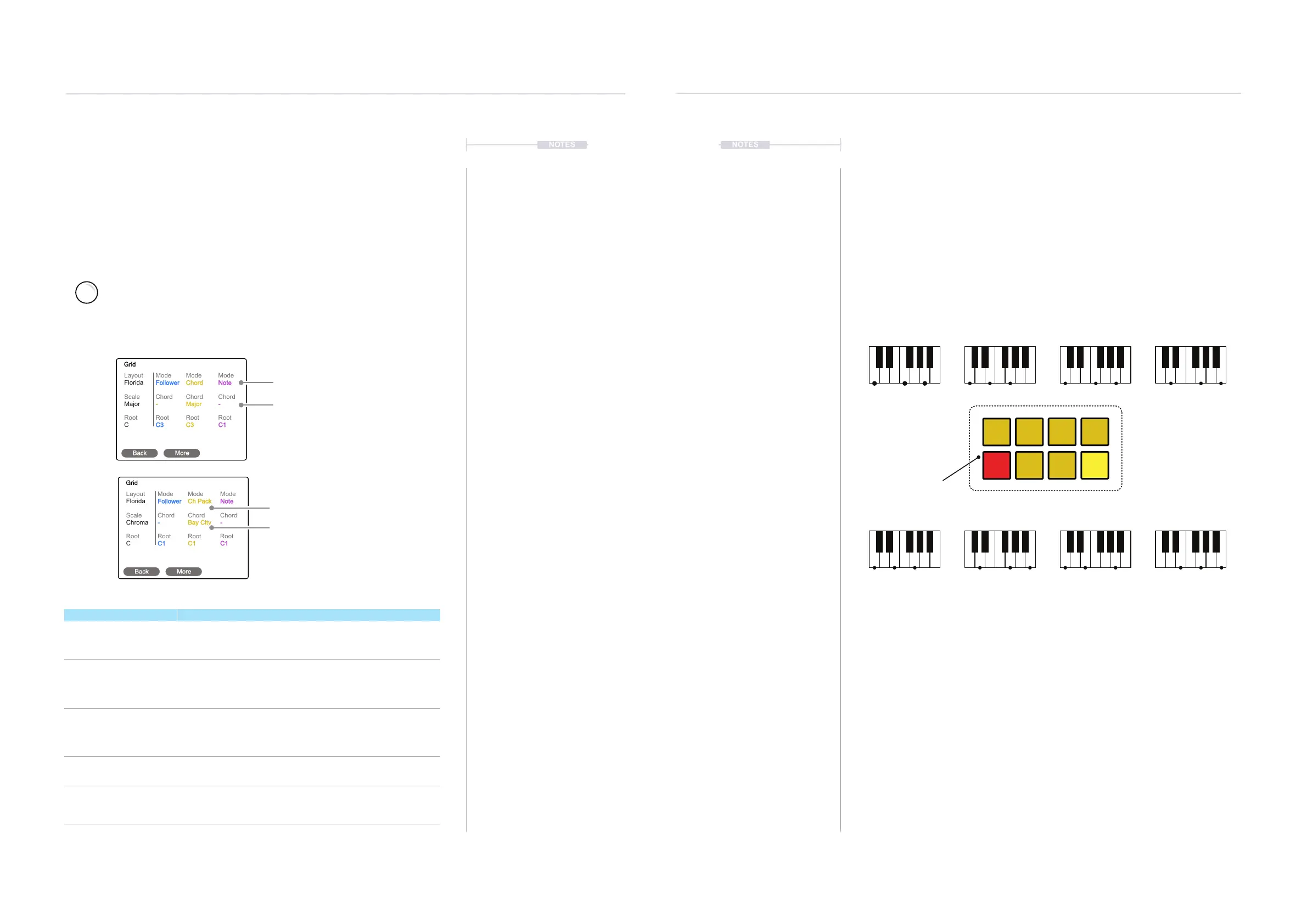
Smart Grid, Follower - Chord Mode
With the Smart Grid, you can play 3 Synths independently in note mode or
use chords intelligently to link synths scales. These options are available in
the grid settings. You can set one synth to operate chords and the other two
synths to operate as chord followers. Therefore, the ‘follower’ synth grid
notes are inuenced by the chord mode synth. Playing chords will
automatically and musically synchronize the manually played or latched
notes on the follower synths based on the scales. The lead synth will show
the last selected pad lit red when acting as the lead chord synth.
Chord mode follower is a great feature for live performances. It allows you
to play multiple engines harmoniously and keeps ad-libs and improvisations
musical.
C Major
C-E-G
F Major
C-F-A
D Major
D-G-B
C Major
C-E-G
A Minor
C-E-A
F Major
C-F-A
E Minor
E-G-B
G Major
D-G-B
C
C
C
C
C
C
C
C
F
F
F
F
F
F
F
F
E
E
E
E
E
E
E
E
D
D
D
D
D
D
D
D
G
G
G
G
G
G
G
G
A
A
A
A
A
A
A
A
B
B
B
B
B
B
B
B
A chord pack size of 8 chords
C3
F2
G2
C2
Em2
G2
Am2
F2
Select First Pad
Next Pad, Assign another chord.
Root Note: C3
Root Note: G2
Chord: Major
4.4 Chords & Smart Grid
The grid page, found in the main menu, offers a number of options to set
how the grid will be used to play back notes or chords.The smart grid
function ensures the three synths can be played musically together. Custom
chords are available as Chord Pack presets. These options are available in
the ‘Mode’ options for each synth when in the Grid page.
Select Grid Option from the Main Menu
Press the (Screen) Knob to open the main menu. Turn (Screen) to scroll and
navigate the menu. Press (Screen) to select a highlighted option or sub-menu.
Turn to highlight ‘Grid’ - Press (Screen) knob to select.
Layout
Scale
Root
Florida
Major
C
Mode
Chord
Root
Follower
-
C3
Mode
Chord
Root
Chord
Major
C3
Mode
Chord
Root
Note
-
C1
Grid
Back More
Note or Chord Modes per Synth
Chord Scale
Mode Description
Note
Plays only the individual notes from a single pad. Pressing
multiple pads can play multiple notes as a chord manually if the
voice count allows.
Chord
Allows individual pads to play as a chord as opposed to a note.
This is the leading chord synth. Only one synth can be assigned to
a chord mode and the others can be set as followers to this scale
or remain as note pads.
Ch Scale
Allows individual pads to play as a chord within the selected scale.
This is the leading chord synth. Only one synth can be assigned to
a chord mode and the others can be set as followers to this scale
or remain as note pads.
Ch Pack
Enables access to a selection of chord presets. These are
selected using the ‘Chord’ option when in Chord Pack Mode.
Follower
This option is only available if another synth is set to a chord
mode. The synths where this option is applied will automatically
adapt the notes presented on the pads to match the chord scale.
Layout
Scale
Root
Florida
Chroma
C
Mode
Chord
Root
Follower
-
C1
Mode
Chord
Root
Ch Pack
Bay City
C1
Mode
Chord
Root
Note
-
C1
Grid
Back More
The ‘ChordPack’ Mode
Chord Packs
Chord Options
A Chord Pack Preset



 To Next Page