45
Polyend Synth Manual
44
Polyend Synth Manual
NOTES
Notes & Chords
4
Notes & Chords
4
NOTES
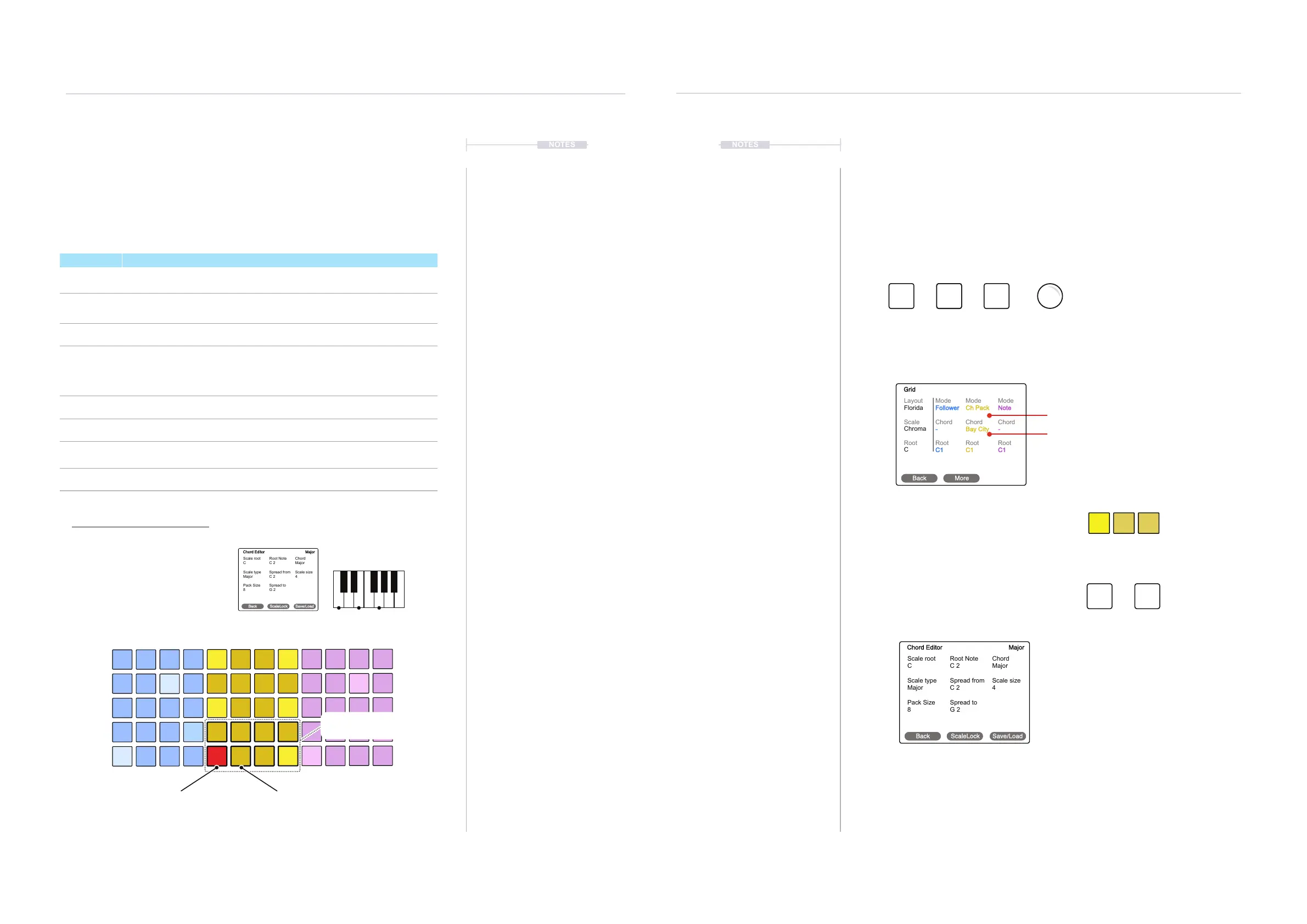
Creating Chord Pack
When editing chords it is important to follow the button commands plus the
menu navigations in the order stated. Start by opening the grid menu while
holding the button combo.
Chord Pack Editor
Chords in a chord pack can be individually congured using the chord pack
editor. This is accessible in the grid page. A chord can then be created for
the selected pad starting with the default settings of C Major and be
combined into a chord pack size of, say 8.
Chord Packs are not saved with the Scene.
Example Chord Pack Conguration
Summary of Options
Option Description
Scale root Root note for the scale.
Root Note
Root note, including octave value for the pad. Also shown on main grid page. [-]
Indicates notes not contained in the selected scale.
Chord Chord assigned to the pad. [-] Indicates chords not contained in the scale.
Scale type
Minor, Major, Dorian, Lydian Major, Lydian Minor, Locrian, Phrygian, Phrygian
Dominant, Mixolydian, Melodic Minor, Harmonic Minor, Hungarian Minor,
Ukrainian, Marva, Super Locrian, Overtone, Double Harmonic, Neapolitan
Major, Neapolitan Minor, Enigmatic.
Spread from Starting, lower note in the chord played.
Scale Size Maximum number of notes in the scale.
Pack Size
Number of chords in the chord pack. Each chord is represented by a grid pad.
Up to 12 chords are available in each pack
Spread to Ending, upper note in the chord played. The chord is spread across the range.
Select First Pad Next Pad, Assign another chord.
Pack Size: e.g. 8
Root Note: C1 Root Note: G2
Chord: Major Chord: Major
G2
C1
Synth 2 - Yellow
Vertically Orientated
Start by setting Pack size for number of
chords to create. Select a pad, then set
the Root Note and the Chord.
[-] Indicates notes / chords not in the scale
C Major
C-E-G
C FED G A B
Scale root
Scale type
Pack Size
C
Major
8
Root Note
Spread from
Spread to
C 2
C 2
G 2
Chord
Scale size
Major
4
Chord Editor Major
Back ScaleLock Save/Load
Press
Press (Screen), Turn to choose
‘Grid’ then Press to select.
Press [Save/Load] to recall or to save an edited Chord pack.
Scale lock can be used to lock the chord and
root note to the scale root, example to C.
Use the parameter knobs to edit each option.
A Chord Pack Preset
4. Open the Chord Editor
3. Select a grid pad chord to edit
2. Select Chord Pack from the Grid Page
5. Save the Chord Pack
1. Select Grid Menu while holding key combo
Select for any one of the Synths
The ‘ChordPack’ Mode
While in the Grid page with ‘Chord Pack’
Mode active as shown above, Hold [Shift] +
Press [LFO] to select the chord pack editor.
Scale root
Scale type
Pack Size
C
Major
8
Root Note
Spread from
Spread to
C 2
C 2
G 2
Chord
Scale size
Major
4
Chord Editor Major
Back ScaleLock Save/Load
Layout
Scale
Root
Florida
Chroma
C
Mode
Chord
Root
Follower
-
C1
Mode
Chord
Root
Ch Pack
Bay City
C1
Mode
Chord
Root
Note
-
C1
Grid
Back More
LFO
ADSR LFO
Shift
Shift
+
+ + +



 To Next Page