15
Polyend Synth Manual
14
Polyend Synth Manual
NOTES
Overview
1
Overview
1
1.4 Display & Control Layout
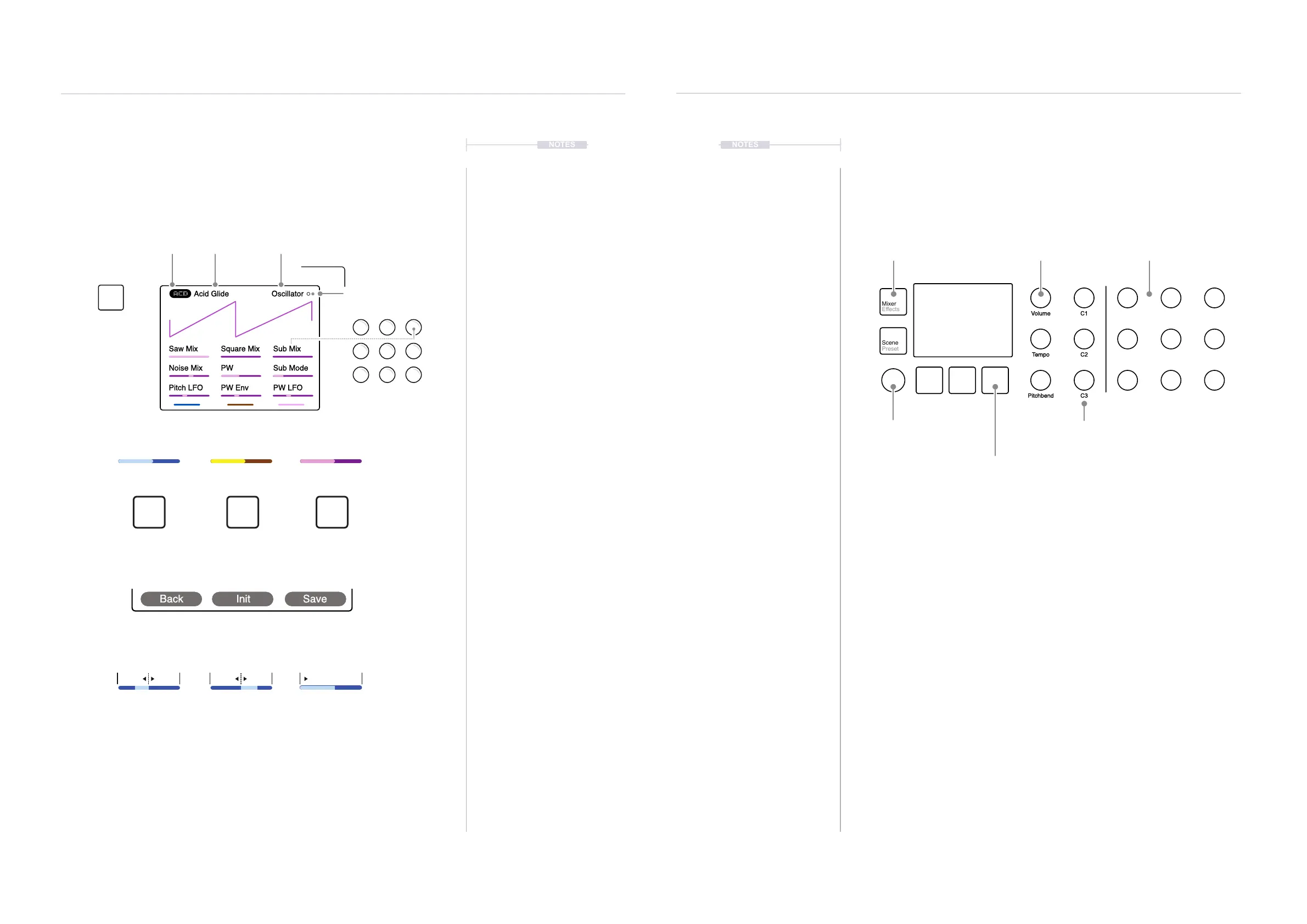
Each page will display the parameter information and control options for the
selected function. While generally this is based on the context and mode of
operation, there are some common features and navigation principles that
apply across all (or most) of the generic pages of Synth.
NOTES
1.5 User Interface Conventions
Adjusting parameters and setting steps follow a dened process. Simply
tapping a [Pad] will play a note, and Holding [Shift] + Tapping [Pad] will lock
the note on. Dened buttons select the labeled function; the grey lower
label refers to a command using shift.
Notes on using the control interface
• The 15 Parameter knobs are touch sensitive, and its parameter is
automatically selected when touched. Turn a (Knob) to change its value
or parameter setting.
• Press [Shift] + Turn (Knob) on some parameters to change the value
with a faster resolution of adjustment. This will increase the speed of
adjustment when changing values across its range. This precise
behavior is dependent on the parameter selected.
• The (Screen) knob is not touch-sensitive. The rotation has detent
control and is push-clickable. Press (Screen) to select and to navigate
the global settings menu. Also press (Screen) to select an option and to
move back when navigating.
• The (Screen) knob will change any selected parameter value in the
same way as the parameter knobs. It will also navigate within the global
settings menus.
• The three [Screen] Buttons generally select each of the 3 Synths. They
can also operate the command displayed above.
3 generic controls operate master
volume, tempo and pitchbend.
Dedicated
functions labelled
Main Menu is selected by
pressing the (Screen) Knob.
Turn to navigate various options.
The 3 [Screen] Buttons select a synth or
command labeled on the screen above.
Macros are congurable and
controlled using the 3 combo knobs.
9 dynamic parameter controls
have variable assignments.
Mixer
Effects
Engine Filter
Scene
Preset
ADSR LFO
Seq
Mod
Shift
Volume
Tempo
Pitchbend
C1
C2
C3
Engine
Vol
The 3 [Screen] Buttons located under the display represent each of the synth
engines 1, 2, 3 by default. In some menus, these buttons will represent the
specic function which is displayed directly above the button.
Colour scheme represents the synth engine selected
The values, range and scale displayed will depend on the function
and the parameter represented.
Square brackets in the descriptions represent the physical button
or pads on the front panel. Push or hold to activate.
Round brackets in the descriptions represent the physical knobs
on the front panel. All knobs except the screen knob are touch
sensitive. Knobs can be turned and / or tapped.
[ ]
( )
Blue
Synth 1
Yellow
Synth 2
Purple
Synth 3
0-100
Example Level
L100 - C - R100
Example Pan
-300% to +300%
Example Pitch LFO
Saw Mix Square Mix Sub Mix
Noise Mix PW Sub Mode
Pitch LFO PW Env PW LFO
OscillatorAcid Glide
Page / Total Pages.
Tempo 123
Each knob represents the
displayed parameter.
Synth Engine Preset
Press to open or cycle
through multiple pages
Function or Parameter being edited
Engine
1
4
7
2
5 6
8 9



 To Next Page