87
Polyend Synth Manual
86
Polyend Synth Manual
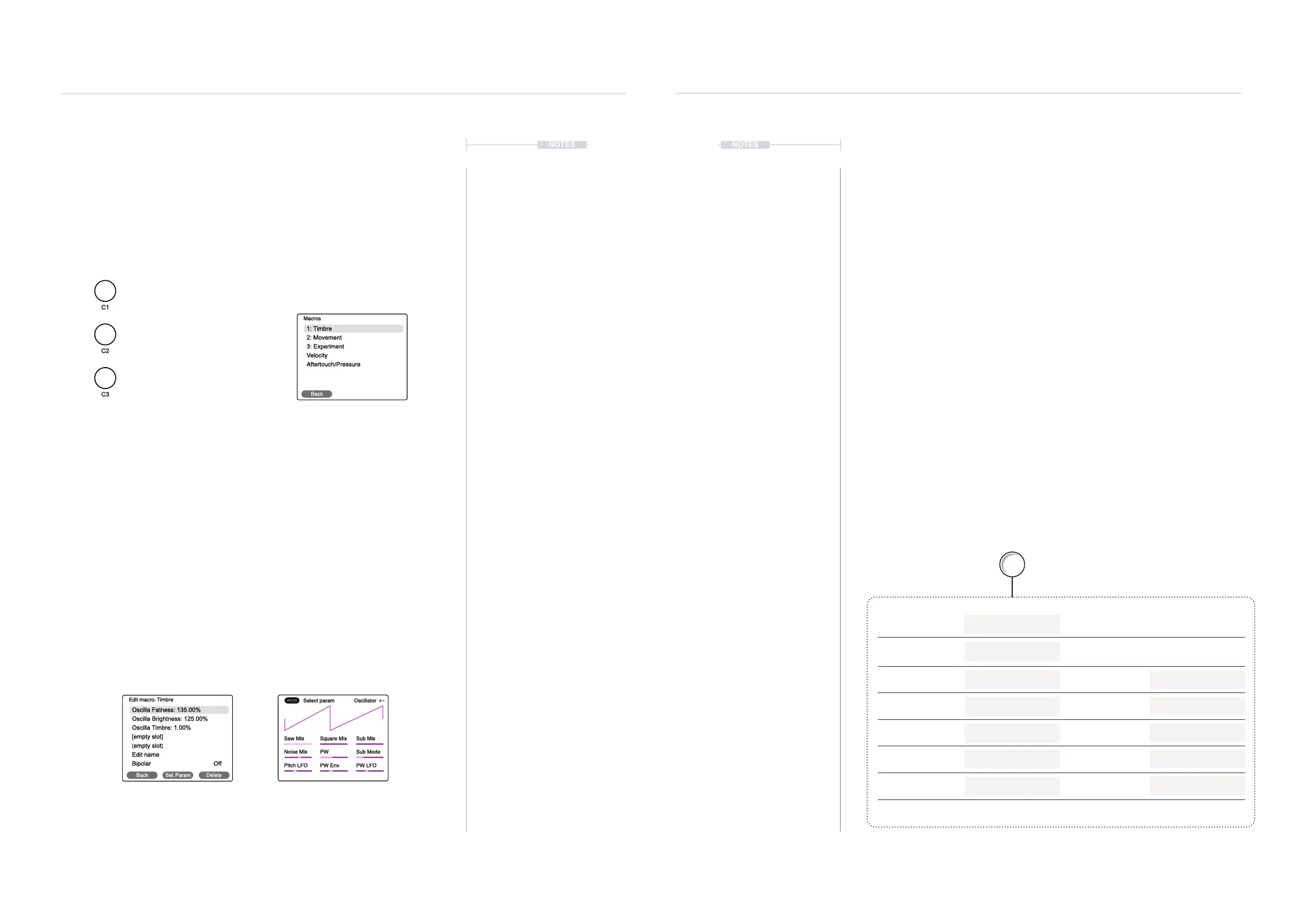
4. Select a parameter. Turn (Screen) to highlight a parameter slot and then
Press [Sel. Param] Screen button to select. The assignment page
opens to reveal the parameter to assign. Note this is a similar style as
the synth functions so do not confuse with a standard pages.
5. Select through the Engine, Filter, ADSR or LFO pages to choose the
page with the parameter to assign. Example, Press [Engine] to locate
the parameter to assign to the macro.
6. Select the parameter. Tap the knob for the parameter to assign. This is
one of the 9 touch sensitive knobs which represents the 9 parameters
on display. Example: Tap ‘Sub Mix’ on the ACD Engine page.
7. The display will revert back automatically to the Macro editor page.
8. The Parameter range can be adjusted by turning the parameter knob
while the parameter is highlighted in the macro page. Example, Adjust a
knob to set the ‘Sub-Mix’ between -200% and +200%. Note that this
refers to the range of control for the parameter assigned to the macro
and is not the setting for the parameter itself.
9. To delete a parameter, highlight the parameter row in the macro page
and Press [Delete] Screen button.
Creating and Editing Macros
Macro conguration is performed in the main menu. Up to 5 Parameters
can be assigned to each of the ‘C’ Knobs. Velocity and Aftertouch/Pressure
can also be setup using the same method.
▌ CONFIGURING A MACRO
1. Select the Macro Menu. Press the (Screen) Knob to open the main
menu. Turn (Screen) to scroll and navigate the menu to highlight the
‘Macros’ option. Press (Screen) to select ‘Macros’ Sub-menu.
2. Select a Macro to edit. Turn (Screen) Knob to highlight one of the 3, ‘C’
knob macros or select Velocity or Pressure. Press (Screen) knob to
select the macro.
3. The 5 Parameter slots per macro can be assigned to a parameter in the
synth voice. For example synth engine or lter parameters etc. It is also
possible to edit the macro name or change the bipolar Behavior here
NOTESNOTES
Synths
5
Synths
5
Back Sel. Param Delete
Oscilla Fatness: 135.00%
Oscilla Brightness: 125.00%
Oscilla Timbre: 1.00%
[empty slot]
[empty slot]
Edit name
Bipolar Off
Edit macro: Timbre
Saw Mix Square Mix Sub Mix
Noise Mix PW Sub Mode
Pitch LFO PW Env PW LFO
OscillatorSelect param
Parameters assigned to the macro Parameter assignment page
1. Timbre
Macros are edited in the Main
Menu under the ‘Macro’ Option
Macro Name
Macro Name
Macro Name
2. Movement
3. Experiment
Back
1: Timbre
2: Movement
3: Experiment
Velocity
Aftertouch/Pressure
Macros
The names shown are typical macro convention names
C2
‘Motion’
Off
LFO Frequency
Filter LFO
20.00%
30.00%
Macro Name
Bipolar
Knob range
Name can be edited - ‘Edit Name’ option
Parameter 1
Parameter 3
Parameter 2
Parameter 4
Parameter 5
Value
Value
Value
Value
Value
etc
Macro
e.g. 200% would double the sound
Macro Range
Example: Macro Mapping for ‘Motion’



 To Next Page