40
Starting a Quick Jam
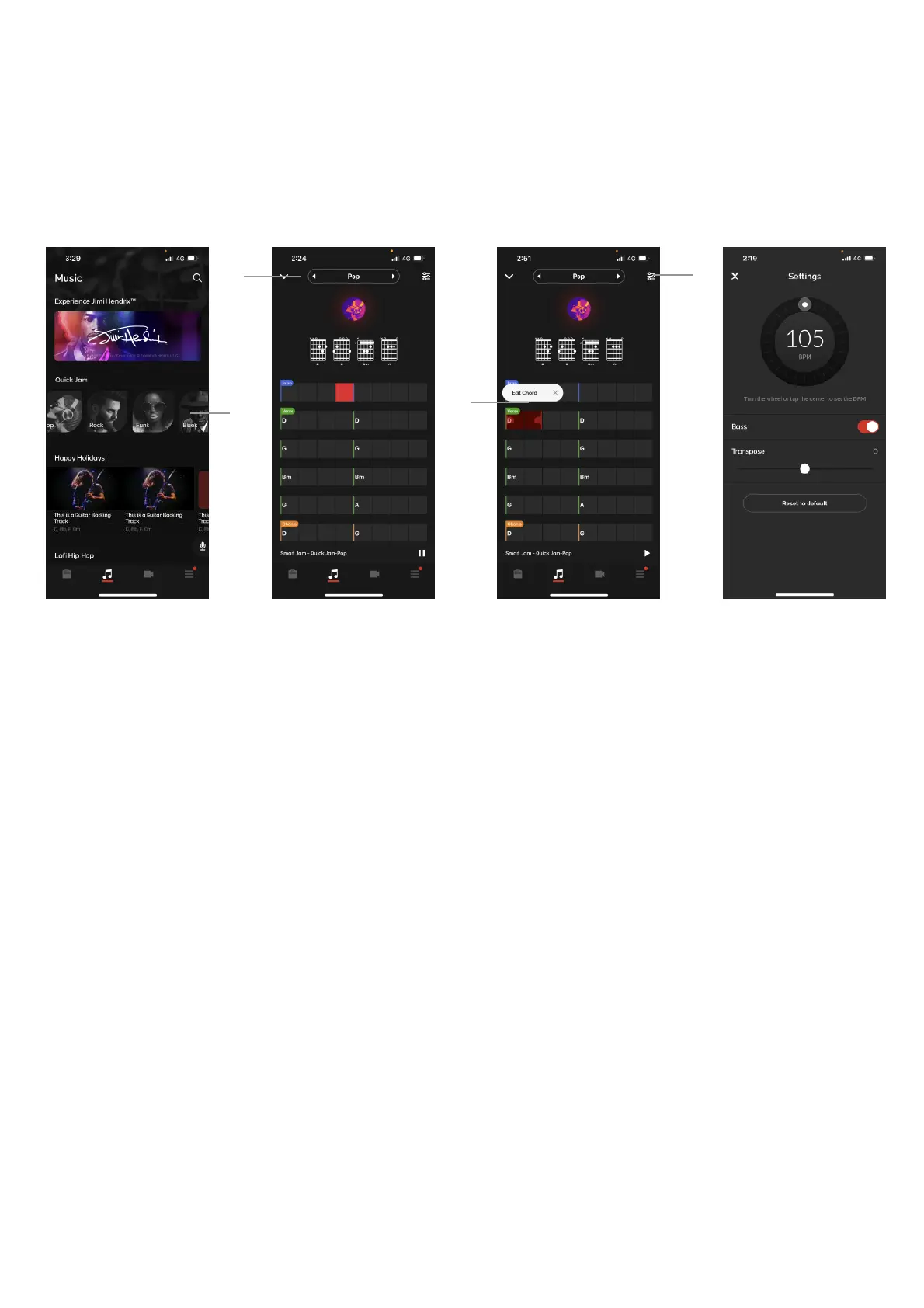
A. Access Quick Jam by going to the Music page, then scroll the Smart Jam/Quick Jam banner
horizontally to see the available genres; Pop, Rock, Funk and Blues. Tap into the genres to start the
backing track.!
B. Tap on the left and right arrows next to the genre at the top of the page to switch between the designed
tracks for each genre.!
C. Pause the track, then long press a chord to edit the chord, following the same steps as Smart Jam.!
D. Tap on the Settings icon on the top right to adjust settings. The same adjustments in Smart Jam are
available here; you may adjust the tempo, turn off the bass, or transpose the track by increments of half
steps up to an octave up or down. Tap Reset to default to reset the track to its initial default state.!
E. Any changes made will be automatically saved, and automatically loaded when you load up Quick Jam.
Quick Jam are backing tracks that use the same audio engine as Smart Jam with preset chord
progressions and grooves.



 To Next Page