PDR-7000 Operation Manual
7.6.1 How to import data from CANON R/K to PDR-7000
1. Check the communication setting of CANON R/K.
CANON RK-5 CANON RK-F1 CANON RK-F2
- COUNT: ON
- TRANS: RS232C
- FMT: 3 C
- Baud Rate: 9600, 8N1
- COUNT: ON
- TRANS: ON
- FMT: 3
- Baud Rate: 9600, 8N1
- Ref: STANDARD
- Ker: STANDARD
- Interface: RS-232C
- Format: RK-F2
- Baud Rate: 9600
- Bit: 8 bit
- Parity: NONE
- Stop Bit: 1bit
- Patient No: ON
- Patient ID - Numeric: ON
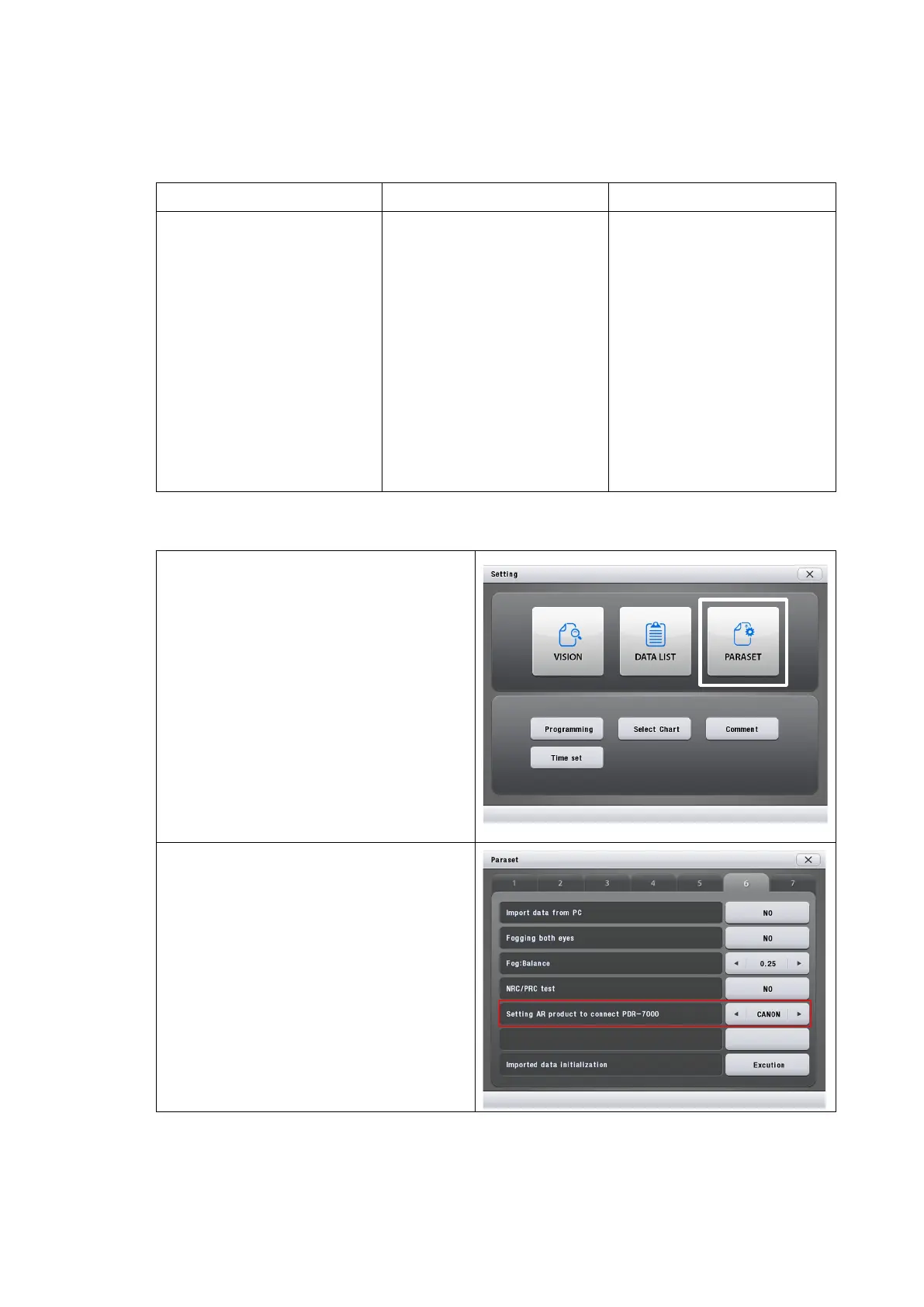
2. Check the communication setting of PDR-7000
1) Enter [PARASET] mode.
2) Go to page6.
3) Change the fifth item setting
(Setting AR product to connect
PDR-7000) as 'CANON'.
- 100 -



 To Next Page