PDR-7000 Operation Manual
3.4 Setting Auxiliary Lenses
Auxiliary lenses are automatically placed according to a selected chart. However,
setting other lenses are also possible as follows:
* It is possible to switch the lens power for retinoscope (+1.5/+2.0) and to set the fog
amount for both eyes open.
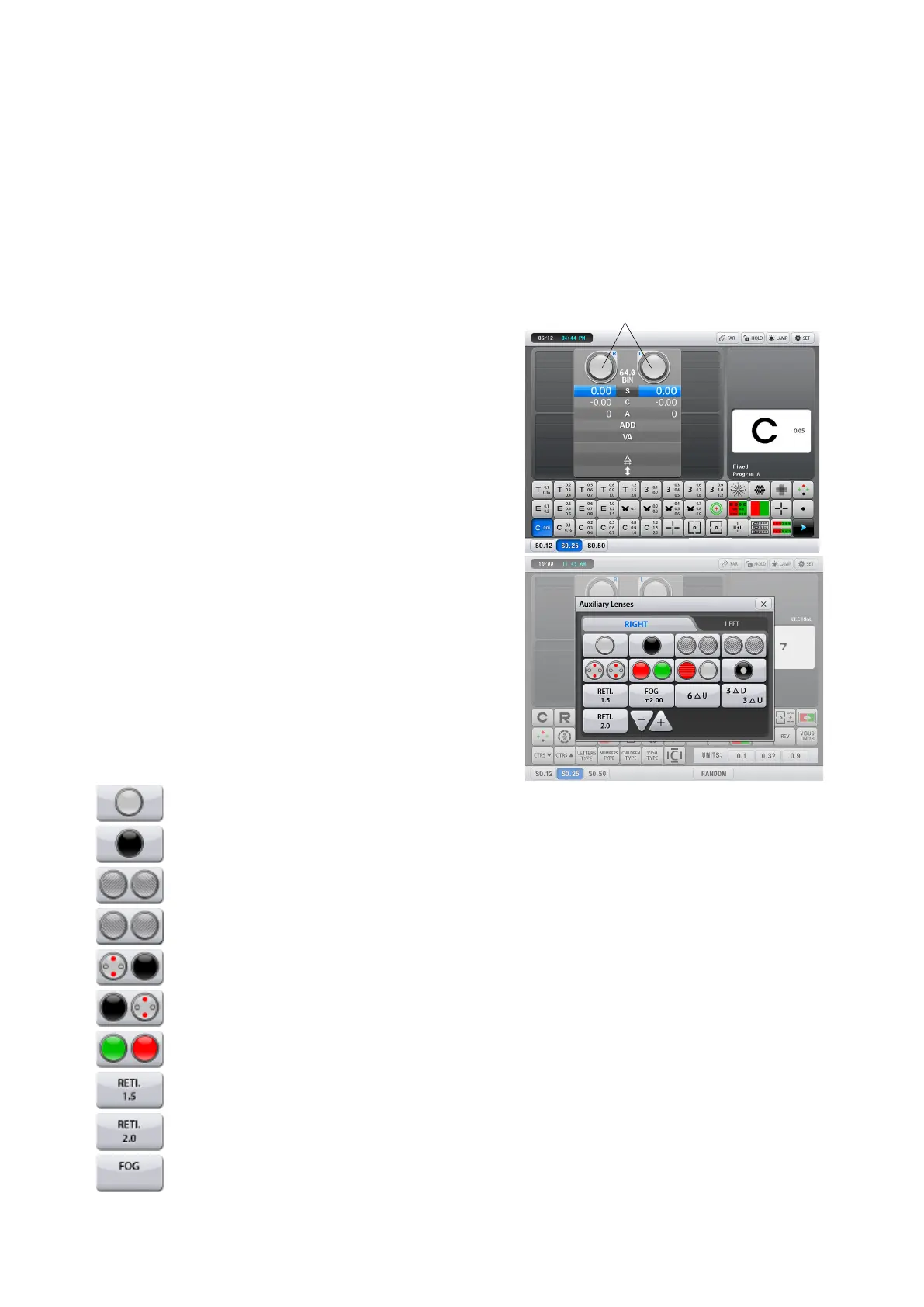
1. Open the Auxiliary Lenses window
Press the auxiliary lens display at the
top of the measurement screen.
2. Select a desired auxiliary lens with the
corresponding button.
The selected auxiliary lenses are placed in
the refractor head and the screen returns
to the main measurement screen.
Open aperture
Occluder
Polarizing filters (Right eye: 45°, Left eye: 135°)
Polarizing filters (Right eye: 135°, Left eye: 45°)
Right eye: Fixed cross cylinder lens, Left eye: Occluder
Right eye: Occluder, Left eye: Fixed cross cylinder lens
Right eye : Red Filter, Left eye : Green Filter
Spherical lenses for retinoscope. The lens power is selectable with [1.5]
Selects the spherical lens power for retinoscope between +1.5D and +2.0D
Fogging
- 42 -



 To Next Page