PDR-7000 Operation Manual
2.5 Standard Program Refraction
The PDR-7000 includes two standard programs (Fixed Programs A, B) for full-
corrected far value and prescription.
See “7.4 Standard Programs” for all test items in the standard programs.
2.5.1 Fixed Program A
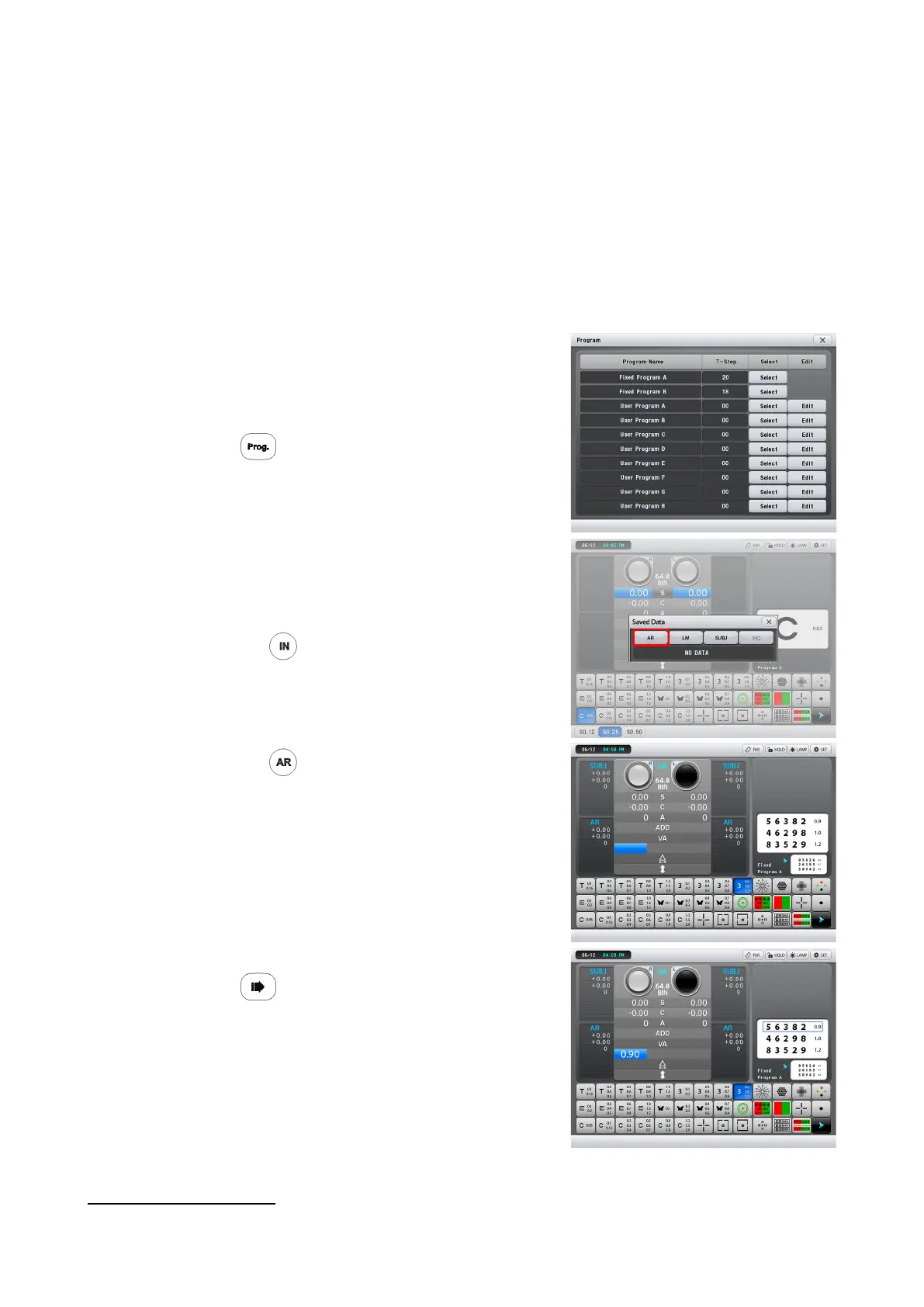
1. Select ‘Fixed Program A’.
Click ‘Select’ button of ‘Fixed Program A’
on the view of selecting program.
2. Press .
Program A starts.
3. Load the AR data
3
1) Measure the patient’s eye with an auto
Ref/Keratometer and print the result.
2) Press
Confirm that the data No. is the same as the print
data No. of the auto Ref/Keratometer.
See “2.2.1 From an auto Ref/Keratometer ”
3) Press .
The AR data appears in the subjective and AR
data fields.
4. Press .
It is possible to measure the unaided visual
acuity for right eye.
Instruct the patient to look at the presented
chart through the measuring windows of the
refractor.
3
When the data has already been entered from an auto Ref/Keratometer or a lensmeter before Program A, Steps 3 and
6 are skipped automatically.
- 27 -



 To Next Page