5–33Replacement Procedures
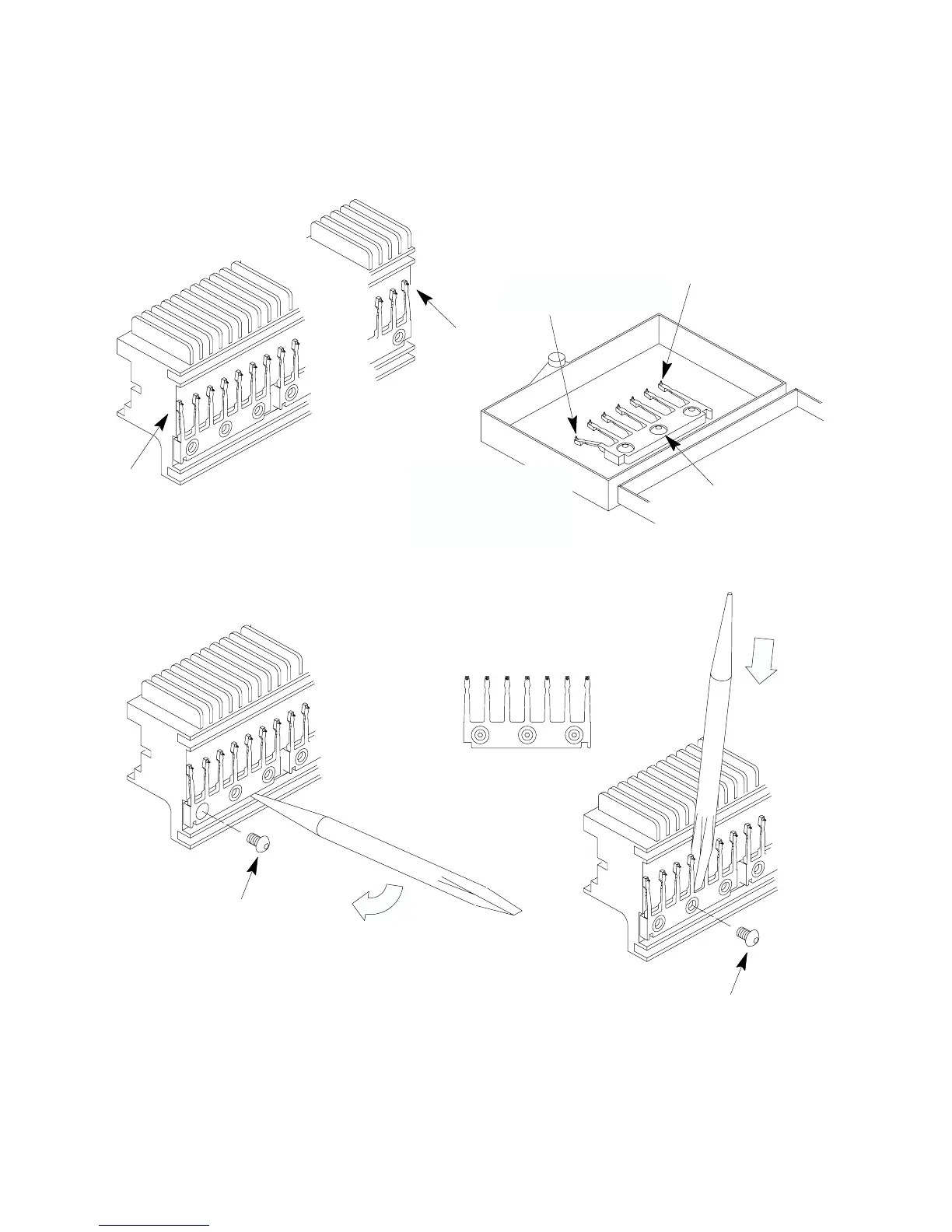
Bend this hammer if
replacing fret 7.
Hammer Spring Replacement Kit: P/N 112251–001
Hammer
Fret 1
Hammer
Fret 7
Hammer Bank
See
See NOTE.
Preparation – Frets 1 and 7 only
NOTE.
NOTE:
If you replace fret 1 or 7, bend the end
hammer down BEFORE removing it from
the box, as shown below. Do this ONLY
for frets 1 and 7.
Use these screws
to install new fret.
Removal – Any Fret
Discard
old screws.
Installation – Any Fret
1.2. 3.
8 in–lbs
Tightening Sequence
(Torque to 8 in–lbs)
Use new
screws.
Bend hammer down
until it touches the
mounting base in the
box.
Left end
Right end
Btn. Hd. Cap,
6–32x.25, Steel/Zinc)
(P/N 102288–019,
Bend this hammer if
replacing fret 1.
Figure 5–13 . Hammer Spring Assembly Removal/Installation













 To Next Page