P
2 s
P
Continuous
display
Menu
Mode
Menu
Security
Menu
Settings
Menu
Clear
1.
2.
Menu
Language
P
Main
Analog
Mode
Settings
Security
Clear
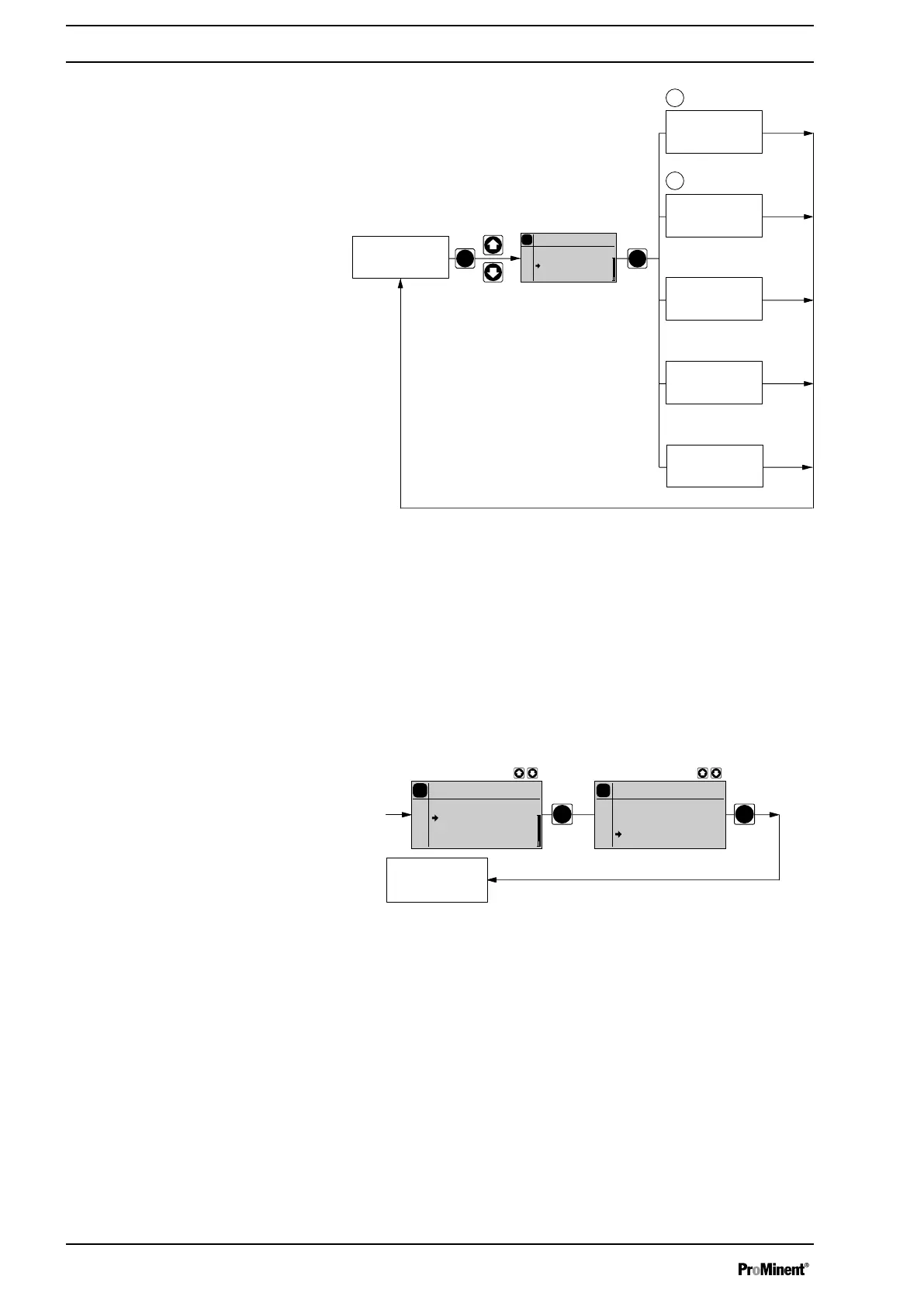
10.4 Selecting the operating mode (Menu "Mode")
In the
‘Operation’
menu (dependent on the identity code, some operating
modes may not be present) the following operating modes can be
selected:
n
‘Manual’
: for manual operation
n
‘Batch’
: for batch operation
n
‘Contact’
: for contact operation
n
‘Analog’
: for current control
P
P
Continuous
display
P
Main
Analog
Mode
Settings
Security
Clear
P
Mode
Analog
Manual
Batch
Contact
Analog
0..20
0..20
10.5 Operating mode settings (menu "Settings")
Various settings can be adjusted in the
‘Settings’
menu dependent on the
selected operating mode.
Setting menus are available in all operating modes for the following pro‐
grammable functions:
n
‘Concentration’
n
‘Auxiliary frequency’
n
‘Calibration’
n
‘Metering’
n
‘System’
Set up
40







 To Next Page