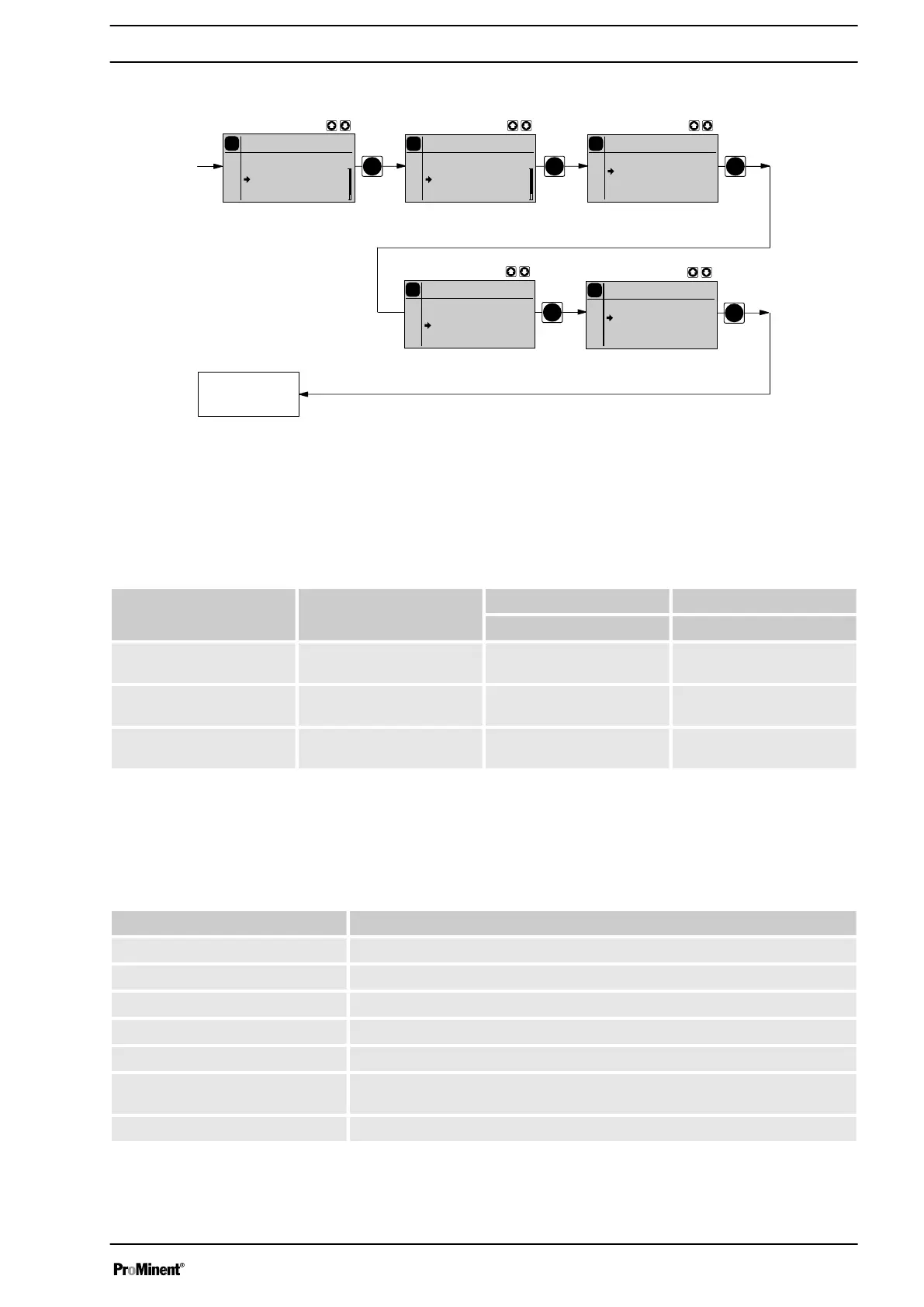
10.6.7 Settings for the “Relay” function (RELAY menu)
PP
P
P
P
P
Relay
Batch
Relay 1
Relay
2
P
Settings
Batch
Dosing
Relay
Analog
Out
System
P
Main
Batch
Mode
Settings
Security
Clear
P
Relay 1
Batch
Error
Warning
Warning+Error
Pulse
P
Relay 1
Batch
energizing
releasing
Continuous
display
Using the
‘Relay’
programmable function, you can match the pump relays
to your requirements.
You can reprogram the relays using the
‘Relay’
function in an almost
unlimited way. Exception:
‘Relay 1’
should not be reprogrammed as a
‘Pulse generator’
due to the then short service life.
Allocations for the relay combinations
Identity code specification Relay type "Relay 1" "Relay 2"
(Mechanical relay) Semiconductor relay)
4 + 5 Fault indicating relay and
pacing relay
Warning + error Pacing relay
8 + 9 Cut-off relay and pacing
relay
Error Pacing relay
A + B Cut-off relay and warning
relay
Error Warning
You can set whether the respective relay is to switch due to a triggering
event from the timer, upon a warning alert, a fault alert or a pump stroke:
Selectable behaviour types
Setting in the
‘Relay’
menu
Effect
Warning The relay switches upon a warning alert (yellow LED*).
Error The relay switches upon a fault alert (red LED*).
Warning + error The relay switches upon a warning alert (yellow LED*) or a fault alert (red LED*).
Pacing relay The relay switches every stroke.
Option The relay has the option of which module was plugged in (e.g. timer).
Warn. + Fault + Stop The relay switches upon a warning alert (yellow LED*) or a fault alert (red LED*)
or a stop (key
‘STOP/START’
or pause).
Bleed valve The relay switches upon the internal signal
‘Airlock’
.
* see "Troubleshooting" chapter
You can also indicate how the respective relay should behave as soon as
it switches. You can change this via the setting
‘NO’
/
‘NC.’
Set up
65







 To Next Page