EasyManua.ls Logo

ProMinent delta DLTa optoDrive - User Manual

ProMinent delta DLTa optoDrive
128 pages
Print Icon
To Next Page IconTo Next Page
Loading...
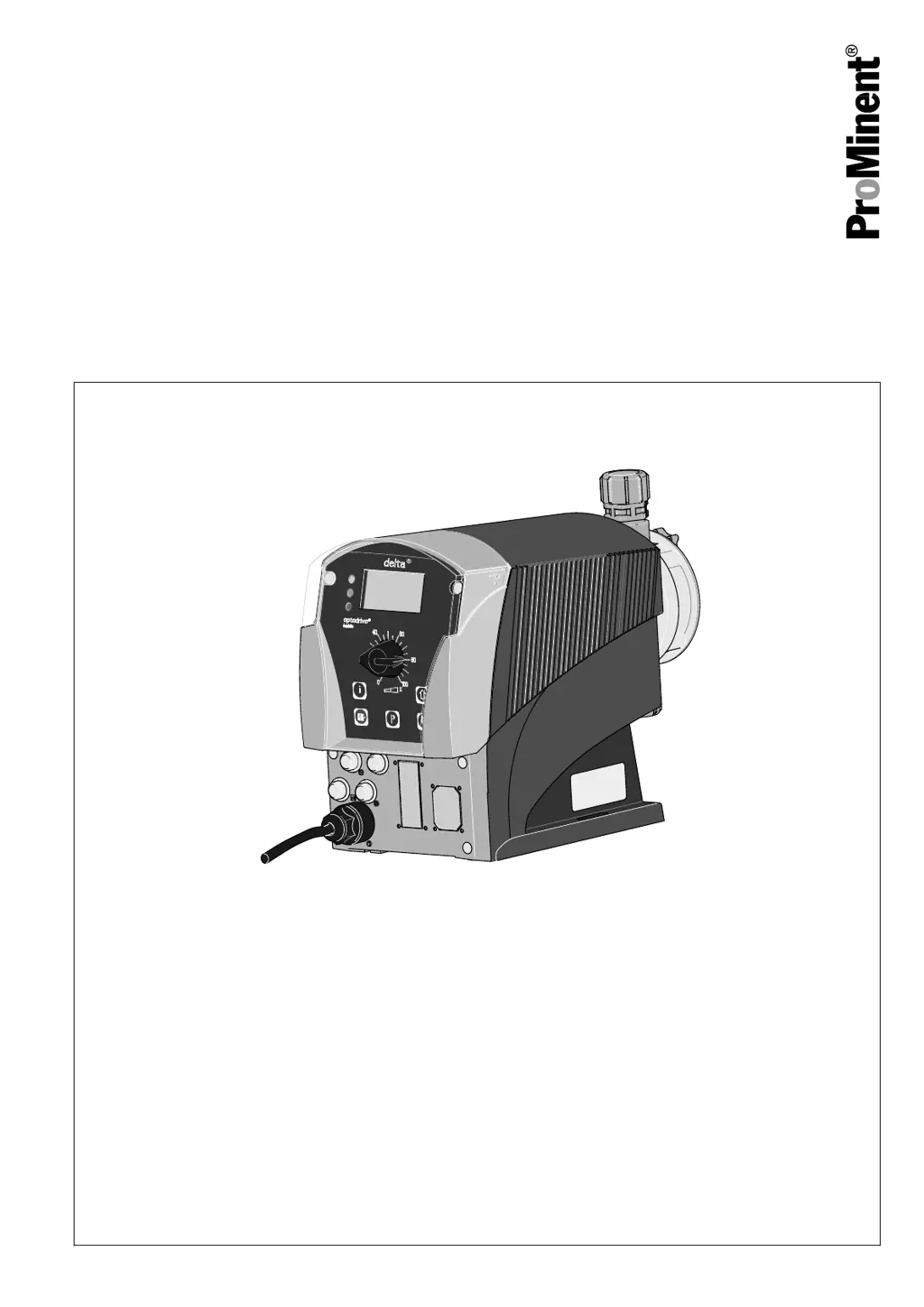
Solenoid Metering Pump
delta
®
DLTa
Operating instructions
P
r
o
M
i
n
e
n
t
P_DE_0002_SW
with controlled optoDrive
®
solenoid drive
Original operating instructions (2006/42/EC)Part no. 986691 BA DE 032 01/14 EN
Please carefully read these operating instructions before use! · Do not discard!
The operator shall be liable for any damage caused by installation or operating errors!
Technical changes reserved.

Table of Contents

Questions and Answers

  • J
    Jamie WebbAug 16, 2025
    What to do if the red LED is lit and the 'Level' symbol is flashing on my ProMinent Water Pump?
    • K
      Kristin HillAug 16, 2025
      If the red LED is lit and the 'Level' symbol is flashing on the LCD, along with 'Error' and 'Stop' symbols, it means the fluid level in the storage tank has reached 'liquid level low 2nd stage'. To resolve this, simply fill the storage tank.
  • G
    gsandersAug 19, 2025
    Why is the yellow LED lit and the 'Level' symbol flashing on my ProMinent delta DLTa optoDrive?
    • A
      Amanda PittmanAug 19, 2025
      If the yellow LED is lit and the 'Level' symbol is flashing on the LCD of your ProMinent Water Pump, it indicates that the fluid level in the storage tank has reached 'liquid level low 1st stage'. You should fill the storage tank.
  • G
    greenmatthewAug 22, 2025
    Why is the 'Air lock' symbol flashing on my ProMinent delta DLTa optoDrive Water Pump?
    • P
      Paul WeeksAug 22, 2025
      If the yellow LED is lit and the 'Air lock' symbol is flashing on the LCD of your ProMinent Water Pump, or if the red LED is also lit with 'Error' and 'Stop' symbols, it is likely due to gas bubbles in the liquid end, possibly from leaks, a gaseous medium, or cavitation. If the red LED is lit, press [P], considering the process consequences. Bleed the liquid end and rectify the cause by sealing the system or slowing the suction stroke.
  • M
    Michael DaviesAug 26, 2025
    What does it mean when the 'Diaphragm' symbol is flashing on my ProMinent Water Pump?
    • M
      Miranda DanielsAug 26, 2025
      If the yellow LED is lit and the 'Diaphragm' symbol is flashing on the LCD of your ProMinent Water Pump, or if the red LED is also lit along with the 'Error' and 'Stop' symbols, it indicates that the diaphragm is broken. You should replace the diaphragm and clean the diaphragm rupture reporter.
  • D
    Daniel MeyerAug 28, 2025
    Why is the 'p+' symbol flashing on my ProMinent delta DLTa optoDrive's LCD display?
    • R
      reginaabbottAug 28, 2025
      If the yellow LED is lit and the 'p+' symbol is flashing on the LCD of your ProMinent Water Pump, or if the red LED is also lit along with the 'Error' and 'Stop' symbols, it indicates a constriction or closed shut-off valve on the discharge side. If the red LED is lit, press [P], considering the consequences for the process. Open the shut-off valve or rectify the constriction.
  • J
    John MaldonadoAug 31, 2025
    What should I do if the 'p-' symbol is flashing on my ProMinent delta DLTa optoDrive Water Pump?
    • L
      Lisa SmithAug 31, 2025
      If the yellow LED is lit and the 'p-' symbol is flashing on the LCD of your ProMinent Water Pump, or if the red LED is also lit along with the 'Error' and 'Stop' symbols, it indicates a leak or a burst or torn line on the discharge side. If the red LED is lit, press [P], considering the process consequences. Rectify the leak or clear the cause.
  • T
    Theresa LeeSep 3, 2025
    Why is the 'Flow' symbol flashing on my ProMinent delta DLTa optoDrive's LCD display?
    • M
      Matthew AdamsSep 3, 2025
      If the yellow LED is lit and the 'Flow' symbol is flashing on the LCD of your ProMinent Water Pump, or if the red LED is also lit with the 'Error' and 'Stop' symbols, this could be due to the dosing monitor not being correctly connected or the dosing monitor reporting too few strokes. Connect the dosing monitor correctly and press [P]. If that doesn't work, press [P] again and investigate to clear the cause.
  • J
    Jennifer SandovalSep 6, 2025
    How to fix a ProMinent Water Pump when the green LED doesn't light up?
    • U
      uhillSep 6, 2025
      If the green LED display on your ProMinent Water Pump does not light up, it indicates that the wrong mains voltage is connected or no mains voltage is connected. Connect the pump correctly to the specified mains voltage as indicated on the nameplate.
  • R
    Roberto SheaSep 9, 2025
    What to do if fluid is leaking from the backplate of my ProMinent Water Pump?
    • C
      Christopher TorresSep 9, 2025
      If fluid is escaping from the backplate of your ProMinent Water Pump, it could be due to loose screws in the dosing head or a diaphragm that is not tight. Tighten the screws in the dosing head in a diagonal pattern. If the issue persists, replace the diaphragm. If a diaphragm rupture has been indicated, clean the diaphragm rupture reporter.
  • S
    stanleyhallSep 12, 2025
    Why won't my ProMinent Water Pump prime even after bleeding?
    • M
      Matthew ChristensenSep 12, 2025
      If your ProMinent Water Pump does not prime despite full stroke motion and bleeding, it may be due to minor or major crystalline deposits on the ball seat because the valves dried out. For minor deposits, take the suction hose out of the storage tank and thoroughly flush out the liquid end. For major deposits, dismantle and clean the valves.

Summary

Operating Instructions

Identity code configuration

About the delta pump

Safety instructions and warnings

Electrical shock and fire hazard warnings

Warns about electric shock from mains voltage, fire hazards with flammable media, and handling dangerous chemicals.

Chemical spraying and component rupture precautions

Advises on preventing chemical spraying and dangers from rupturing hydraulic components.

Device overview and control elements

Control panel functions and connections

Details control elements, key functions, and electrical connections on the pump.

Key functions and display identifiers

Explains key functions, stroke length adjustment, and LCD display identifiers.

Functional description

Operating modes and core functions

Details operating modes (Manual, Batch, Contact, Analog) and key functions (Calibration, Auxiliary rate, Flow).

Assembly and installation precautions

Pump assembly safety warnings

Provides warnings on electric shock, incorrect operation, and capacity issues during assembly.

Hydraulic installation safety

Hydraulic installation warnings and component safety

Covers warnings about chemical spraying, component rupture, and using approved parts.

Hydraulic installation procedures

Electrical installation guidelines

Electrical safety warnings

Warns about electric shock risks from mains voltage, moisture, and improper installation.

Socket descriptions and External control

Details pump sockets, pin assignments, and the function of the 'External control' terminal.

Diaphragm rupture sensor and Relay outputs

Covers 'Diaphragm rupture sensor' terminal and 'Fault indicating relay' output.

Setup and adjustment procedures

Operating mode and settings configuration

Explains selecting operating modes ('Mode' menu) and configuring settings ('Settings' menu).

Manual and Batch operating mode settings

Details settings for 'Manual' mode and the 'BATCH' menu within 'Batch' mode, including batch size adjustment.

Contact operating mode settings and Memory function

Explains 'Contact' mode settings, pulse conversion, and the 'Memory' function extension.

Analog operating mode settings and signal processing

Details 'Analog' mode settings, control via current signals, and signal processing types (0-20mA, 4-20mA, Curve).

Analog signal processing: Curve and Error

Explains 'Curve' processing, its options (Linear, sidebands), and error processing for analog signals.

Concentration function settings (Manual mode)

Explains setting concentration values in 'Manual' mode, including calibration and input steps.

Concentration measurement safety and procedure

Warns about high concentrations and outlines the procedure for setting up concentration measurement.

Concentration settings in Batch mode

Details concentration input settings for 'Batch' mode, including prerequisites and procedure.

Concentration settings in Batch mode (cont.)

Continues explanation of Batch mode concentration settings, including safety and procedure.

Concentration settings in Contact mode

Explains concentration input for 'Contact' mode, including safety and procedure.

Concentration settings in Analog mode

Details concentration input settings for 'Analog' mode.

Analog concentration setup warnings and preparation

Warns about high concentrations and incorrect concentrations, outlining preparatory settings for Analog mode.

Auxiliary frequency function settings (AUX menu)

Explains how to set and activate an auxiliary stroke rate via the 'AUX' menu and 'External control' terminal.

Metering function settings (DOSING menu)

Describes settings within the 'Metering' function, covering discharge and suction stroke adjustments.

Relay function settings (RELAY menu)

Explains configuring pump relays using the 'Relay' function for various alerts and pump strokes.

Analog output function settings (ANALOG OUTPUT menu)

Details configuring the pump's current output signal to represent strokes/h, capacity, or performance.

System menu structure and sub-options

Outlines the 'System' menu structure and submenus for Unit, Diaphragm, Info, and Change head.

Programmable function settings overview

Lists programmable functions available in the 'Settings' menu across all operating modes.

Calibration function settings (CALIBRATION menu)

Explains operating the pump in calibrated state for accurate volume/capacity display.

Bleeding function settings and options

Details the 'Bleeding' function for controlled liquid end bleeding, its hardware options, and triggering methods.

Operation modes and controls

General operation safety and manual mode

Provides general operation safety warnings and details for manual mode, including stroke length adjustment and pump start/stop.

Maintenance and safety precautions

Repairs and safety guidelines

Repairs safety warnings

Warns about electric shock, fire hazards, chemical contact, and spraying during repairs.

Diaphragm replacement procedure

Details the procedure for replacing the pump diaphragm, including safety precautions and exploded view references.

Troubleshooting guide

Pump faults without specific alerts

Lists faults without alerts, their causes, remedies, and responsible personnel.

Fault alerts and warning alerts

Details fault alerts (e.g., low level, analog signal issues) and warning alerts (e.g., flow issues, diaphragm break).

Technical data

Performance data specifications

Provides detailed performance data for various liquid end types, including pump capacity and stroke rates.

Diagrams for setting metering capacity

EC Declaration of Conformity

Operating menu overview

Continuous displays

ProMinent delta DLTa optoDrive Specifications

General IconGeneral
BrandProMinent
Modeldelta DLTa optoDrive
CategoryWater Pump
LanguageEnglish

Related product manuals