PP
P
P
P
Continuous
display
P
Calibrate
Analog
Off
Start calib.
P
Settings
Analog
Analog
Concentration
Aux
Calibrate
P
Main menu
Analog
Operation
Settings
Security
Clear
P
Calibrate
Manual
Stop calib.
200
0..20
0..20
0..20
0..20
P
Calibrate
Analog
0.100
0..20
WARNING!
If the feed chemical is dangerous, take appropriate safety
precautions when executing the following calibration instruc‐
tions. Observe the safety data sheet for the feed chemical!
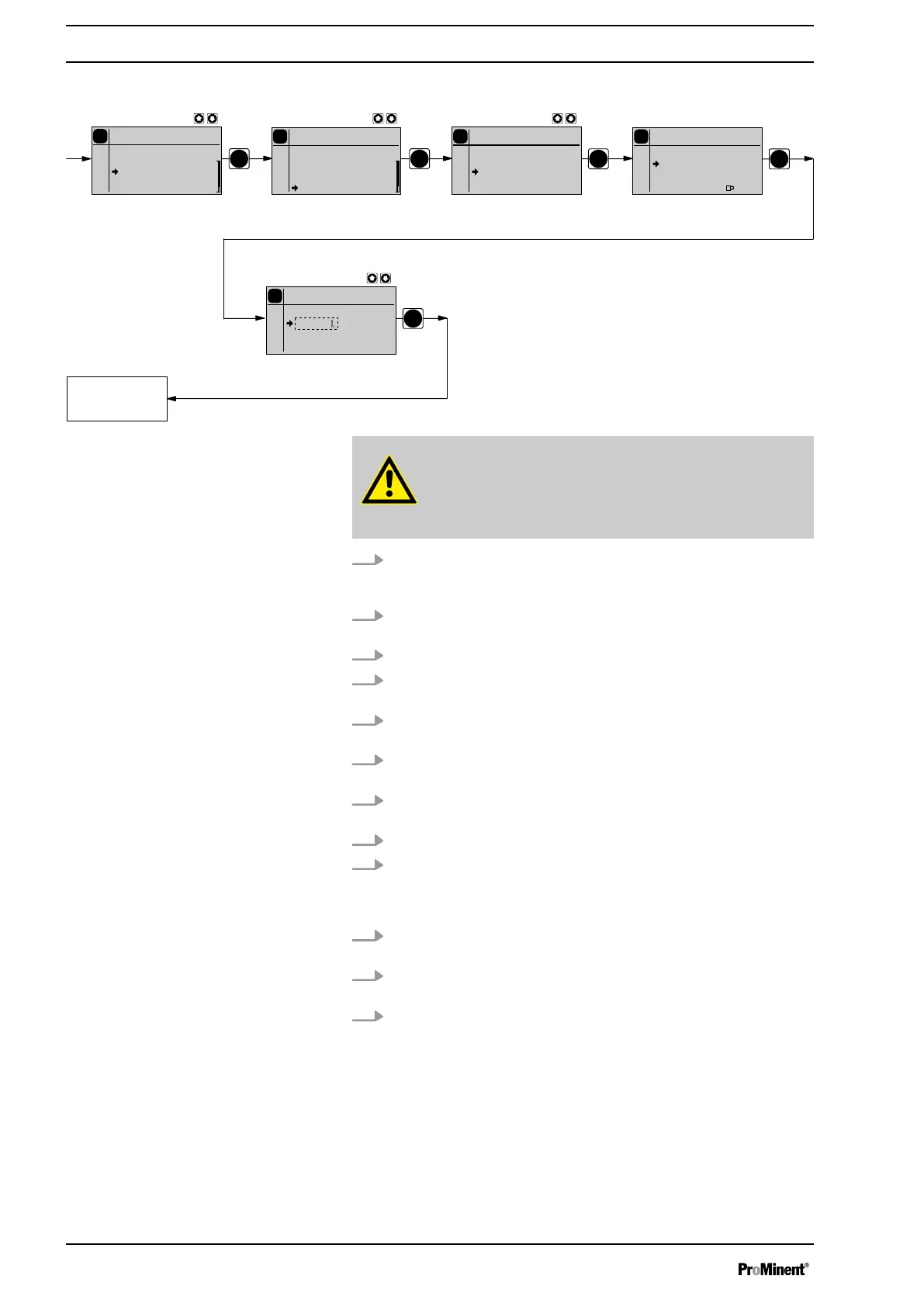
1. Lead the suction hose into a measuring cylinder containing the feed
chemical - the discharge hose must be installed in a permanent
manner (operating pressure, ...!).
2. Prime using the feed chemical (simultaneously press the two
[arrow keys]
), should the suction hose be empty.
3. Record the level in the measuring cylinder.
4. Using the
[i]
key scroll through the continuous display and check
whether litres or gallons are selected.
5. If the incorrect volume units are selected, select the
‘SYSTEM’
menu and the then the
‘UNITS’
sub-menu.
6. Using the
[arrow keys]
, select the correct units and confirm by
pressing the
[P]
key.
7. Select the
‘CALIBRATION’
menu and then use the
[P]
key to
change to the first menu option.
8. Use the
[DOWN]
key to select
‘Start calib.’
.
9. To start the calibration, press the
[P]
key: The next menu option,
‘Stop calib.’
. appears, the pump starts to pump and indicates the
stroke rate (the pump works at the stroke rate, which is set under
‘MANUAL’
).
10. After a reasonable number of strokes (e.g. 200), stop the pump by
pressing the
[P]
key.
11. Determine the required metering volume (difference initial volume -
residual volume).
12. Enter this volume in the menu option which appears and then press
the key
[P]
- the pump changes to continuous display.
ð
The pump is calibrated.
The corresponding continuous displays indicate the calibrated
values.
Calibration
Set up
58



 To Next Page