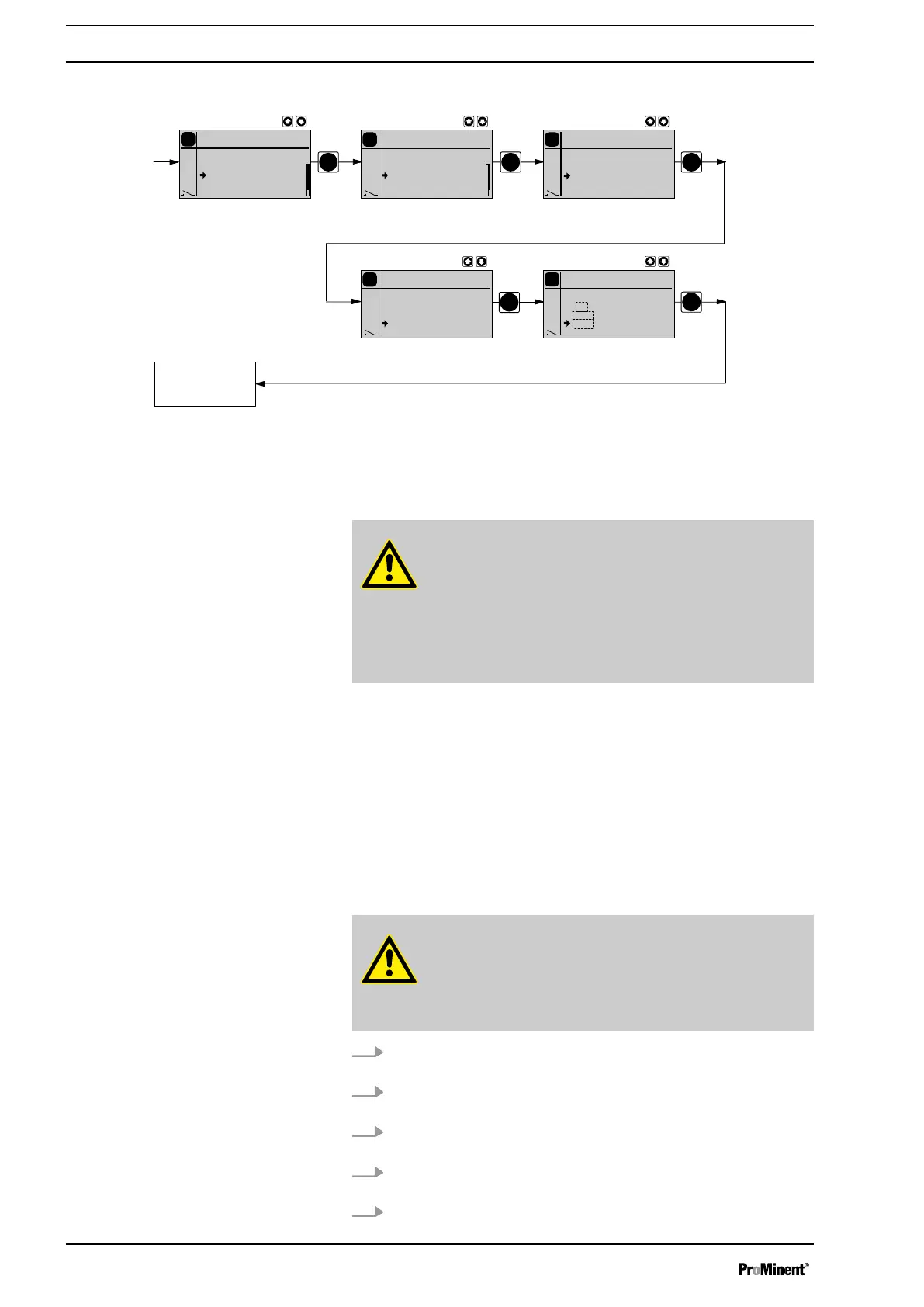
10.6.1.3 CONTACT operating mode (Settings for the "Concentration" function)
PP
P
P
P
Continuous
display
P
Concentration
Contact
off
on
P
Settings
Contact
Contact
Concentration
Auxiliar
Calibration
P
Main
Contact
Mode
Settings
Security
Clear
P
Concentration
Contact
1 l/
35.0 %
1.26 kg/l
P
Concentration
Contact
1 l/
35.0 %
1.26 kg/l
The "Concentration input" in operating mode
‘CONTACT’
, is intended for
metering of a substance into a pipeline containing a medium flowing at a
constant rate in such a way that it exists in the flow with a specific mass
concentration.
CAUTION!
Danger of too high concentrations
The metering pump can continue to dose, if the flow falls or
stops entirely.
– System precautions must be taken to prevent the
metering pump from continuing to dose in such circum‐
stances.
n the flowing medium has the same density as water (1 kg/L
≜ g/cm
3
)
n the mass concentration of the feed chemical is known - see the feed
chemical safety data sheet (e.g. with 35 % sulphuric acid: 35 %)
n the density of the feed chemical is known - see the feed chemical
safety data sheet (e.g. with 35 % sulphuric acid: 1.26 kg/L ≜ g/cm
3
)
n a contact water meter is hydraulically installed and connected to the
external input of the metering pump.
n The measurement unit for liquid volume is set in the
‘System’
menu in
the
‘Unit’
submenu, see chapter "Settings under the 'System' menu".
CAUTION!
The accuracy of the concentration is strongly dependent on:
– the accuracy of the metering pump calibration.
–
the accuracy of the entries.
1. Calibrate the metering pump if it is not yet calibrated - see chapter
"Settings for the "Calibrate" function".
2. Select
‘CONTACT’
operating mode (possibly existing settings from
other operating modes remain saved.).
3. From the
‘ADJUSTMENT’
menu, select the
‘CONCENTRATION’
menu.
4. Under the first menu option, set
‘On’
for working with the concentra‐
tion display and press the key
[P]
.
5. Adjust the contact gap and press key
[P]
.
The prerequisites are that:
Procedure
Set up
52



 To Next Page