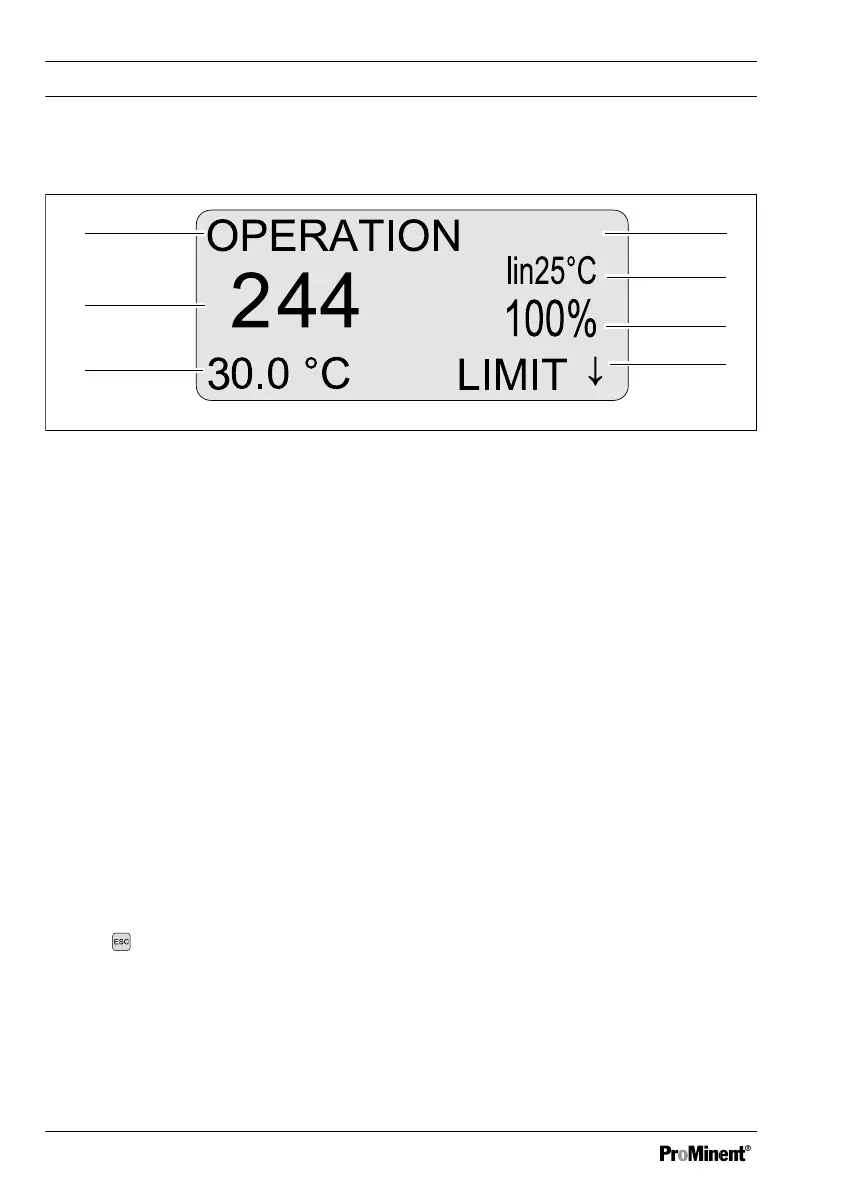
8.4 Continuous display
Fig. 19: Continuous display
1 Measured variable (switch using
ESC), the following are possible:
[ConC]
,
[RES]
,
[TDS]
and
[SAL]
2 Reference temperature or temperature
compensation
3 Control variable
4 Possible error text: for example
"Limit↓" (direction of limit value trans‐
gression e.g. value below the limit in
this case)
5 Temperature (correction variable)
6 Measured value (actual value)
7 Operating status
The bottom line displays the current measuring temperature and a temperature manually
entered. The temperature display cannot be switched off.
The temperature (measuring temperature or reference temperature) is needed to calcu‐
late all measured variables, which is why the second line of the continuous display there‐
fore displays information about temperature compensation and the reference tempera‐
ture.
The setpoint is displayed in the Information menu.
Switching between measured variables
Use the key to switch between the con‐
troller's measured variables
[ConC]
,
[RES]
,
[TDS]
and
[SAL]
in the continuous
display.
Depending on the measured variable set,
the settings of variables are changed or
the variables are hidden completely in the
[INPUT Ø TCOMP]
menu and in the
[LIMIT]
menu.
Operating diagram
52















 To Next Page