SECTION 5—WHEELCHAIR OPERATION
Pronto
®
M50
™
, M51
™
and M61
™
with SureStep
™
30 Part No. 1125085
To drive the wheelchair, perform the following:
1. Turn the power on. Refer to Turning the Power On/Off on page 28.
2. Adjust speed. Refer to Adjusting the Speed on page 30.
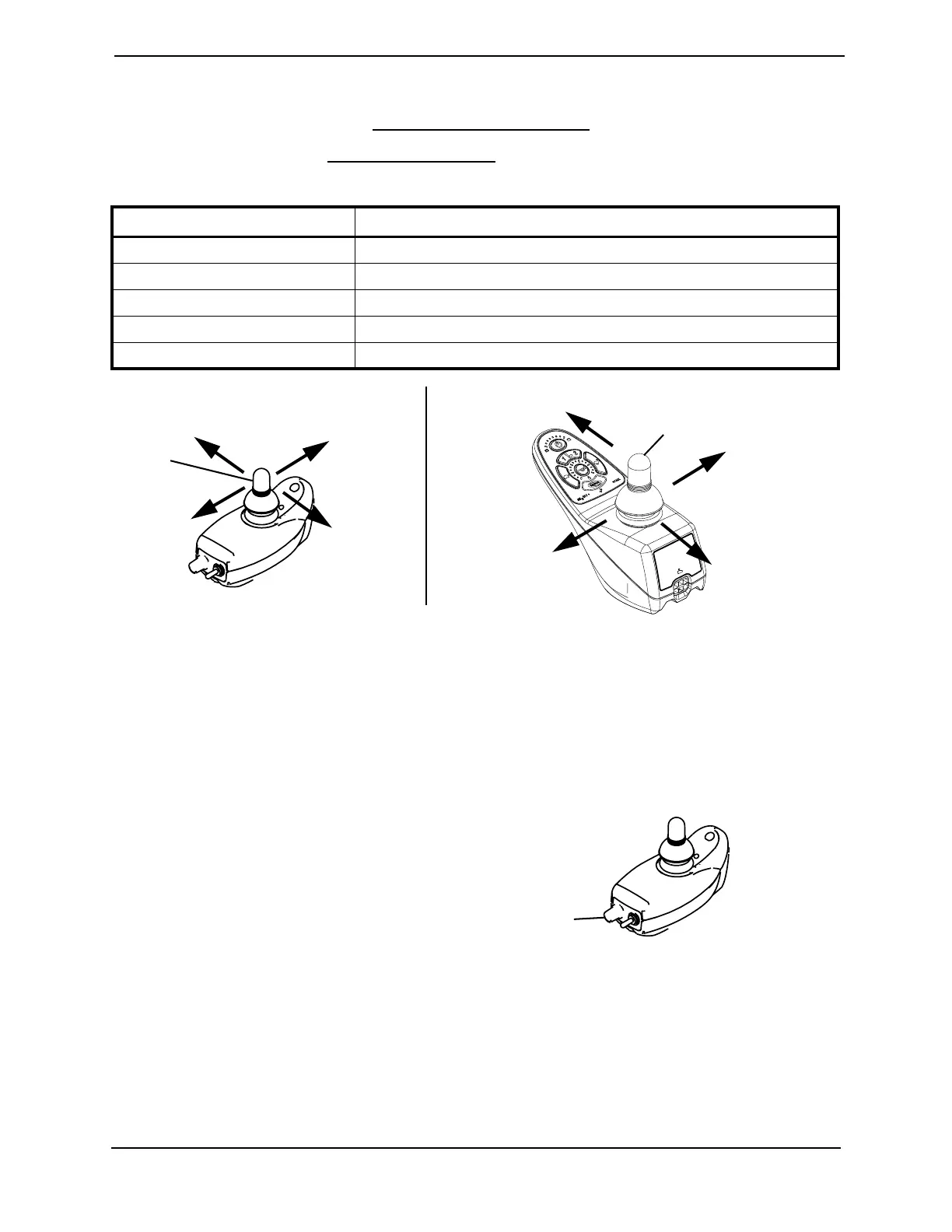
3. Maneuver the joystick in the following manner:
FIGURE 5.3 Using the Joystick to Drive the Wheelchair
Adjusting the Speed
M50 and M51 Wheelchairs
NOTE: For this procedure, refer to FIGURE 5.4.
1. Turn the speed control knob to adjust
the speed:
• Clockwise - Increase speed.
• Counterclockwise - Decrease speed.
FIGURE 5.4 M50 and M51 Wheelchairs -
M50 and M51 Wheelchairs
MOVEMENT ACTION
FORWARD Push forward on the joystick.
REVERSE Pull back on the joystick.
Turn RIGHT Move the joystick RIGHT.
Turn LEFT Move the joystick LEFT.
STOP Release the joystick and the wheelchair will quickly slow down.
To Move
Forward
To Move
Right
To Move Left
To Move
Backward
Joystick
M50 and M51 Wheelchairs M61 Wheelchairs
Joystick
To Move Left
To Move
Forward
To Move
Right
To Move
Backward
Speed
Control
Knob


 To Next Page