SECTION 6—ARMS
Part No. 1125085 39 Pronto
®
M50
™
, M51
™
and M61
™
with SureStep
™
SECTION 6—ARMS
WARNING
After ANY adjustments, repair or service and BEFORE use, make sure that all
attaching hardware is tightened securely - otherwise injury or damage may result.
Before performing any maintenance, adjustment or service verify that ON/OFF
switch on the joystick is in the OFF position.
Removing/Installing the Arms
WARNING
Increasing the width of the arms may affect the overall width of the wheelchair.
Ensure that there is enough clearance when attempting to pass through doorways
or other tight spaces, otherwise serious injury or damage may result.
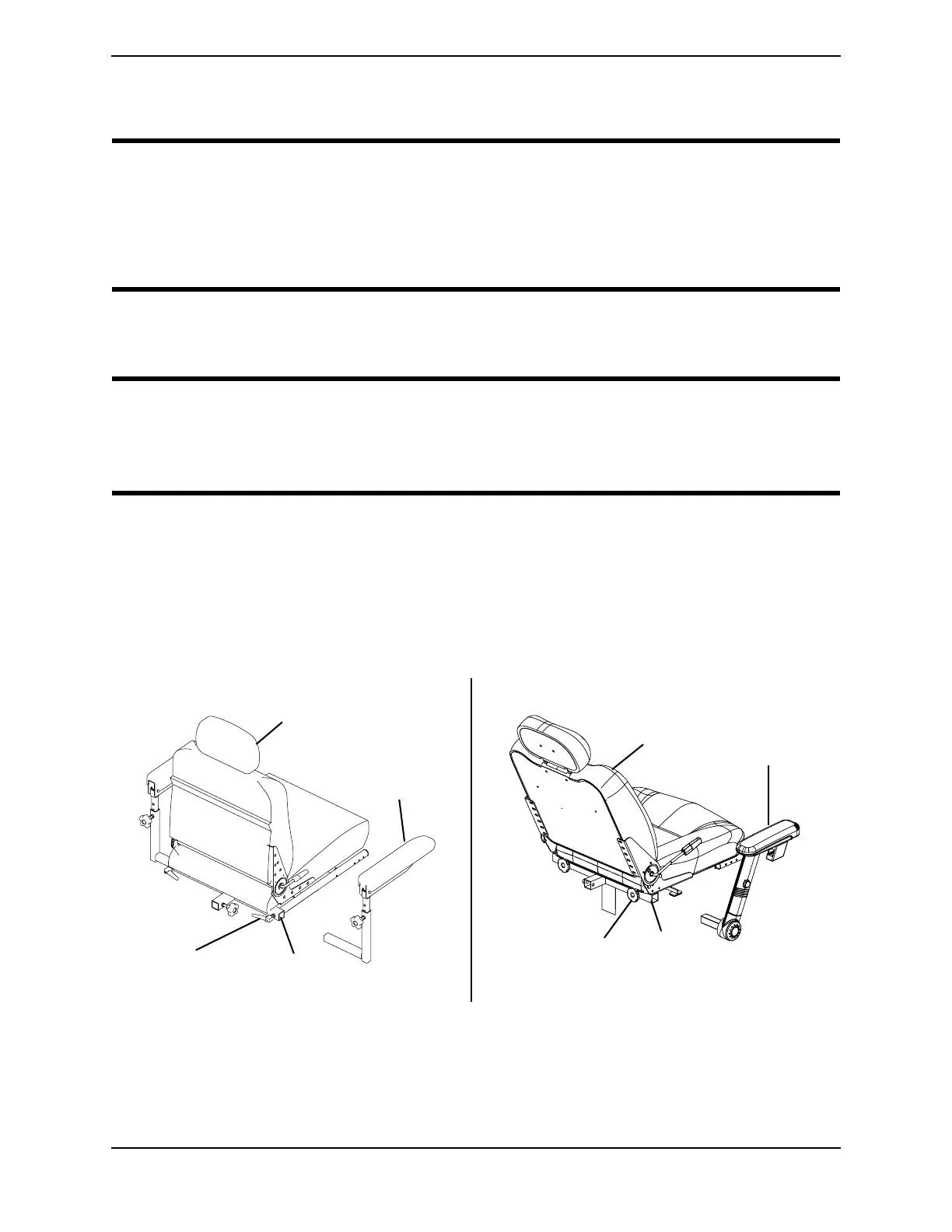
NOTE: For this procedure, refer to FIGURE 6.1.
NOTE: Reverse this procedure to install the arms.
1. Loosen lock knob that secures the arm to the arm support tube.
2. Remove the arm from the arm support tube.
3. If necessary, repeat STEPS 1-2 to remove the other arm.
FIGURE 6.1 Removing/Installing the Arms
Lock
Knob
Arm
Support
Tube
Arm
Lock
Knob
Arm Support
Tube
Seat
Seat
Detail “A” - Standard Arms
Detail “B” - Office Style Arms
Arm


 To Next Page