SECTION 12—ELECTRONICS
Part No. 1125085 77 Pronto
®
M50
™
, M51
™
and M61
™
with SureStep
™
4. Install the joystick. Refer to Removing/Installing the Joystick on page 75.
5. Connect the joystick. Refer to Disconnecting/Connecting the Joystick on page 78.
Removing
1. Disconnect the joystick. Refer to
Disconnecting/Connecting the Joystick
on page 78.
2. Remove the joystick. Refer to
Removing/Installing the Joystick on
page 75.
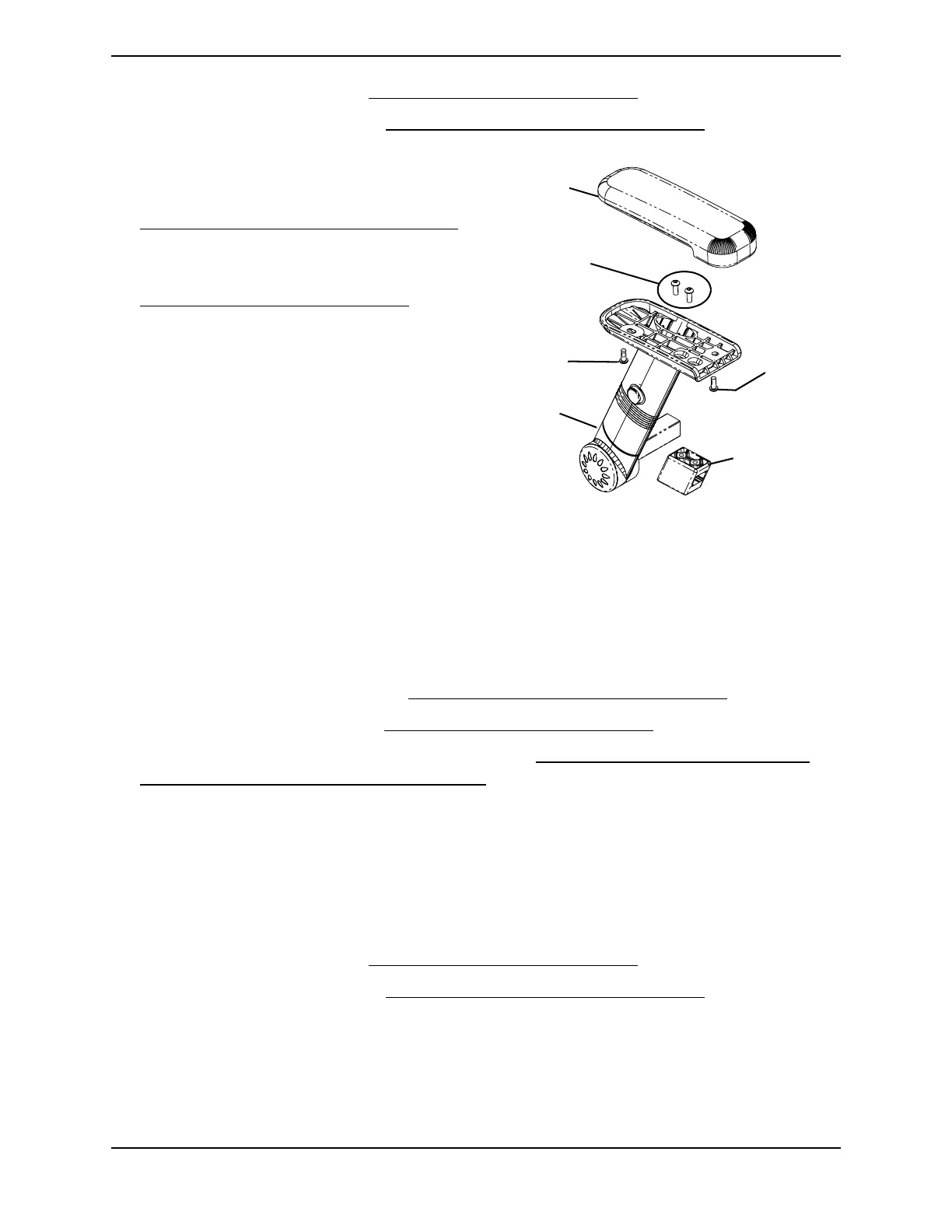
3. Remove the two (2) armpad mounting
screws that secure the armpad to the
arm. Refer to FIGURE 12.3.
4. Remove the two (2) bracket mounting
screws that secure the mounting
bracket to the arm. Refer to
FIGURE 12.3.
FIGURE 12.3 Installing/Removing the
Joystick Mounting Bracket (Office Style Seat
Only)
Repositioning the Joystick
NOTE: For this procedure, refer to FIGURE 12.3.
1. Disconnect the joystick. Refer to Disconnecting/Connecting the Joystick on page 78.
2. Remove the joystick. Refer to Removing/Installing the Joystick on page 75.
3. Remove the joystick mounting bracket. Refer to Installing/Removing the Joystick
Mounting Bracket (Office Style Seat Only) on page 76.
4. Reinstall armpad to the arm using the two (2) armpad mounting screws.
5. Remove the two (2) armpad mounting screws that secure the armpad to other arm.
6. Install the mounting bracket on the other arm using the two (2) bracket mounting
screws.
7. Reinstall the armpad to the arm using the two (2) armpad mounting screws.
8. Install the joystick. Refer to Removing/Installing the Joystick on page 75.
9. Connect the joystick. Refer to Disconnecting/Connecting the Joystick
on page 78.
Armpad
Armpad
Mounting
Screw
Armpad
Mounting
Screw
Bracket
Mounting
Screws
Arm
Joystick
Mounting
Bracket


 To Next Page