SECTION 12—ELECTRONICS
Part No. 1125085 79 Pronto
®
M50
™
, M51
™
and M61
™
with SureStep
™
Adjusting/Operating the Quad-Link Retractable Mount
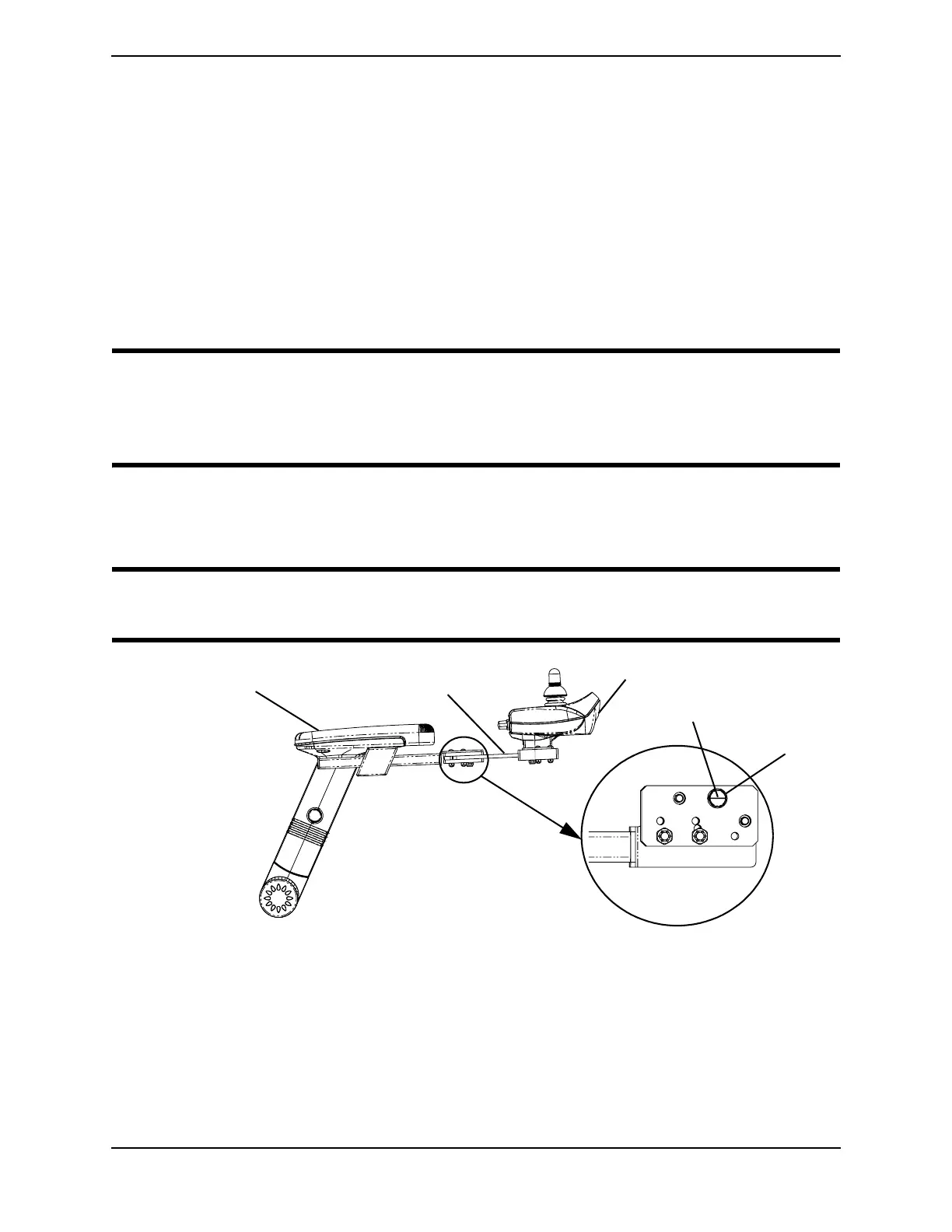
Adjusting Lock/Release Tension
NOTE: For this procedure, refer to FIGURE 12.5.
NOTE: The amount of force required to lock and release the Quad-link can be adjusted by changing
the position of the spring loaded ball plungers located on the underside of each Swivel Block.
1. Loosen the ¼-inch locknut.
2. With a slotted screwdriver, turn the ball plunger clockwise to increase tension and
counterclockwise to decrease tension.
CAUTION
DO NOT adjust the ball plungers too deep into the swivel blocks or damage to the
ball plunger and swivel links will occur. The ball plungers should be adjusted so that
a “click” can always be heard when the swivel links are extended and retracted.
3. Once the desired tension is achieved, hold the position of the ball plunger with a
slotted screwdriver and tighten the lock nut.
4. Repeat STEPS 1-3 for the other ball plunger.
CAUTION
DO NOT over-tighten the locknut, otherwise damage to the ball plunger will occur.
FIGURE 12.5 Adjusting Lock/Release Tension
Operating the Quad-Link Retractable Mount
NOTE: For this procedure, refer to FIGURE 12.6.
1. To retract the joystick from the normal extended position, push outward on the inside
surface of the joystick until the quad-link is free.
Arm
Quad Link Retractable Mount
Joystick
Bottom View
Ball Plunger
Locknut


 To Next Page