MVI56E-MCMR ♦ ControlLogix Platform Reference
Modbus Communication Module with Reduced Data Block User Manual
ProSoft Technology, Inc. Page 151 of 223
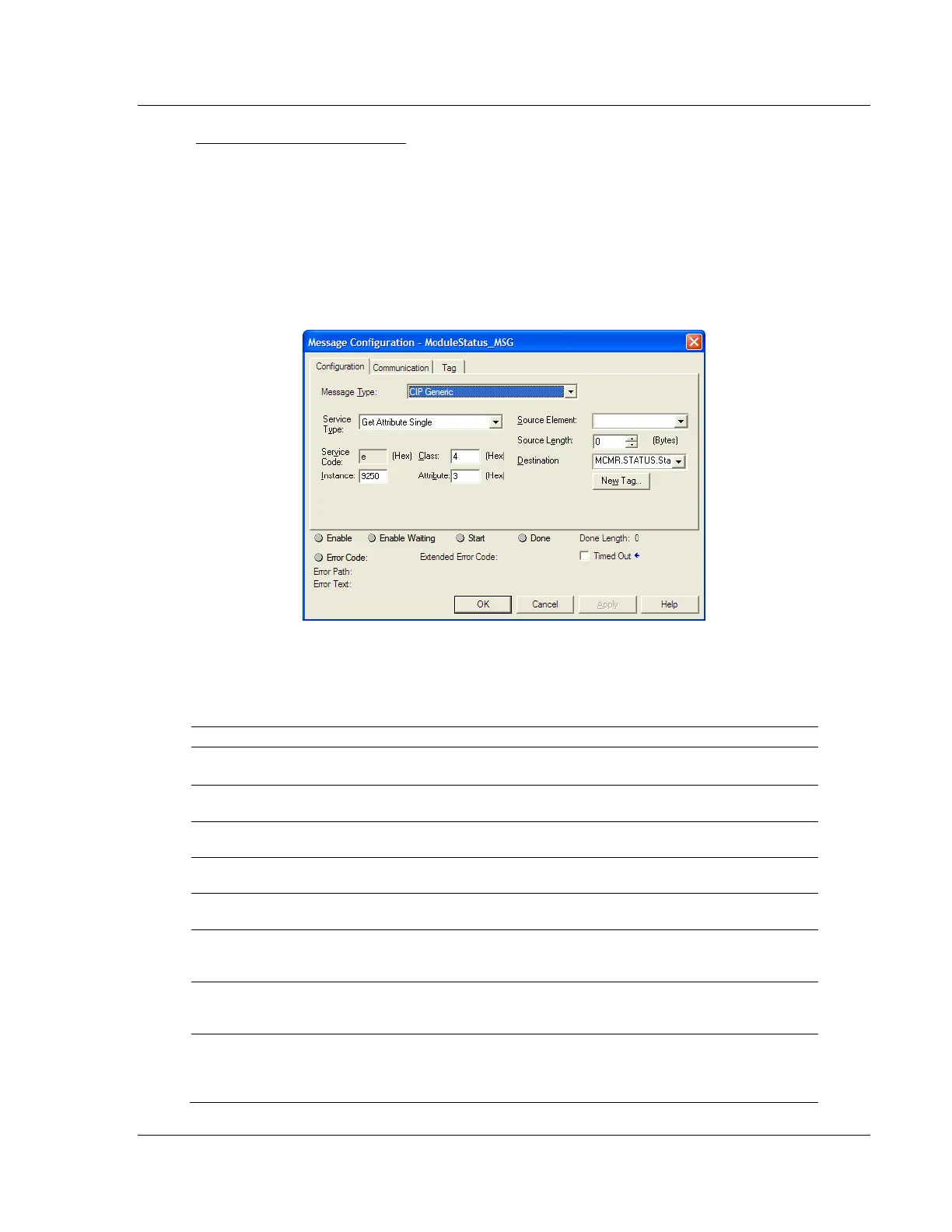
Module Status Block (9250)
The General Module Status block contains some basic information about the
module itself and diagnostic counters to help monitor activity on each port and
across the ControlLogix backplane. The block can be requested as needed and
is available regardless of whether the module's ports are configured as Masters
or Slaves. Use block identification code 9250 to request this General Module
Status block.
This block of data is requested using the "Get Attribute Single" service type MSG
instruction.
The following table describes the format of the 33-word data block returned to the
processor by this MSG instruction.
Block Response from Module to Processor
This value is incremented each time a complete
program cycle occurs in the module.
The four bytes of these two words contain the ASCII
code values of the 4-letter product code.
These two registers contain the product version of the
current running module firmware.
These two registers contain the month and year
values for the program operating system.
These two registers contain the run number value for
the currently running software.
Port 1 Command List
Requests
When Port 1 is a Master, this field contains the
number of requests made from Port 1 to Slave
devices on the network.
Port 1 Command List
Response
When Port 1 is a Master, this field contains the
number of Slave response messages received on the
port.
Port 1 Command List Errors
When Port 1 is a Master, this field contains the
number of command errors processed on the port.
These errors could be due to a bad response or bad
command.



 To Next Page