Configuring the MVI56E-MCMR Module MVI56E-MCMR ♦ ControlLogix Platform
User Manual Modbus Communication Module with Reduced Data Block
Page 54 of 223 ProSoft Technology, Inc.
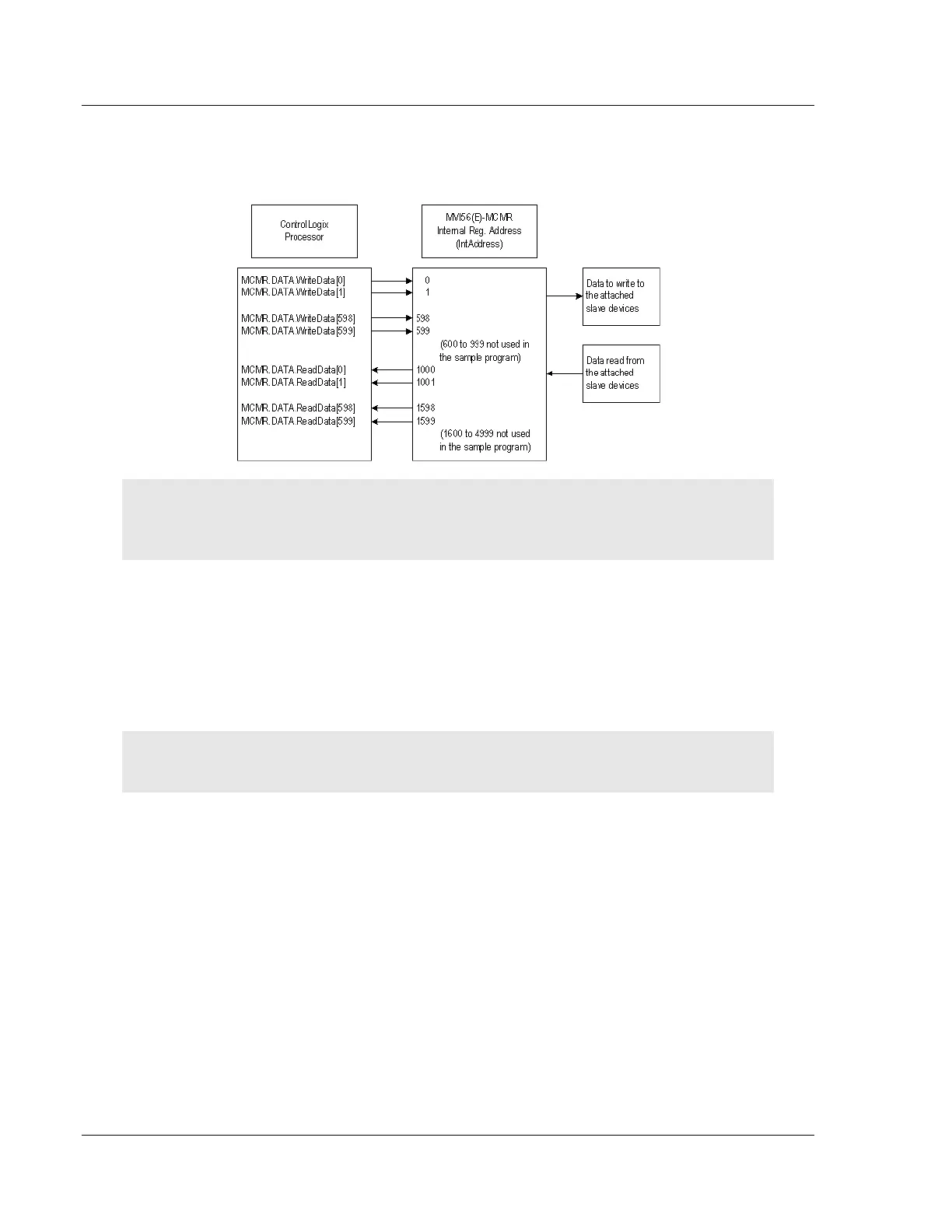
The sample configuration values configure the module database to store
WRITEDATA[0 to 599] in registers 0 to 599, and READDATA[0 TO 599] in registers
1000 to 1599, as shown in the following illustration.
Important: If you need to configure different values for the Read Register Count and Write
Register Count parameters, you must also configure the same values in the user-defined data type
MCMRData in the sample program (page 37).
2.3.3 Port Configuration
The MODBUS PORT X configuration parameters are used when the module is
configured as a Modbus Master device. Port 1 and Port 2 each have their own
set of configuration parameters.
Note: Any changes made within the configuration file must be downloaded to the MVI56E-MCMR
module from ProSoft Configuration Builder.
In ProSoft Configuration Builder, expand the MVI56E-MCMR node, and then
expand the MCM PORT 1 node. Double-click the MODBUS PORT 1 icon. In the
EDIT - MODBUS PORT 1 dialog box, click to highlight the Type parameter, and then
select MASTER from the dropdown list.



 To Next Page