12
4.9 Expansion Connector
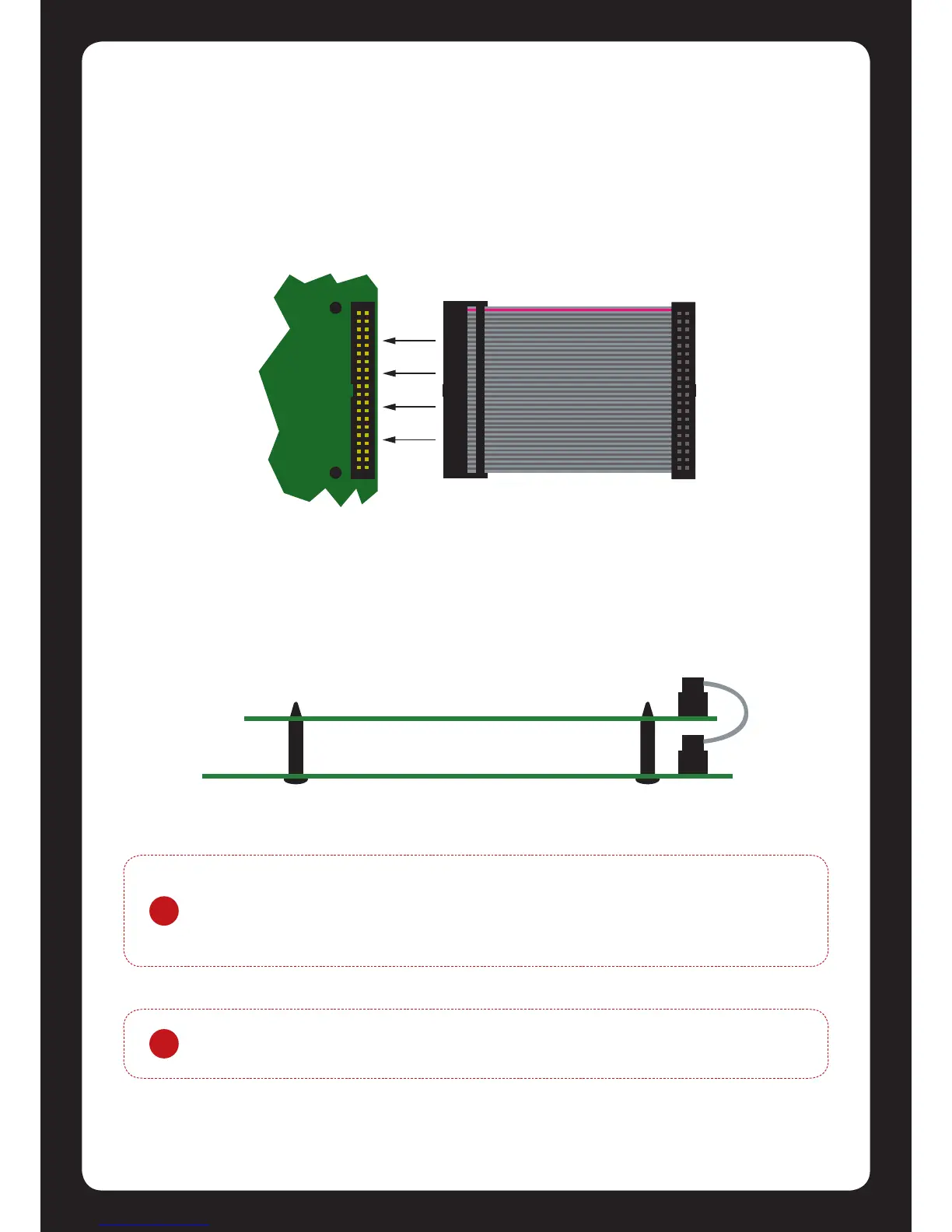
The Protégé® SE Integrated System Controller has an onboard expansion connector that is used to
connect serial communicaon, memory and special funcon interface devices. Connect the
interface card to the Protégé® SE Integrated System Controller as shown in the following diagrams.
For conguraon informaon refer to the Protégé® Reference Manual and the Installaon
Instrucons provided with the interface device.
When installing the daughter board ensure that the plasc mounng hardware provided is
correctly inserted from the rear of the Protégé® SE Integrated System Controller. Pay aenon to
the key locaon of the 40 Way Connector.
Figure 12 - Expansion Connector and Mounng Hole Locaon
Figure 13 - Connecon and Mounng
!
Power to the Protégé® SE Integrated System Controller must be turned o when
connecng any hardware or system device to the Protégé® SE Integrated System
Controller. Failure to do so may damage the Protégé® SE Integrated System
Controller and expansion device.
!
If the Protégé® SE Integrated System Controller is used with the expansion
connector ed then the second onboard reader port becomes unavailable.


 To Next Page