5
4.0 Connecons
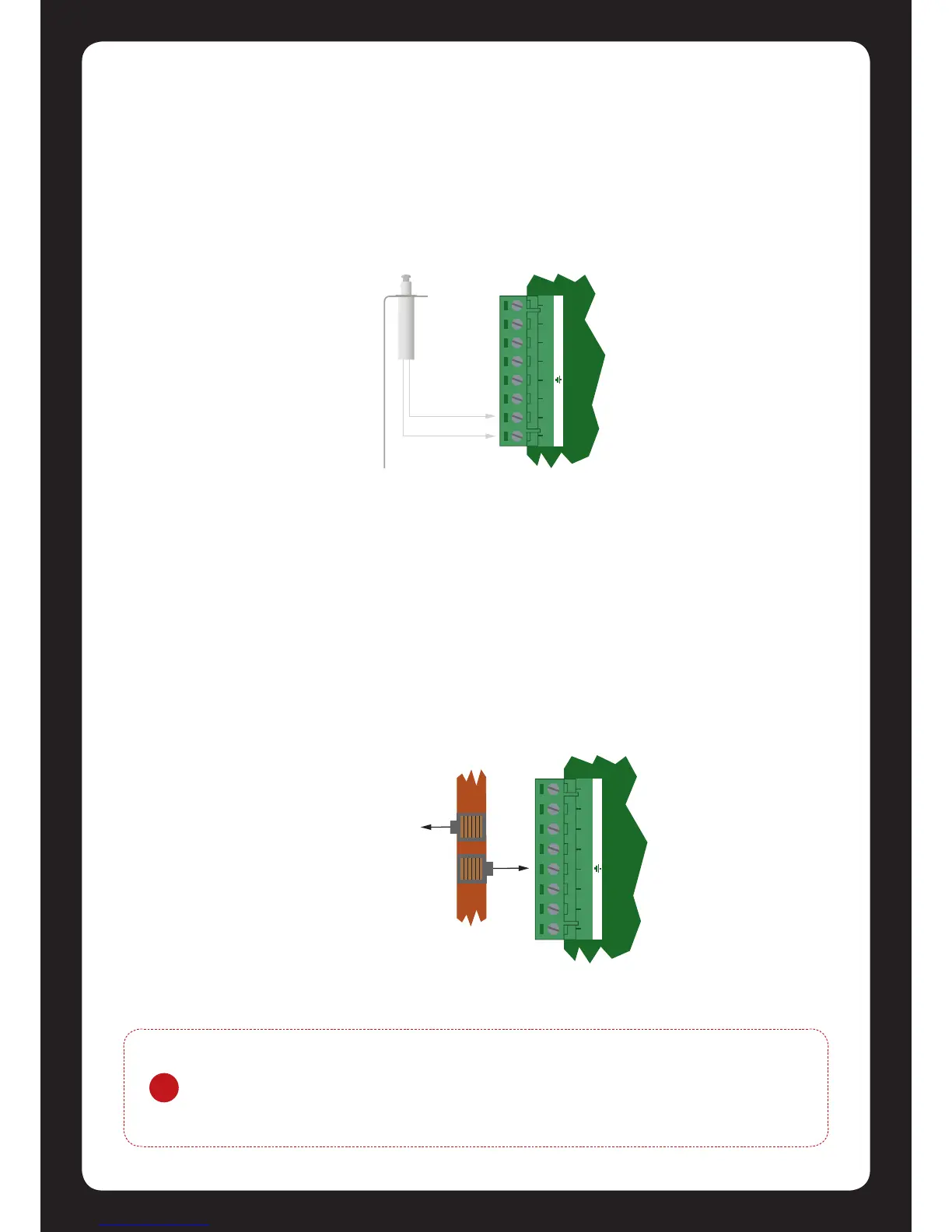
4.1 Cabinet Enclosure Tamper Switch
The cabinet enclosure tamper input signals to the monitoring staon or remote computer that an
cabinet enclosure has been opened. The tamper input switch should be mounted into the steel
bracket provided and connected to the tamper connecon terminals as shown in gure 1 below.
4.2 Earth Ground Connecon
The Protégé® SE Integrated System Controller has a connecon for earth ground. For best results a
cold water pipe should be used with a pipe wiring clamp. If a cold water pipe is not available
connect to a suitable ground connecon in the installaon. A minimum 14AWG solid copper wire
should be used from the Protégé® SE Integrated System Controller’s earth connecon point to the
clamp on the cold water pipe. If other earth clamps are present at the same connecon point
connect the clamp below the exisng units.
Figure 1 - Tamper Input Connecon
Figure 2 - Earth Ground Connecon
!
The telephone communicaon dialer contains a separate earth connecon. Do not
loop the earth connecon from the dialer to the earth of the Protégé® SE
Integrated System Controller. A separate connecon should be connected to the
same earth point.
AC AC B+ B- ST TP TP


 To Next Page