14
5.0 Door Access Control
The Protégé® SE Integrated System Controller provides Access control funconality onboard
without the requirement for addional hardware. With 2 Access controlled Doors built in, the
exibility of the Protégé® System as expanded even further.
The Protégé® SE Integrated System Controller allows the connecon of 2x Wiegand devices to
control 2 doors (Entry or Exit Only) or can be congured in Mulplex Mode to allow 4x Wiegand
devices controlling 2 doors giving the exibility of Entry and Exit readers.
5.1 Card Reader Connecon
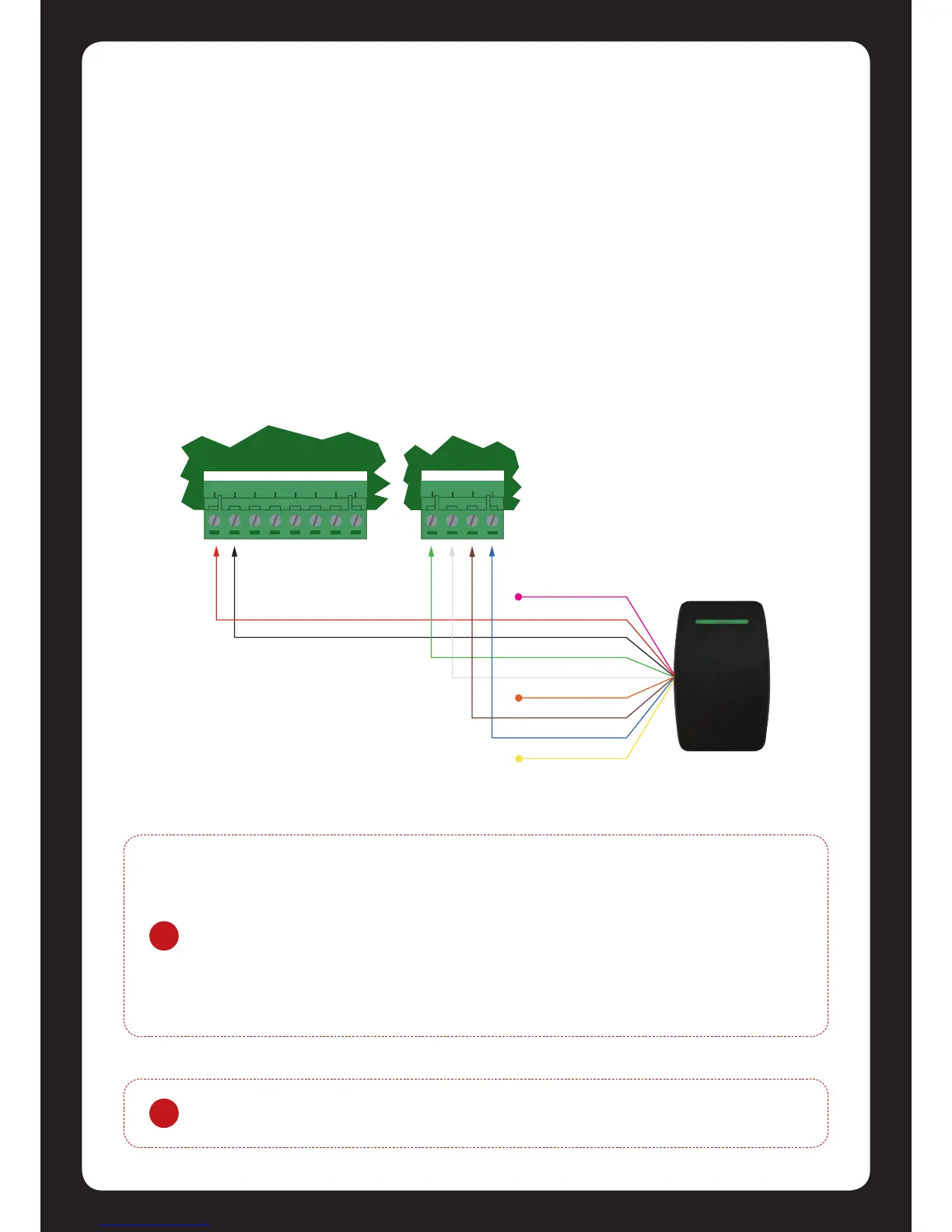
The following diagrams show the connecon of standard Wiegand Reader with the Protégé® SE
Integrated System Controller controlling an Access Door in Entry or Exit mode (2 Doors, 2 Readers).
!
The shield connecon on the card reading device that is connected to the
Protégé® SE Integrated System Controller port should not be connected to a AUX-
or 0V connecon. Do not join the shield and black wires at the card reading device.
The shield should not be connected to any shield used for isolated communicaon.
Always refer to the card reader manufacturer for detailed installaon guidelines.
The beeper output on the Protégé® SE Integrated System Controller provides
diagnosc informaon to the end user and installer when access is denied or the
unit is operang oine.
Figure 16 - Card Reader Connecon


 To Next Page