15
5.2 Mulple Wiegand Card Reader Connecon
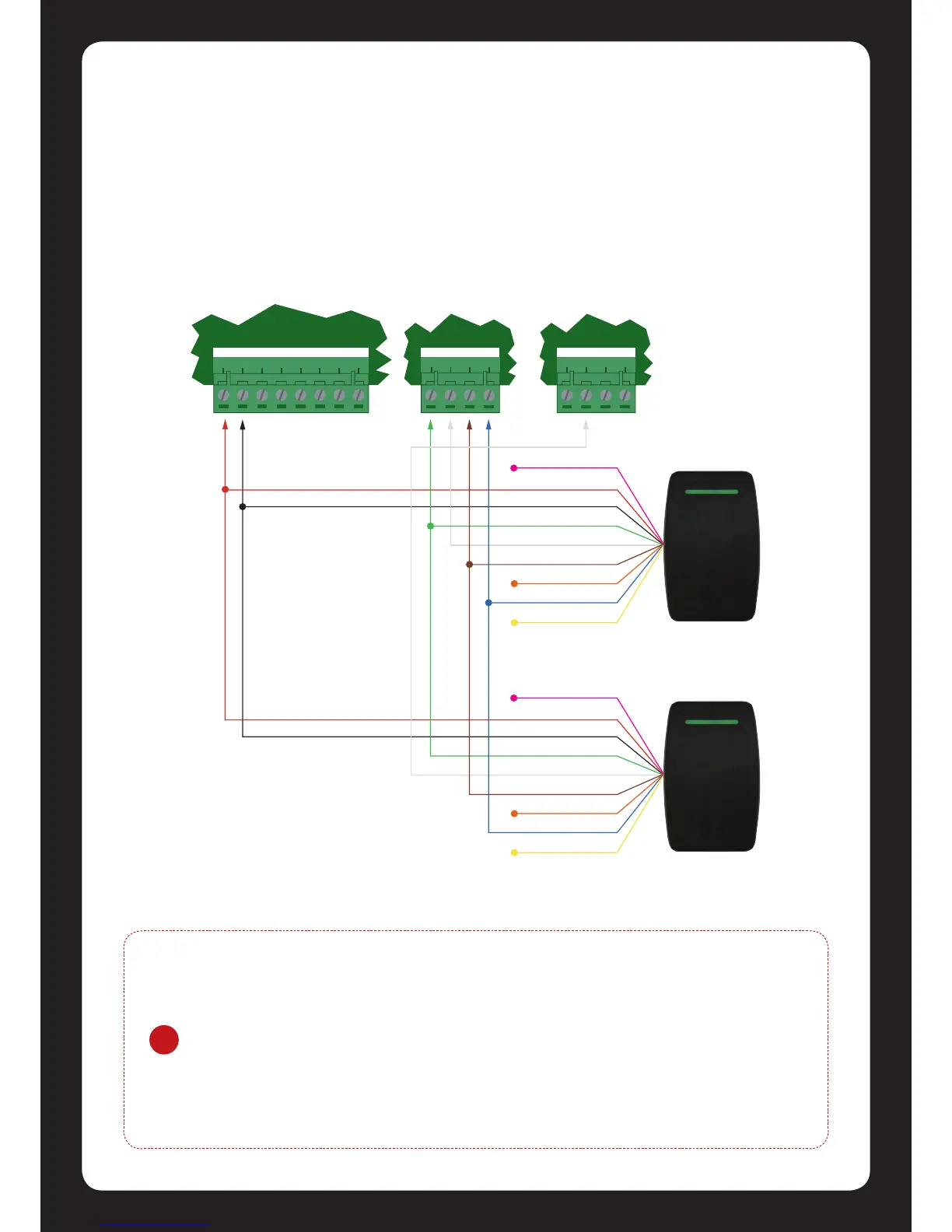
When operang the Protégé® SE Integrated System Controller in Mulple Reader mode the
Protégé® SE Integrated System Controller allows the connecon of 4 Wiegand reading devices
controlling two doors each with Entry/Exit readers.
When connecng Wiegand readers in Mulple Reader mode the secondary reader that is
connected will have all connecons wired to the same port as the primary card reader with the
DATA 1 connecon wired to the opposite reader connecon DATA 1 input.
!
The shield connecon on the card reading device that is connected to the
Protégé® SE Integrated System Controller port should not be connected to a AUX-
or 0V connecon. Do not join the shield and black wires at the card reading device.
The shield should not be connected to any shield used for isolated communicaon.
Always refer to the card reader manufacturer for detailed installaon guidelines.
The reader that is mulplexed in to the alternate reader port will operate as the
exit reader and the normal reader connecon should be programmed to operate as
the entry reader.
Figure 17 - Mulple Wiegand Card Reader Connecon


 To Next Page