18
5.5 Programming the Onboard Reader
The onboard reader is programmed in exactly the same way as any other reader module is. It can
be though of as if it were a normal reader expander module on a separate circuit board. By default
the onboard reader is registered as the last reader in the dened prole (which is Reader Expander
008 in the Standard Prole). Consequently any reader expander module that is connected with the
same address as this will be treated as a duplicate and will fail to register. To change the address at
which the onboard reader is registered, or to disable it please refer to the Protégé® SE Integrated
System Controller Programming Guide.
The onboard reader uses zone inputs 9-12 and 13-16 as it’s door contact, REX, bond sense and REN
inputs respecvely. Any of these inputs that are not congured for use with the Onboard Reader
may be used as general purpose zone inputs. The default sengs are shown in the following table:
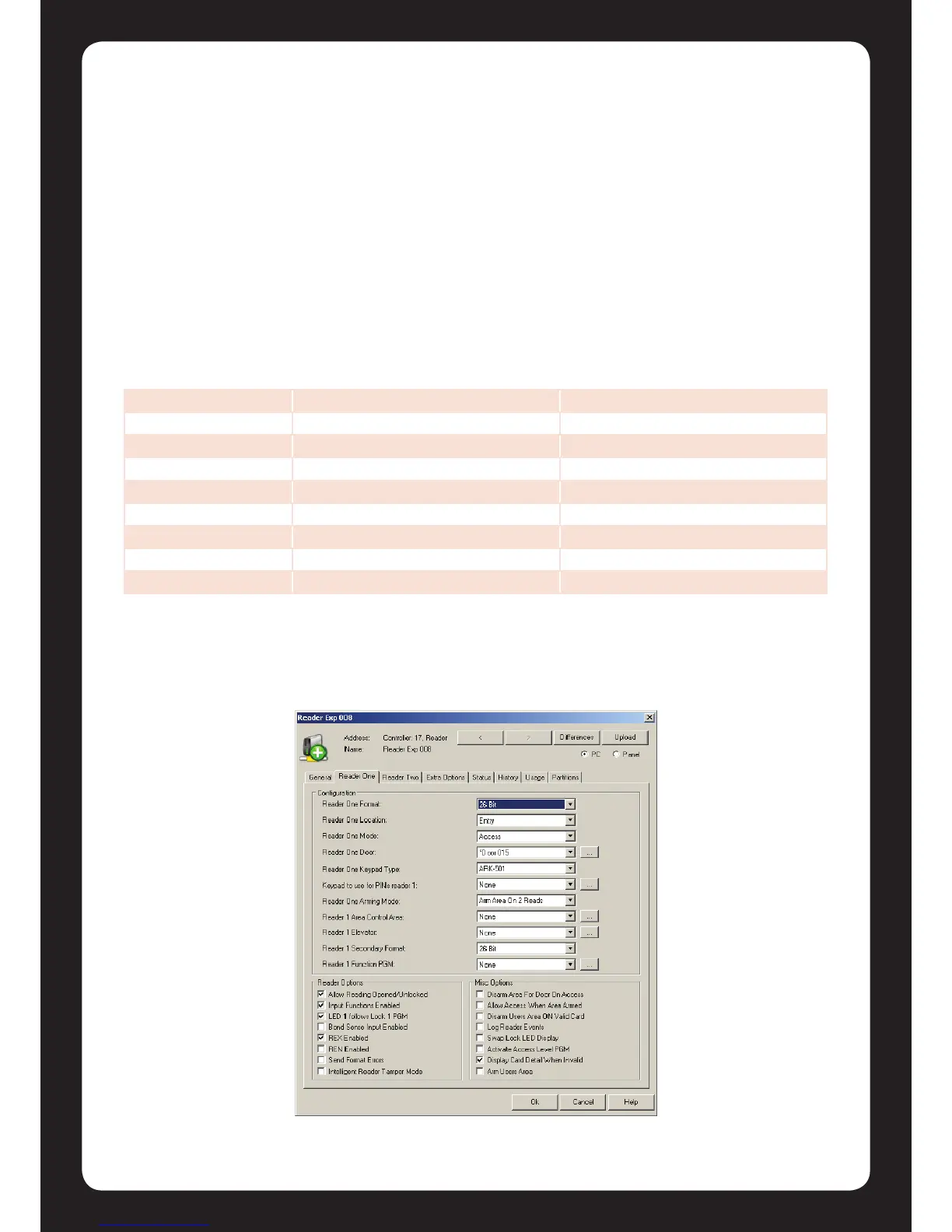
To enable or disable the onboard reader inputs use the reader expander properes box in the
Protégé® Soware as shown below.
Figure 20 - Reader Expander Properes Box
Zone Access Control Funcon Default Seng
Zone 9 Door Contact, Port 1 Door Contact, Port 1
Zone 10 REX Input, Port 1 REX Input, Port 1
Zone 11 Bond Sense, Port 1 General Purpose Zone
Zone 12 REN Input, Port 1 General Purpose Zone
Zone 13 Door Contact, Port 2 Door Contact, Port 2
Zone 14 REX Input, Port 2 REX Input, Port 2
Zone 15 Bond Sense, Port 2 General Purpose Zone
Zone 16 REN Input, Port 2 General Purpose Zone


 To Next Page