16
5.3 Door Contact Connecon
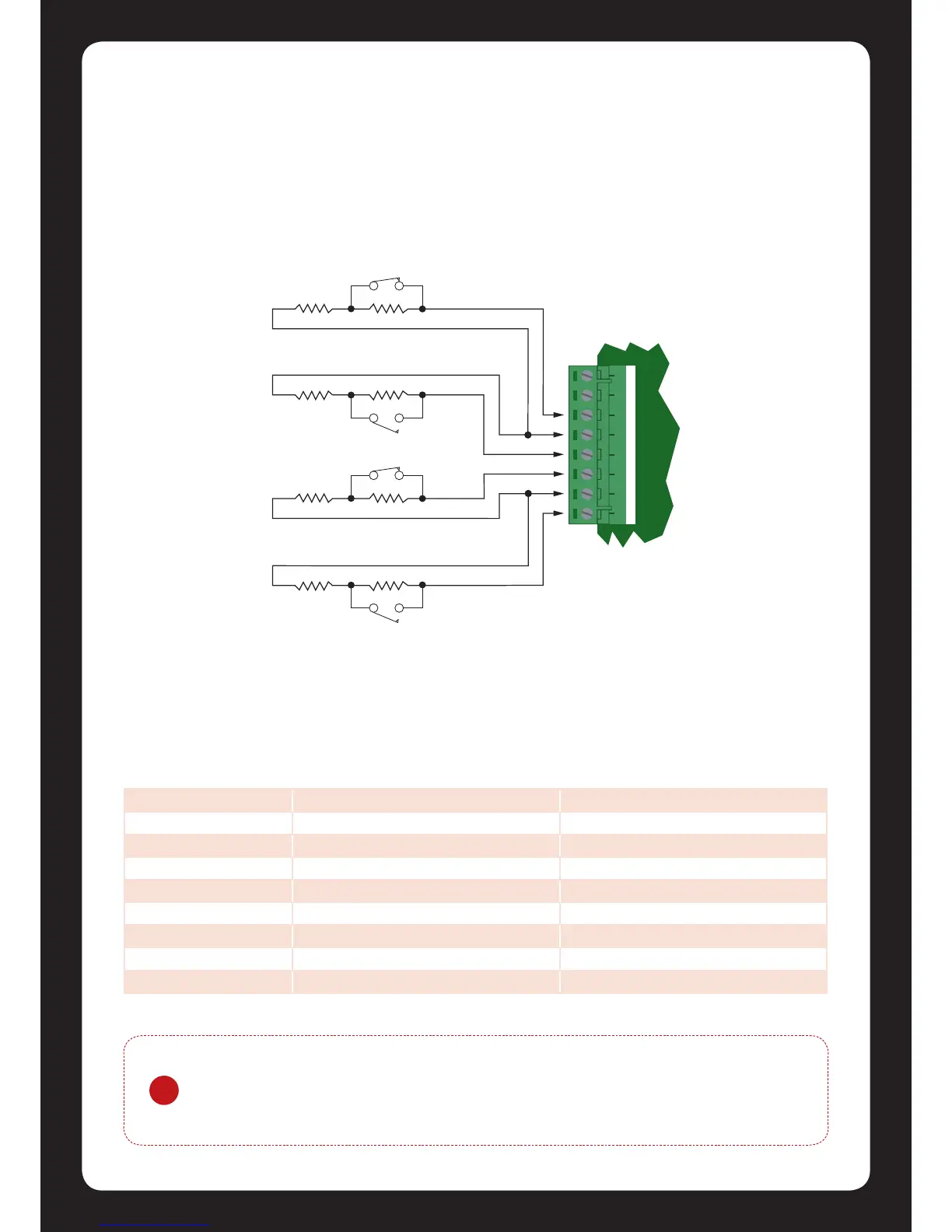
The Protégé® SE Integrated System Controller allows the connecon of up to 4x contacts for
monitoring and controlling access control doors. Each zone on the reader expander can be used
for the door funcon that is automacally assigned and as a normal zone input on the system. The
following example shows the connecon of a normally closed door posion monitoring contact to
monitor the Open, Closed, Forced and Alarm condions of the door.
The zones 9-12 and 13-16 can operate as either general purpose zone inputs or as onboard reader
inputs. If used as general purpose zone inputs then make sure that these input are not dened in
the onboard reader set up.
Figure 18 - Door Contact Connecon
Zone Access Control Funcon Default Seng
Zone 9 Door Contact, Port 1 Door Contact, Port 1
Zone 10 REX Input, Port 1 REX Input, Port 1
Zone 11 Bond Sense, Port 1 General Purpose Zone
Zone 12 REN Input, Port 1 General Purpose Zone
Zone 13 Door Contact, Port 2 Door Contact, Port 2
Zone 14 REX Input, Port 2 REX Input, Port 2
Zone 15 Bond Sense, Port 2 General Purpose Zone
Zone 16 REN Input, Port 2 General Purpose Zone


 To Next Page