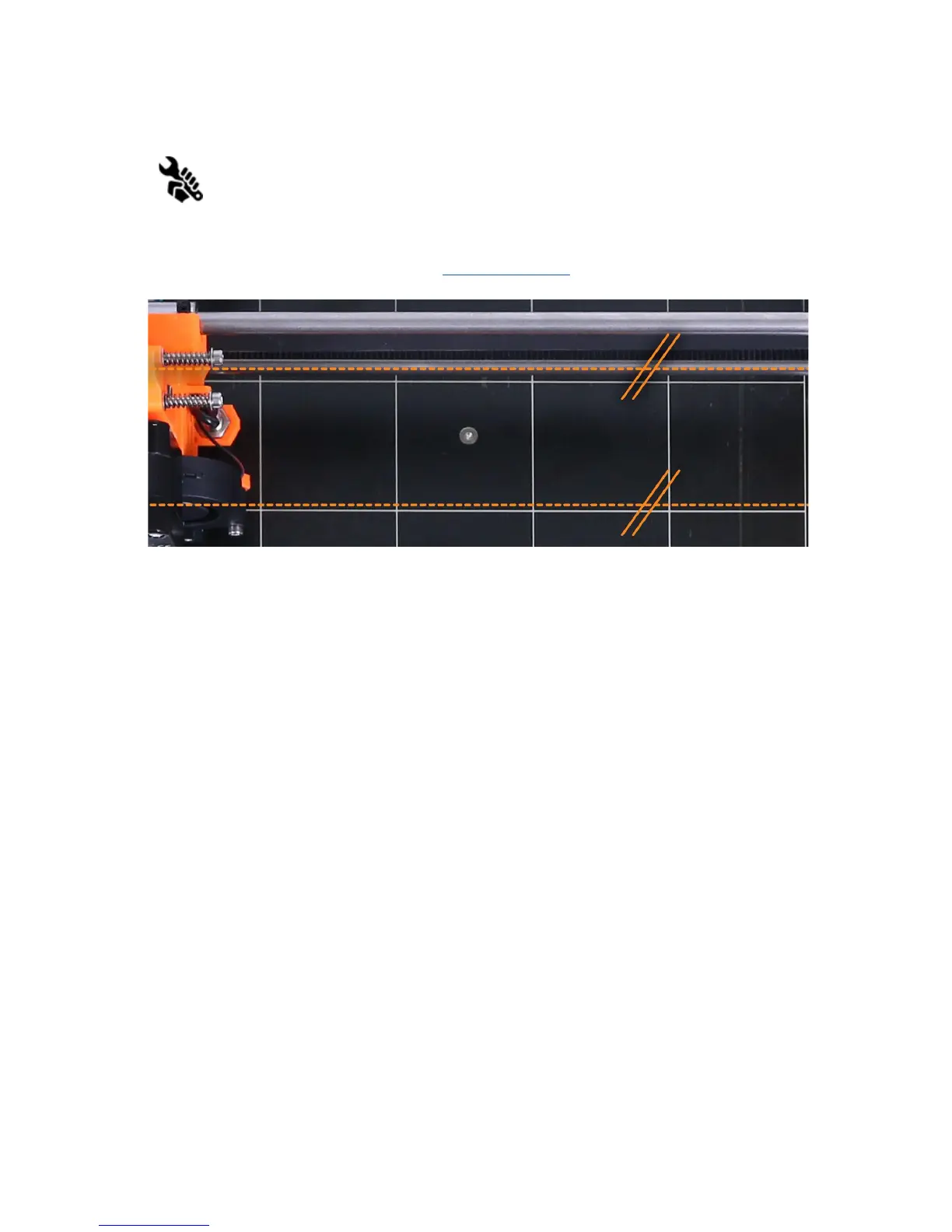
6.3.5.1 Y axis alignment (kit only)
For autocalibration to work properly, it is extremely important for the Y axis to be
perpendicular to the X axis. This can be easily checked by looking at the printer
from the top and visually aligning the X-axis rods with lines on the heatbed. If the Y
axis is misaligned, you can easily adjust the position of the Y axis inside the frame
by loosening the M10 nuts on the Y axis and securing them at the newly adjusted position.
You can see how in the Assembly Manual 7.PSU/Step 20 (Check if everything is correct )
or in P.I.N.D.A. Probe Misaligned topic at help.prusa3d.com.
Pic.
4
-
X-axis
rods
must
be
visually
aligned
with
lines
on
the
heatbed.
If the Calibrate XYZ gives “XYZ
calibration
compromised.
Front
calibration
points
not
reachable.
” error, you don’t necessarily need to adjust the M10 nuts and position of the axis
in the frame, but you can adjust the belt holder position. Y-belt-holder with a slot allows to
make a 1 mm adjustment to both the front and the back. Loosen the Y belt holder
screws, push the belt holder part towards the Y motor and retighten the screws.
6.3.6 Calibrate Z
Calibrate Z is located in Calibration menu. It should be performed whenever you move the
printer to different location. It saves the heights of all 9 calibration points in non-volatile
memory. Stored information is used every time mesh bed levelling is called during a print.
When the measured values are vastly different to the stored value, print is canceled as it is a
good indicator something is wrong. Calibrate Z is a part of Calibrate XYZ routine so there’s
no need to run it after successful Calibrate XYZ.
It is a good practice to run this procedure every time you travel or printer is shipped as the
geometry might change slightly and cause an error.
At the start of the Z calibration procedure the printer prompts you by a following message:
"Calibrating
Z.
Move
Z
carriage
up
to
the
end
stoppers.
Click
when
done.”
After that, the printer asks you to confirm this step: "Are
left
and
right
Z
carriages
all
up?"
19



 To Next Page