6.3.8.1 Unloading the filament
Similar procedure to the loading operation. Preheat the nozzle for material you used last
time (pre assembled printers are shipped with PLA). Wait for temperatures to stabilize and
use Unload filament option from the menu.
6.3.9 First layer calibration (kit only)
NOTE:
The
calibration
process
has
been
made
easier
and
is
now
called
V2
Calibration.
If
the
V2Calibration.gcode
is
not
present
on
your
SD
card
you
can
easily
obtain
it
from
our
support
or
on
our
http://www.prusa3d.com/drivers/
page.
Check if your print surface is clean! You can find instructions how to clean it in
the chapter 6.3.2 PEI print surface preparation. Don't forget to complete 6.3.5
Calibrate XYZ chapter or you can permanently damage the print surface!
Now we will finally calibrate the distance between tip of the nozzle and the probe. Preheat
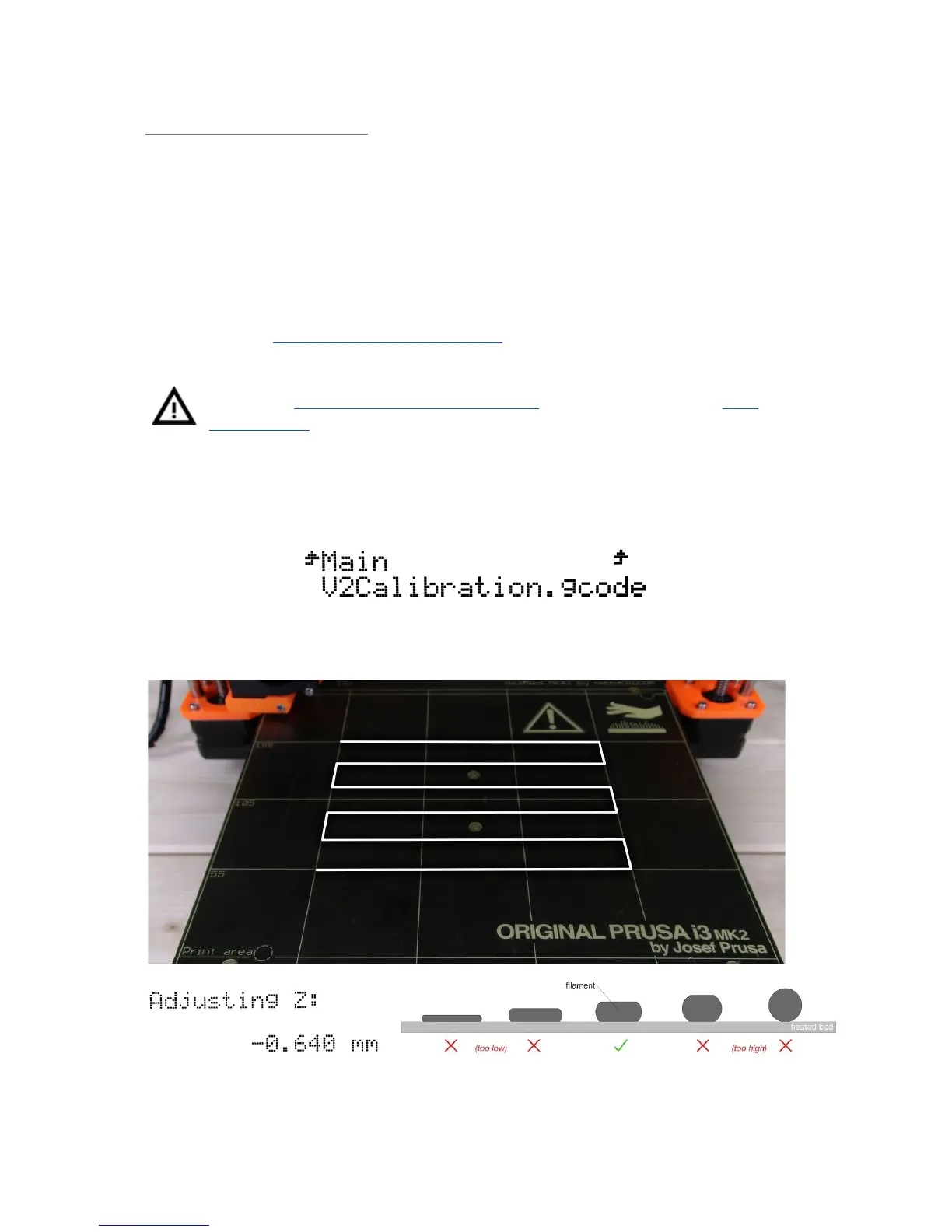
the nozzle for PLA. On the LCD menu, go to Print from SD and run V2calibration.gcode
file from the bundled SD card.
The printer will probe the bed and start printing zig zag pattern on the print surface. The
nozzle will be at the height based on the P.I.N.D.A probe setting, it must not by any means
touch the print surface.
Pict.
7
-
How
to
tune
the
nozzle
height
live
during
the
test
print.
Note:
-0.640
mm
is
only
for
illustration.
Your
setting
will
be
different!
22



 To Next Page