Note:
Defaultdatapagescanbefurthereditedorremovedtosuityour
preference
.Formoreinformation,refertothefollowingsections:
•p.22—Deletingpages
•p.31—Widgetcreationandcustomization
Note:
Formoreinformationonthedefaultpagesthatareconfiguredonyour
performancedisplay ,refertothefollowingsection:p.25—Pagepresets
3.6Basiccontrols
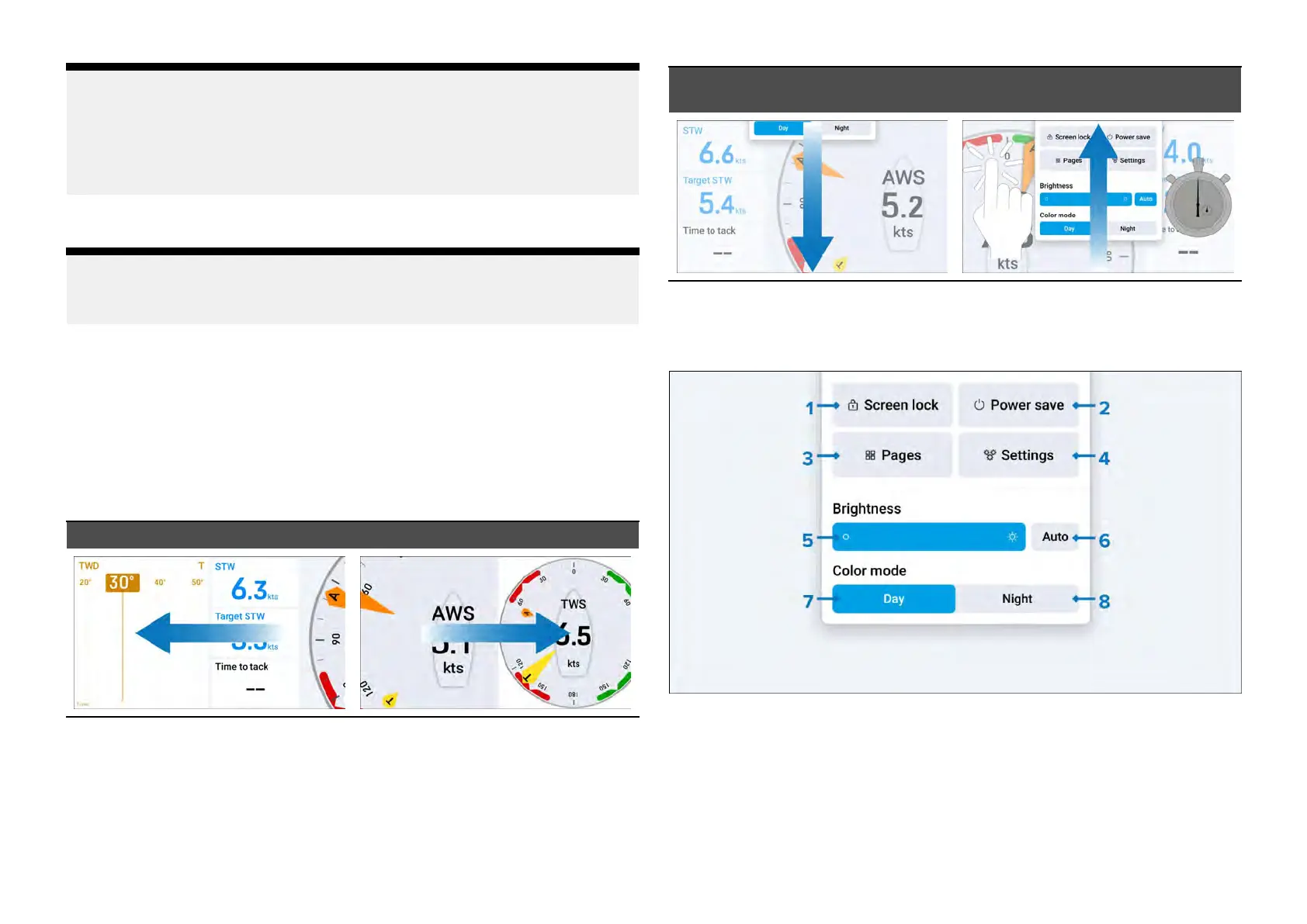
Y oucanswitchbetweendatapagesbyeitherswipingtotheleftorright.
Datapageswillloopifyoureacheitherthestartorendandcontinueto
swipeleftorright.
Onceyourlastdatapagehasbeenreached,swipingtotheleftorrightagain
willcausetheselectedpagetoloopbacktothestart.
S wipeleft(changepage)Swiperight(changepage)
Eachofthedisplay’ sdefaultpages,userpreferencesandsettingscanbe
customizedbyselectingoneoftheoptionsavailableviatheoverlaymenu,
whichappearswhenswipingdownwardfromthetopedgeofyourscreen.
Theoverlaymenuandotherpop-upscanbedismissedbyeitherswiping
upwardfromthebottomedgeofyourscreen(overlaymenuonly),bytapping
outsideofthewindow,orbywaitingforanautomatictime-outtooccur.
S
wipedown(openoverlay)Swipeup/tapoff/automatic
time-out(dismissoverlay)
3.7Overlayoptions
Thefollowingoptionsareavailableviathe[Overlaymenu]:
1.[Screenlock]
2.[Powersave]
3.[Pages]
4.[Settings]
5.[Brightnessbar]
16







 To Next Page