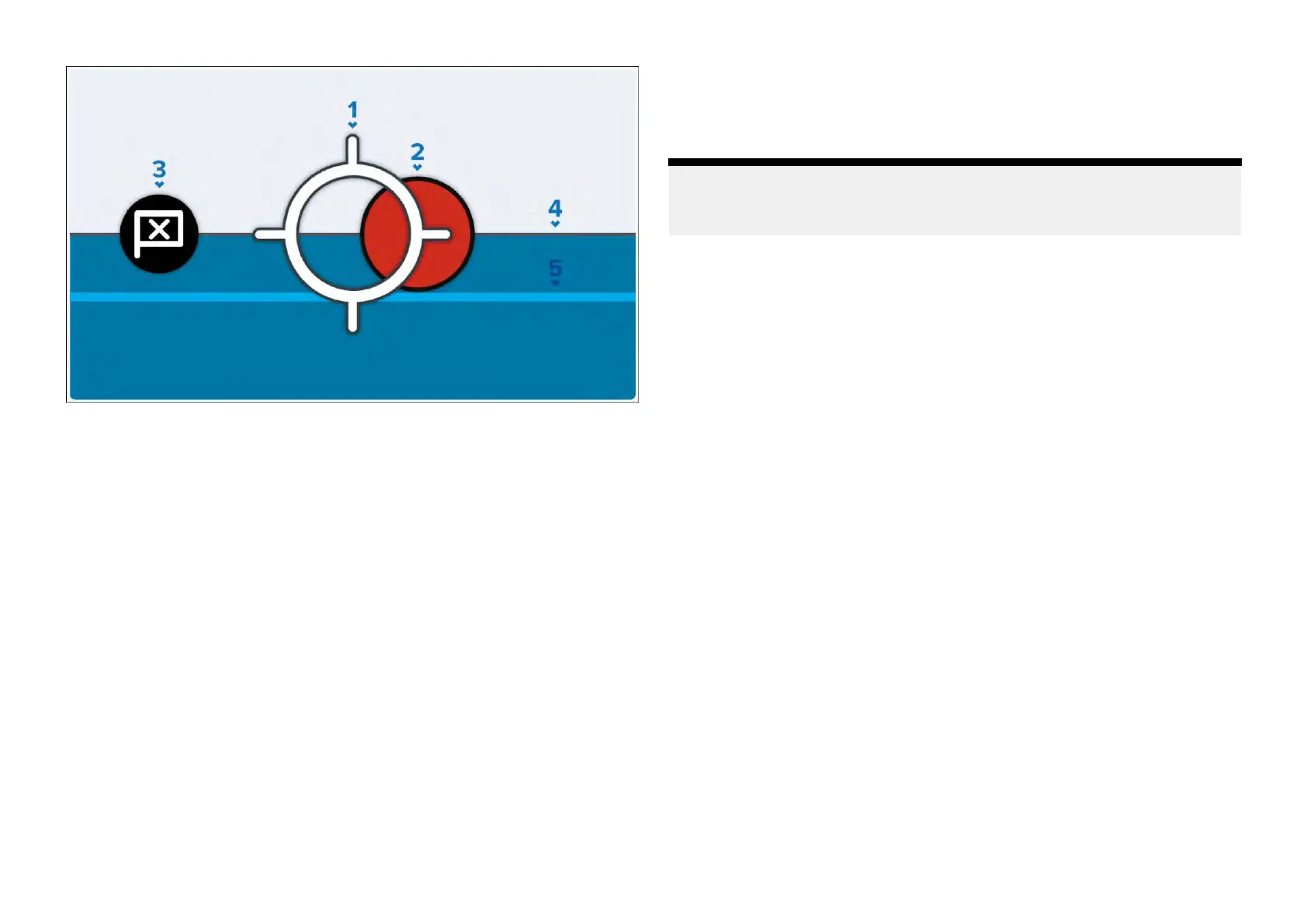
1.Headingcrosshair—Y ourboat’sheadingisrepresentedbyacentral
crosshair.Whenamarkeriswithinthecrosshair,theboatisconsidered
tobeontargettoachievethebestupwindanddownwindVelocity
MadeGood(VMG)/waypointCourse-to-Steer(CTS),accordingto
yourmultifunctiondisplay/chartplotter’s[FixedAngles]/[Polar]layline
configuration.Formoreinformation,refertothe“Chartapp–racing
mode”chapterintheLightHouse™4AdvancedOperationInstructions
(81406).
2.Steeringmarker—Indicatestheoptimumport(redmarkerisillustrated)
orstarboard(greenmarker)tacksteeringangle(upwindanddownwind).
3.Waypointmarker—IndicatestheoptimumwaypointCourse-to-Steer
(CTS).
4.Targetspeed—Targetpolarboatspeedforthecurrentwindspeed
andangle.
5.Polarperformance—Currentpolarboatperformance.
SailPointwidgetoptions
Y oucantap-holdawidgetandselect[...]todisplayadditionalwidgetoptions
whicharespecifictotheselectedwidgettype.
Thefollowingwidgetoptionsareavailable:
•[Editdata]—replacestheselectedwidgetwithanotherchosenfromthe
[Selectdatacategory]sub-menus.Thenewwidgetwilladoptthesame
positionanddimensionsasthepreviouswidget.
•[Delete]—deletestheselectedwidget.
Note:
Formoreinformationonhowtoedityourwidgets,refertothefollowing
section:p.32—Widgetcustomization
6.4Dataitemandwidgetoverview
Networkdatasharedfromyourconnectedmultifunctiondisplay/chartplotter
canbeshownasdifferentcustomizablewidgetsonyourperformancedisplay
.
Whenaddingdatatoyourperformancedisplay,eachdataitem(and
correspondingwidgettypeavailable)isorganizedintoadatacategory.
Thefollowingsectionwilloutlineeverydataitemandcustomizablewidget
typethatisavailableundereachdatacategory.
•p.42—Batterydata
•p.42—Boatdata
•p.42—Depthdata
•p.42—Distancedata
•p.43—Enginedata
•p.44—Environmentdata
•p.44—Fueldata
•p.45—GPSdata
•p.45—Generatordata
•p.46—Headingdata
•p.47—Insideenvironmentdata
•p.47—Navigationdata
•p.48—Pilotdata
•p.48—Speeddata
•p.49—Timedata
•p.49—Watertankdata
•p.50—Winddata
Widgetcreationandcustomization
41







 To Next Page