Enginecombogaugewidgetoptions
Y
oucantap-holdawidgetandselect[...]todisplayadditionalwidgetoptions
whicharespecifictotheselectedwidgettype.
Thefollowingwidgetoptionsareavailable:
•[Editdata]—replacestheselectedwidgetwithanotherchosenfromthe
[Selectdatacategory]sub-menus.Thenewwidgetwilladoptthesame
positionanddimensionsasthepreviouswidget.
•[Delete]—deletestheselectedwidget.
•[Showbackground]—togglestheselectedwidget’sbackgroundeither
[On](todisplayashadedbackground)or[Off](todisplaynoshaded
background).
Note:
Formoreinformationonhowtoedityourwidgets,refertothefollowing
section:p .32—Widgetcustomization
S tandardcompass
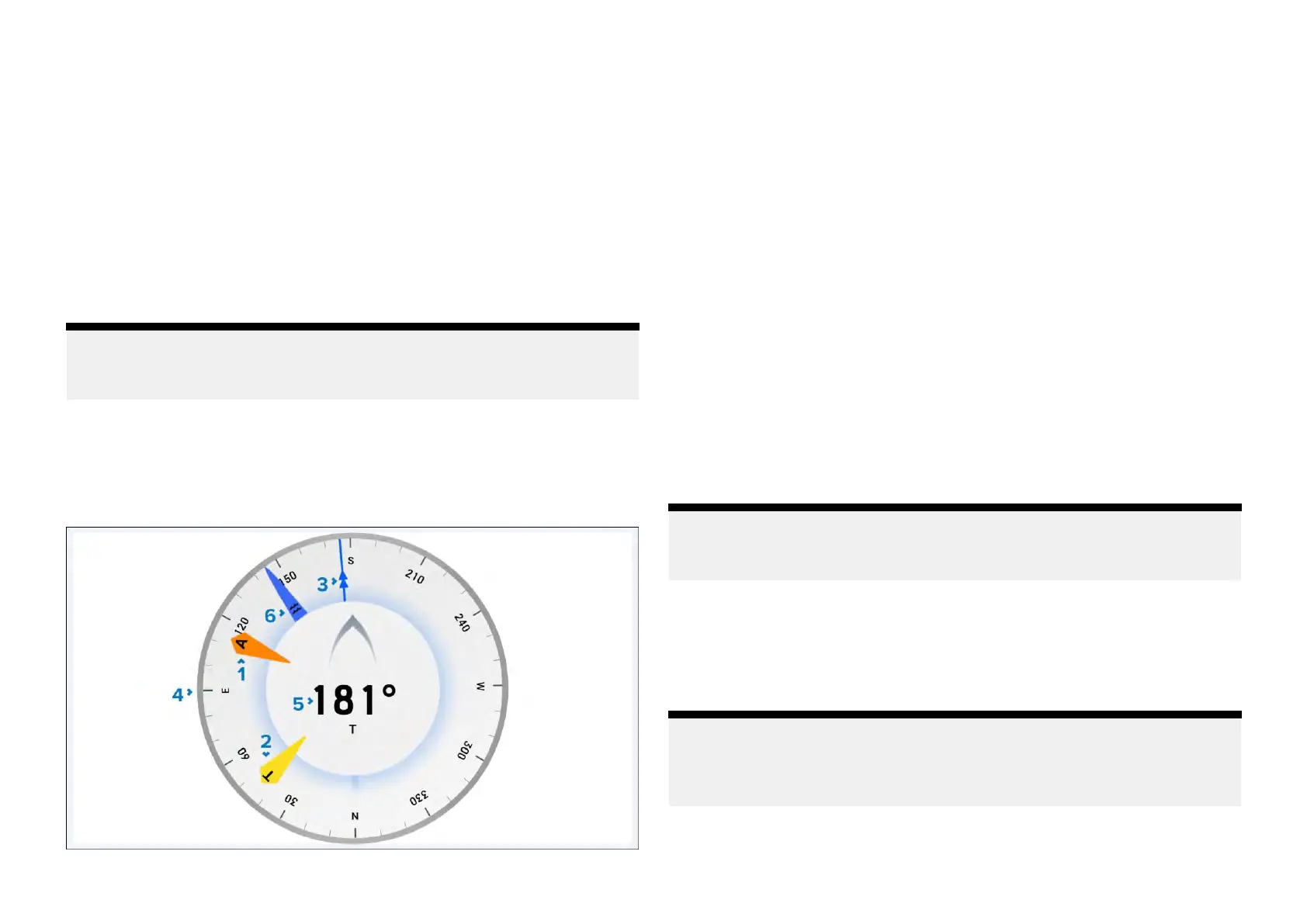
The[Standardcompass]widgetcombinesadynamicgraphicalvessel
headinggaugewithtidedirection,AWD,TWDandCOGindicators.
Example:Standardcompass
1.A
WDindicator—ApparentWindDirection.
2.TWDindicator—TrueWindDirection.
3.COGindicator—CourseOverGround.
4.Compassdial—Thecompassdialwillrotatetoprovideindicationof
heading.
5.Heading—Vesselheading.
6.Tideindicator—Tidedirection.
Standardcompasswidgetoptions
Y oucantap-holdawidgetandselect[...]todisplayadditionalwidgetoptions
whicharespecifictotheselectedwidgettype.
Thefollowingwidgetoptionsareavailable:
•[Editdata]—replacestheselectedwidgetwithanotherchosenfromthe
[Selectdatacategory]sub-menus.Thenewwidgetwilladoptthesame
positionanddimensionsasthepreviouswidget.
•[Delete]—deletestheselectedwidget.
•[Showbackground]—togglestheselectedwidget’sbackgroundeither
[On](todisplayashadedbackground)or[Off](todisplaynoshaded
background).
Note:
Formoreinformationonhowtoedityourwidgets,refertothefollowing
section:p.32—Widgetcustomization
3Dcompasswidget
The[3Dcompass]widgetoptionprovidesadigitalviewofawetcompass
whichrespondsdynamicallytoyourboat’smagneticheadingandmovement.
The[3Dcompass]widgetcanbefurthercustomizedtosuityourpreference.
Note:
Amaximumof2[3Dcompass]widgetscanbecreatedperperformance
display.Ifathird[3Dcompass]widgetiscreated,a[Cannotaddwidget]
pop-upwillappear.
Example:3Dcompasswidget
38







 To Next Page