7
.3AlphaSeriessidebaroperations
(LightHouse™4MFD)
SomeAlphadisplayfunctionscanbeinvokedremotelywhenusinga
Raymarine®LightHouse™4(version4.5orlater)multifunctiondisplay/
chartplotterconnectedtothesamenetworkasyourAlphadisplay(s).These
functionsaresplitbetweeneitherthemultifunctiondisplay/chartplotter’s
[Network]page(forconfiguration-basedoptions)and[Sidebar]menu(for
featuresoftenrequiredwhilstsailing).
Whenviewinganapplicationonyourmultifunctiondisplay/chartplotter,you
canswipefromtheleftedgeofthescreentodisplaythe[Sidebar]menu.
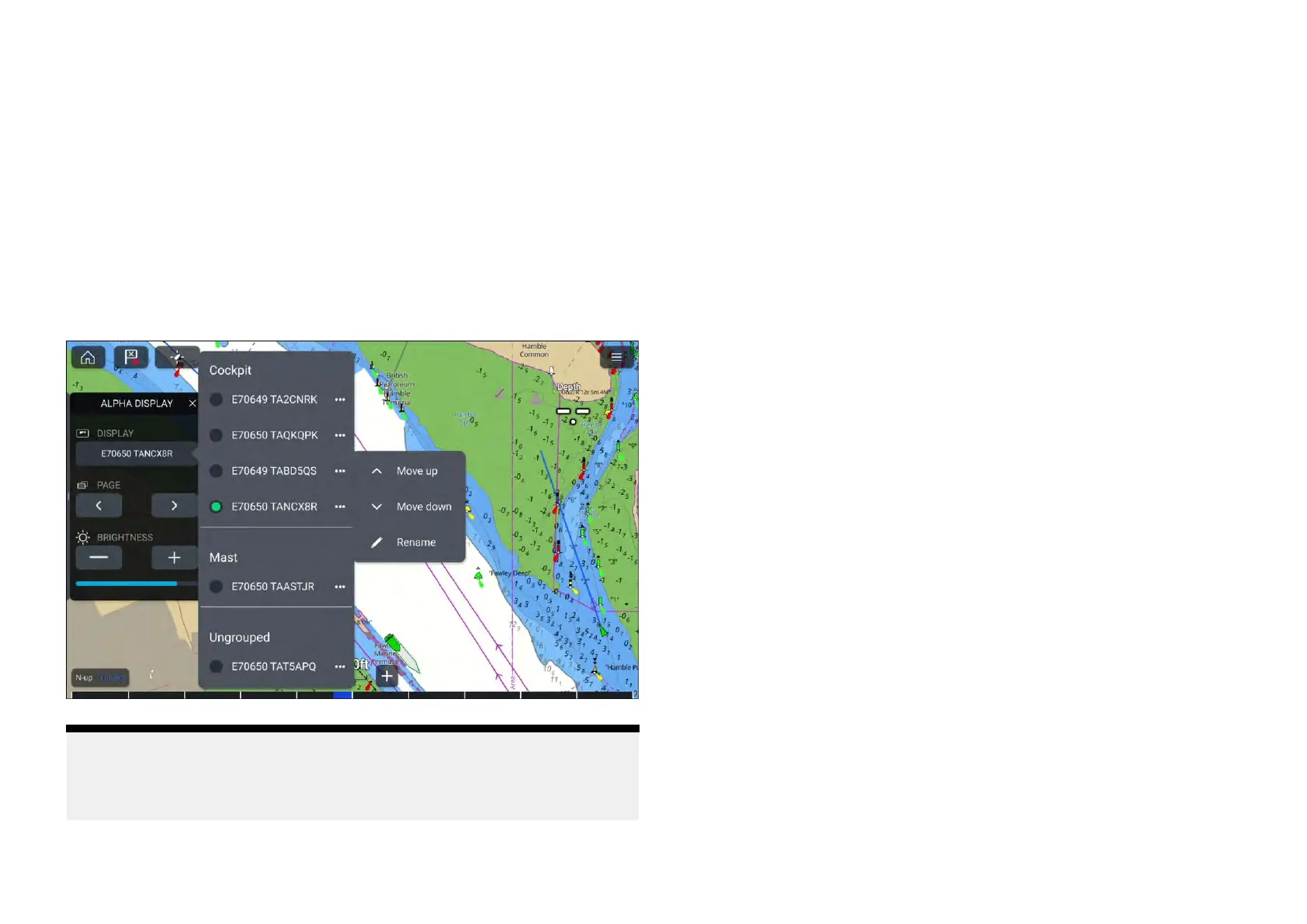
Fromthere,select[Alphadisplay]inordertoinvokethefollowingfunctions
remotely:
Note:
The[Display]optionanditsavailablesub-optionsareonlyavailableifmore
thanoneAlphaSeriesdisplayisnetwork edtothesamesystemasyour
multifunctiondisplay/chartplotter.
•[Display]—Indicatesthecurrentperformancedisplaythatisbeing
operatedviathe[Sidebar]menu.Adifferentperformancedisplaycanbe
operatedbyselectingthe[Display]optionandchoosingadifferentdisplay
fromthelistshown.EachAlphaSeriesdisplayissortedaccordingtothe
displaygroupthatithasbeenassignedto
.
–[...]—Opensamenuwithadditionaloptions:
♦[Rename]—Displaysanonscreenkeyboardwhichcanbeusedtoedit
theselectedAlphadisplay’sname.
♦[Moveup]—MovestheselectedAlphadisplayupwithinthelistby
oneposition,ifmultipleAlphadisplaysareavailable.Thisoptionis
disabledifyourAlphadisplayhasreachedthetopofthedisplaygroup
thatithasbeenassignedto.
♦[Movedown]—MovestheselectedAlphadisplaydownwithinthelist
byoneposition,ifmultipleAlphadisplaysareavailable.Thisoptionis
disabledifyourAlphadisplayhasreachedthebottomofthedisplay
groupthatithasbeenassignedto.
•[Page]—SwitchesbetweentheselectedAlphadisplay’sdatapages.Data
pagescanbecycledthrougheitherusingthe[<]leftoptionor[>]right
option.
•[Brightness]—IncreasesordecreasestheselectedAlphadisplay’sscreen
brightness.Brightnesscanbechangedusingthe[+]increaseoptionor
[–]decreaseoption.Thecurrentscreenbrightnessisindicatedbythe
[Brightnessbar]belowthe[+]and[–]options.
54







 To Next Page