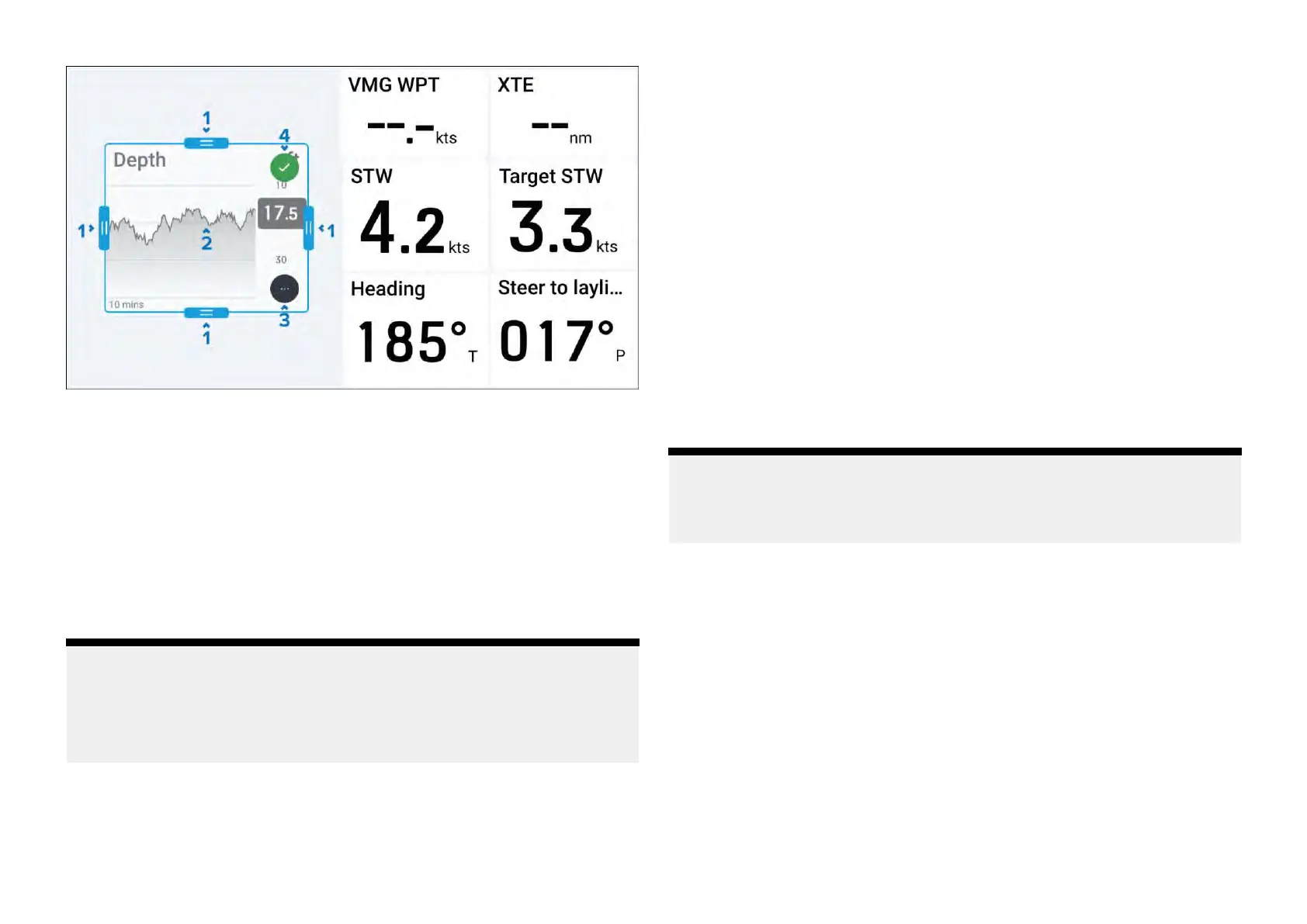
1.[Scalehandle]—T ap,holdanddraginwardoroutwardtoeitherincrease
ordecreasethesizeofyourwidgetinthedirectionofthehandlewhich
youhaveselected.
2.[Movewidget]—Tapandholdinsideyourwidget,thendragthewidget
toanewlocation.
3.[Moreoptions]—Taptoshowmoreoptionsrelatedtothewidgettype
thatyouhaveselected.Formoreinformationoneachofthewidget
typeoptionsavailable,refertotheinformationfoundwithinthefollowing
section:p.33—Widgettypesoverview
4.[Accept]—Taptoconfirmyourchanges.
Note:
•Iftheselectedwidgetisscaledwithinclosepro ximitytoanotherwidget,
itwillautomaticallysnapintoalignment.
•Informationinsideofyourwidgetwillautomaticallyscaletomatchany
dimensionchanges.
6.3Widgettypesoverview
Thefollowingsectionwilloutlinewhichtypesofwidgetsareavailableon
yourperformancedisplay:
1.p
.34—Digitaldatawidgets
2.p.35—Gaugewidgets
3.p.36—Graphwidgets
4.p.36—Levelwidgets
5.p.37—Barwidget
6.p.37—Enginecombogauge
7.p.38—Standardcompass
8.p.38—3Dcompasswidget
9.p.39—Windperformancegauge
10.p.40—SailPoint
Note:
Forinformationonwhichwidgetsaresupportedforeach
ofthedataitemsavailable,refertothefollowingsection:
p.41—Dataitemandwidgetoverview
Widgetcreationandcustomization
33







 To Next Page