Note:
•Whilethenamechangeisbeingappliedthe
Wirelessset-upmenuwillbeunavailable
.
•YourWirelesshandsetwillautomaticallyreconnecttothehubusingthenewname.
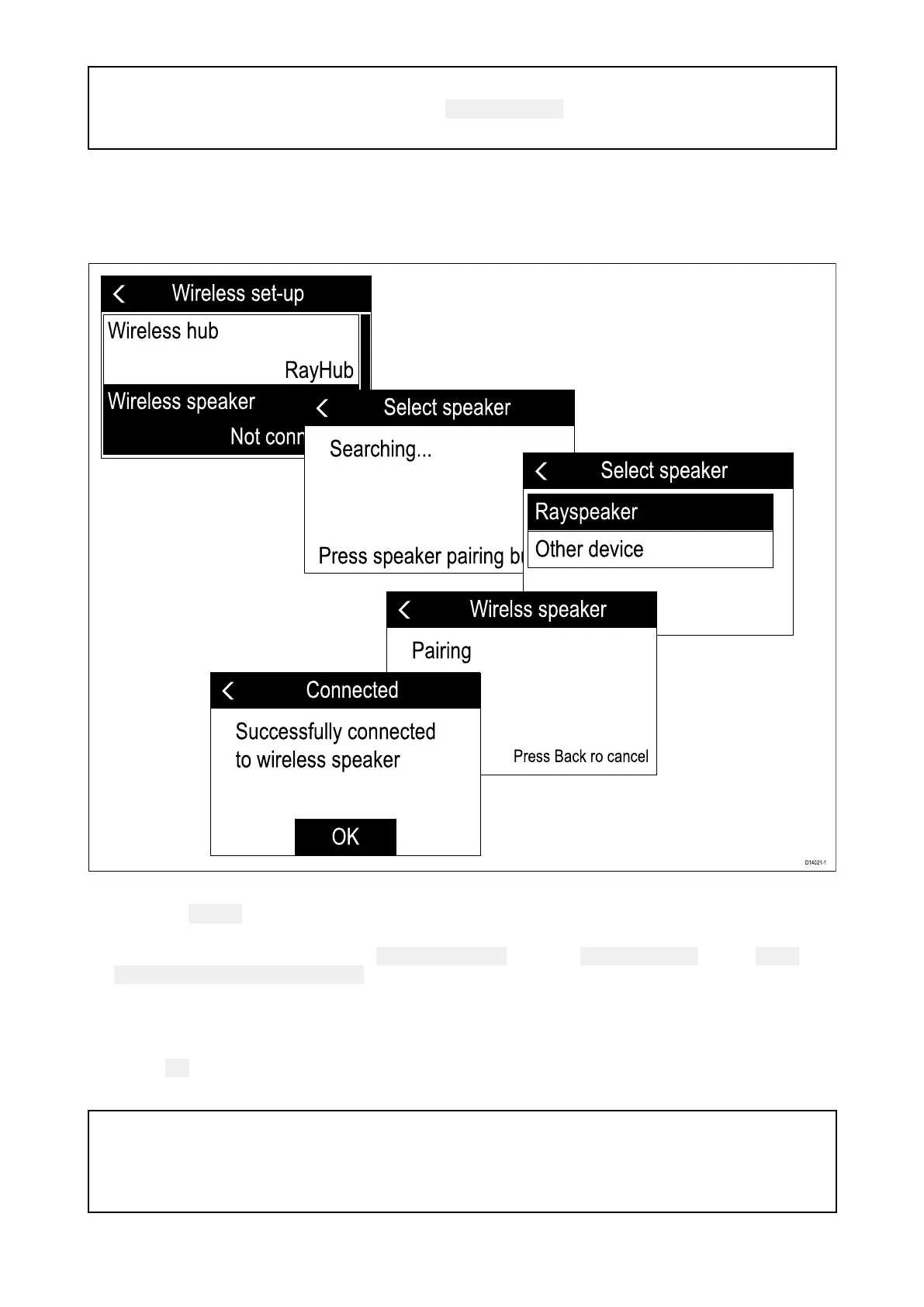
10 .3ConnectingthewirelessspeakertotheWirelesshandset
YoucanconnectaWirelessspeakertoyourWirelesshandset.
1.P owerontheWirelessspeaker.
2.Pressthe
PairingbuttononthefrontofyourWirelessspeakertopairwithaWirelesshandset
forthefirsttime.
3.UsingtheWirelesshandset,select
Wirelessspeakerfromthe Wirelessset-upmenu: Menu
>Maintenance>Wirelessset-up
Thehandsetwillsearchforavailabledevices.
4.SelectyourWirelessspeak
erfromthelist.
TheWirelesshandsetwillnowpairwiththeWirelessspeaker.
5.Select OK.
TheWirelesshandset’saudiowillnowbeheardthroughtheWirelessspeaker.
Note:
•Y oucanonlyoutputaudioto1speakerfromthesamehandset.
•Ifthepairingisunsuccessful,powerthewirelessspeakeroffandthenbackonagainand
repeattheprocess.
Wirelesshandsetstations119



 To Next Page
 Loading...




