6.2Connectingawirelesshandsettothehub
WirelesshandsetsmustbeconnectedtotheradioviaaWirelesshub
.
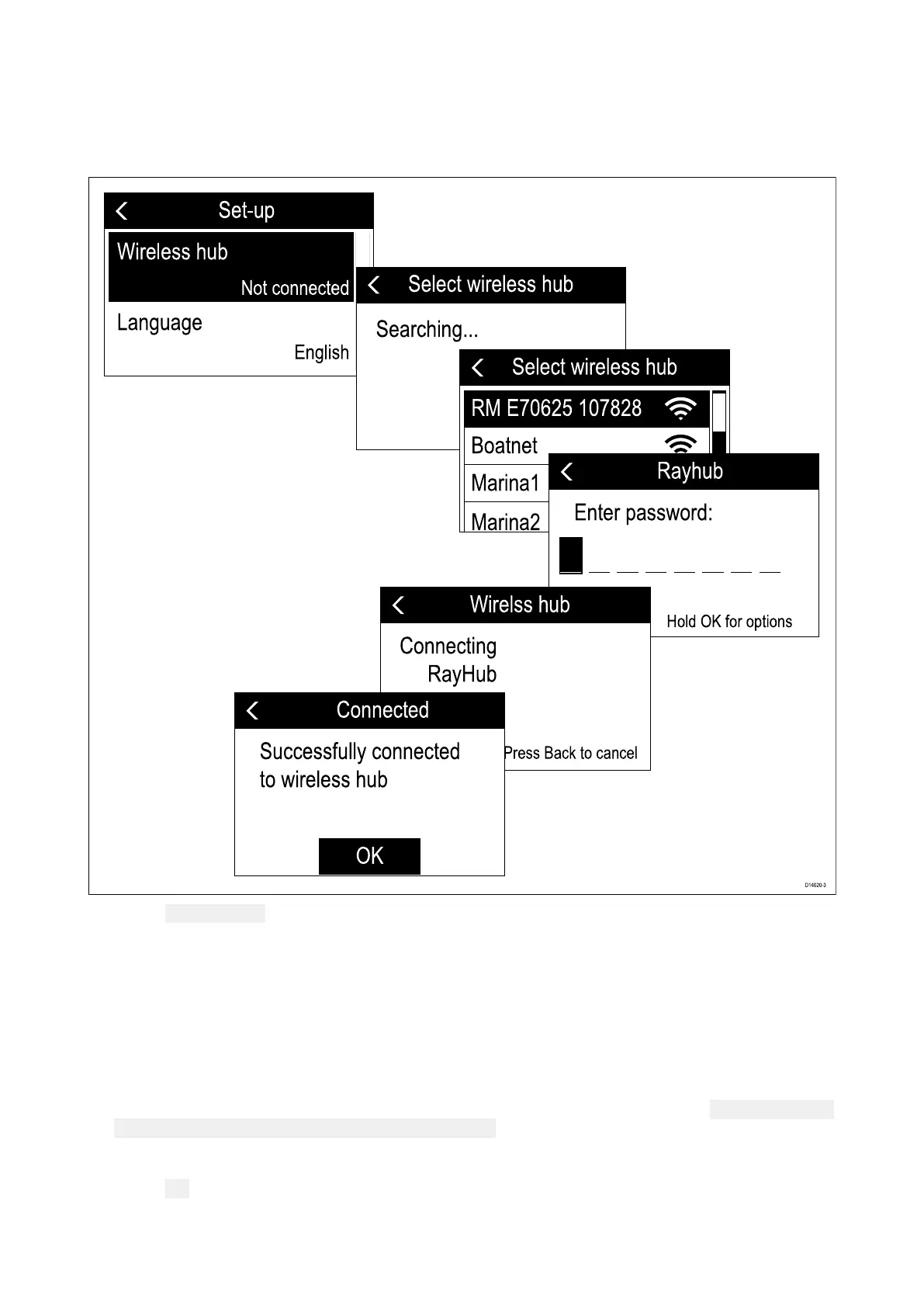
WhentheWirelesshandsetispoweredonforthefirsttimeyouwillneedtoconnectittoaWireless
hub.
1.Select Wirelesshub.
Thehandsetwilldisplayalistofwirelessdevicesinrange.
2.SelectyourWirelesshubfromthelist.
TheWirelesshub’sdefaultnameis‘RM’followedbythe6digitpartnumberand7digitserial
numberoftheradiothattheWirelesshubisconnectedto(e.g.:Radiopartnumber:E70625and
serialnumber:1070828=Hubname:RME70625107828).
3.Enterthepassword.
Y oucanchecktheWirelesshub’spasswordusingaWiredhandsetbyselecting: Menu>Set-up>
Wirelessset-up>Wirelesshubset-up>Password.
ThehandsetwillnowconnecttotheWirelesshub.
4.Select
OK.
Wirelesshandsetstations85



 To Next Page
 Loading...










