RE 30126-01-B/08.07 | Manual Hydraulics | Bosch Rexroth AG 18/76
Application: Valve control for the 4WRE6 / 4WRE10 3
3.4 Configure inputs
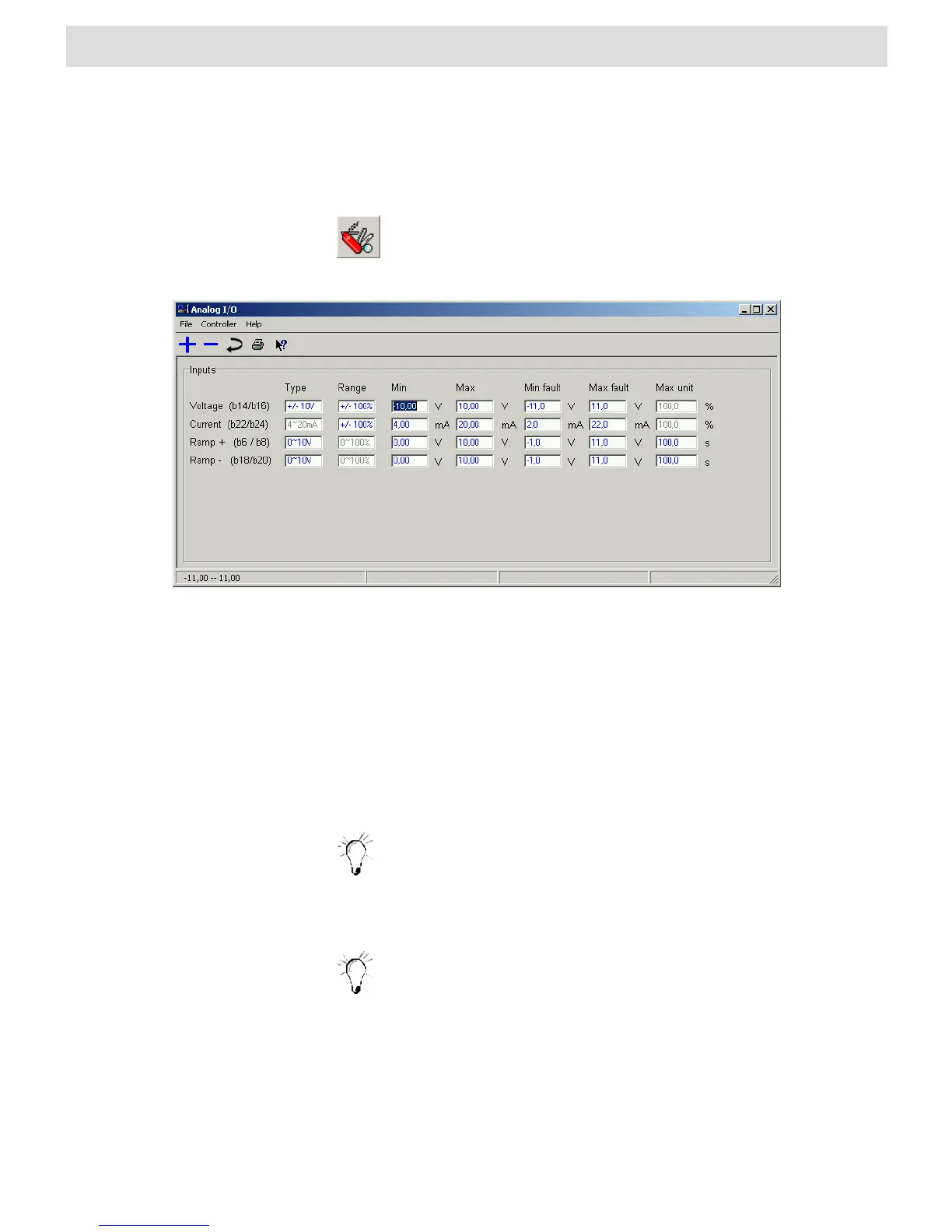
The “Analog I/O” menu is where you configure the analog inputs for your application.
also opens the “Analog I/O” window. A list of existing shortcuts for the
toolbar can be found in Section 4.2 “BODAC Toolbar”.
Fig. 6 “Analog I/O" window
The File menu in the “Analog I/O” window corresponds to the BODAC main window
“File menu”.
Contains commands for reading, writing and modifying parameters.
Takes you directly to the help for the current topic, or to the contents page of the
BODAC windows help.
NOTES:
Note that set external command values are added to the internal
command values of the profiles. If the external command value is
turned off, only the parameterized internal set point always remains as
the input for the controller.
The analog inputs are all differential inputs.
Note:
If the differential inputs are used both connections of the differential
input have to be switched ON or OFF simultaneously.
Contacts used for this have to be suitable for currents< 1mA.
Voltage (b14/b16)
Here the range for the external setpoint (Voltage input b14/b16) is defined.


 To Next Page