RE 30126-01-B/08.07 | Manual Hydraulics | Bosch Rexroth AG 26/76
Application: Valve control for the 4WRE6 / 4WRE10 3
3.6 Valve configuration
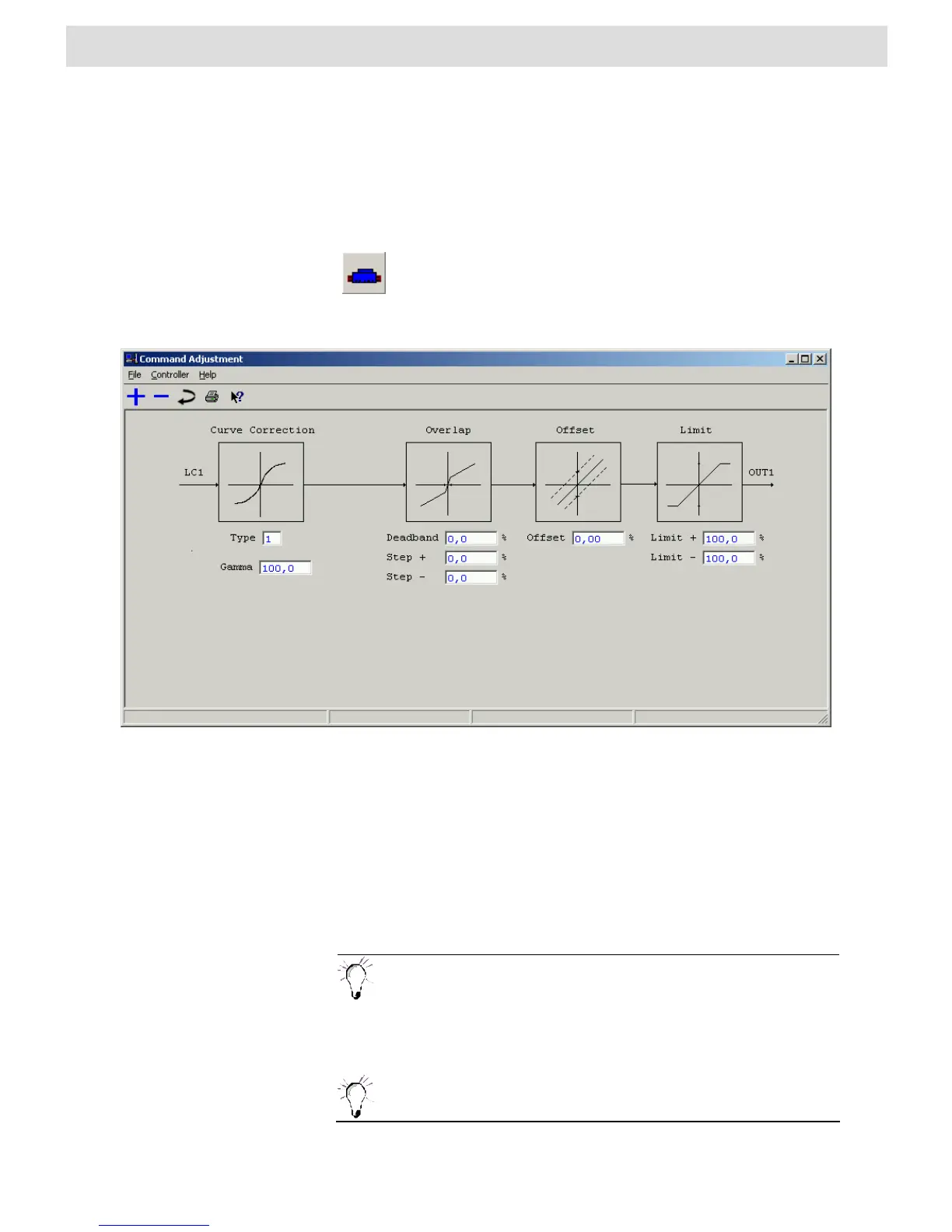
Command Adjustment
In this window the controller can be optimized to the applied valve by adjusting the
command for the characteristic properties of this valve.
Clicking on the preceding icon, which is a component of the toolbar
also opens the “Command Adjustment“ window. A list of existing
shortcuts for the toolbar can be found in Section 4.2 „BODAC Toolbar“.
Fig. 10 „Command Adjustment“ window
The File menu in the „Command Adjustment“ window corresponds to the BODAC
main window „File menu“.
Contains commands for reading, writing and changing parameters.
Takes you directly to the help function for the current topic, or to the contents page of
BODAC windows help.
NOTES:
You can adapt the controller setting to the releva
nt valve by selecting the
valve in the “Structure“ window. Please note also that the valve
parameters shown are only updated after you transmitted the valve
selection (i.e. the valve selection is displayed in blue).
In the offline mode, always the same standard parameter set is
displayed. If you wish to view the parameter set of the selected valve,
you have to be online.



 To Next Page