RE 30126-01-B/08.07 | Manual Hydraulics | Bosch Rexroth AG 21/76
Application: Valve control for the 4WRE6 / 4WRE10 3
3.5 Configure Profile
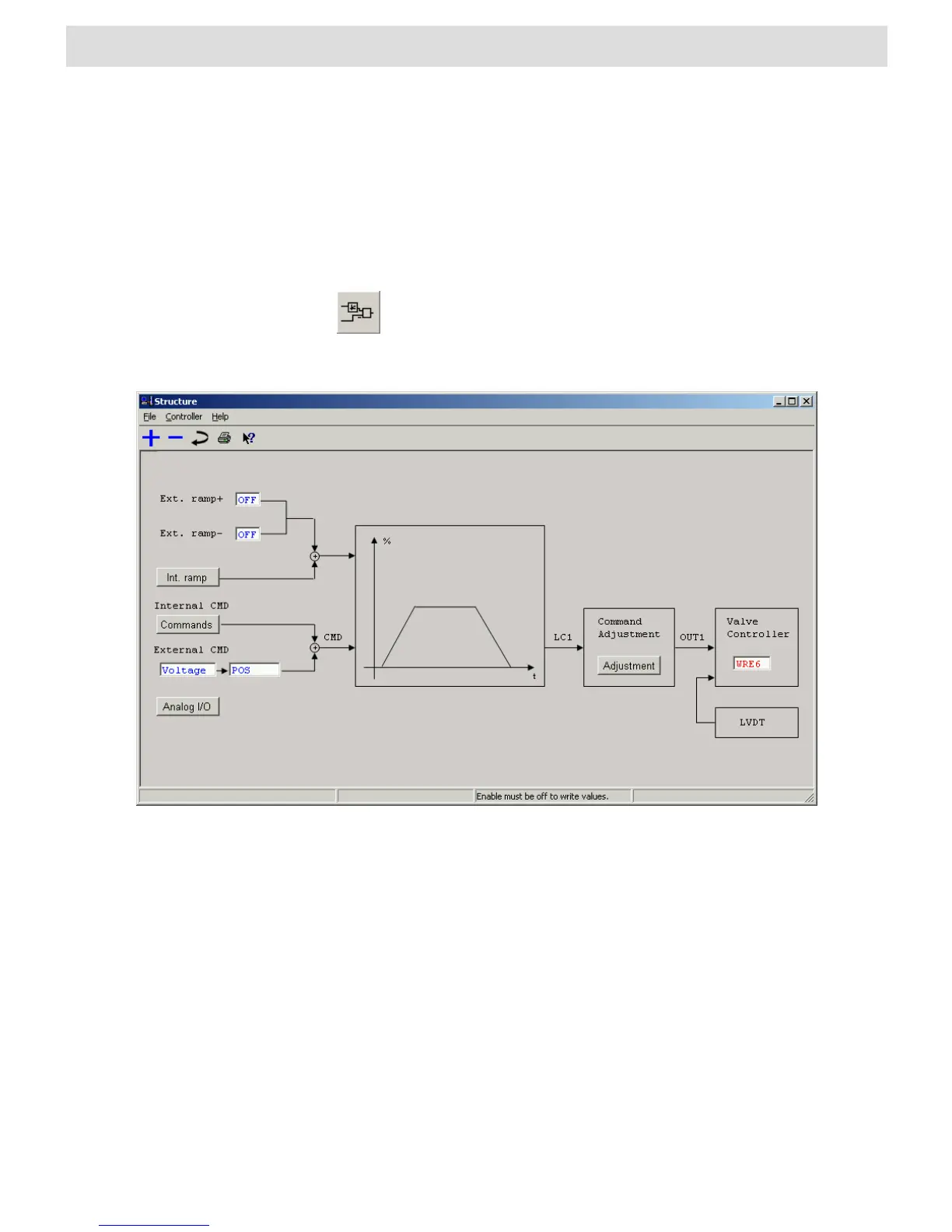
Configure Strucure
This window is used to configure which inputs and/or components are going to be
active.
Clicking on the preceding icon, which is part of the toolbar, also opens
the window „Structure“. A list of existing icons for the toolbar can be
found in section 4.2 „BODAC Toolbar“.
Fig. 7 „Struc ture“ window
The File menu in the “Structure” window corresponds to the BODAC main window
“File menu”.
Contains commands for reading, writing and modifying parameters.
Takes you directly to help for the current topic, or to the contents page of the BODAC
windows help.
Activates / De-activates the positive external Ramp.
Activates / De-activates the negative external Ramp.
Here the user can select the external setpoint (Voltage, Current or OFF) and polarity.
The valve to be controlled with this card has to be selected in this window. Choosing a
valve defines the default values for the valve parameters.


 To Next Page