Clicking on the preceding icon, which is a component of the toolbar,
also opens the “Command values” window. A list of existing shortcuts
for the toolbar can be found in Section 4.2 “BODAC Toolbar”.
See also: Section 3.4 “Configure profiles”.
Digital I/O
Opens the window „Digital I/O“.
Clicking on the preceding symbol, which is a component of the
toolbar, also opens the „Digital I/O“ window. A list of existing
shortcuts for the toolbar can be found in Section 4.2 „BODAC
Toolbar“.
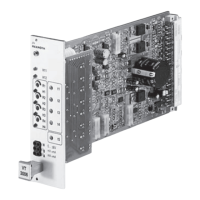
Fig. 44 Window „Digital I/O“
Defines under what conditions the Digital Outputs are set. DO1 – DO3 conditions are
pre-defined and can not be changed. DO4 – DO6 can be configured as follows:
n OFF
The Digital Output is not active.
n LVDT>=WINDOW
The actual value exceeds or is equal to a set value (WINDOW).
n LVDT<=WINDOW
The actual value is less than or equal to a set value (WINDOW).
n Ramp done
The Ramp is done.
n Fault Analog Inputs
A fault concerning the analog inputs has been detected. If the user wants to use
this condition to set an output the response of this fault has to be set to “Flag” in
the “Fault” window. For detailed information on configuring the “Fault” window
please see also Section 3.5 „Configure Profile”
Outputs


 To Next Page