RE 30126-01-B/08.07 | Manual Hydraulics | Bosch Rexroth AG 53/76
BODAC – Menu Description 5
5.5 Tools menu
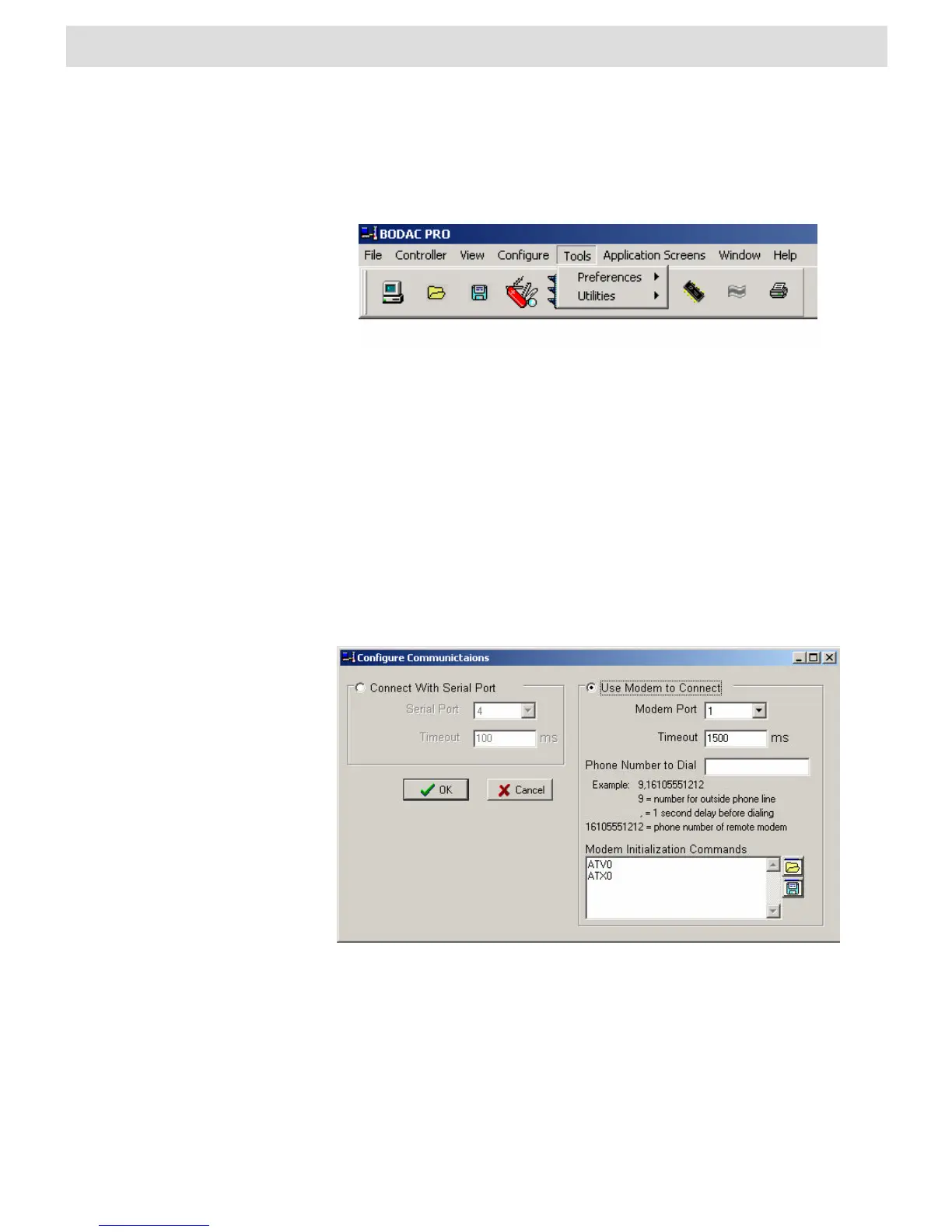
In the “Tools” menu you adjust the settings of the BODAC program for communication
with the card to your special needs.
Fig. 31 “Tools” menu
In the submenu “Preferences” you change the parameters for the communications
interface between PC and controller card, the access rights and the behavior for data
synchronization with the card. The submenu “Utilities” contains update functions and a
function for resetting the card to its default settings.
Preferences
Com
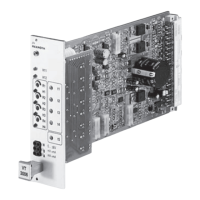
The “COM“ window is the dialog window for configuring the serial port.
Fig. 32 “Com” window
Select the radio button “Connect with Serial Port” if you want to connect with the PC to
the VT-VRPD using the Serial Port connection.
With the “Serial Port“ entry field the user specifies which serial port of the PC is used
to communicate with the controller card.
The “Timeout“ field is the delay for “Cable break” detection by BODAC. This value can
be changed in Security Level 2.


 To Next Page