RE 30126-01-B/08.07 | Manual Hydraulics | Bosch Rexroth AG 42/76
BODAC – Menu Description 5
Clicking on the “Print” button takes you to the standard “Print” window of Windows.
Information about the Print window can be found in your Windows online help.
Quit
Closes all currently opened windows and quits the BODAC program.
5.2 Controller menu
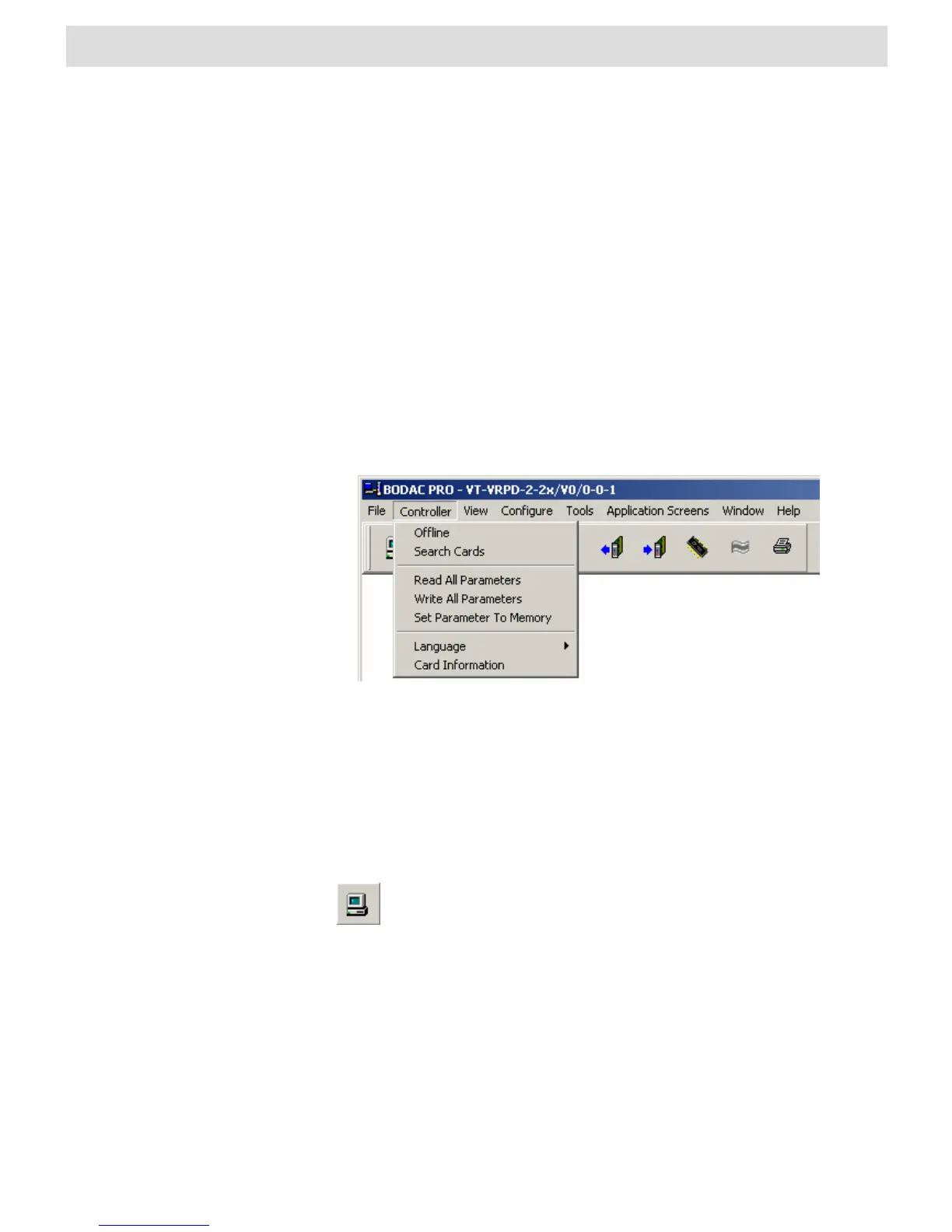
The “Controller” menu contains commands for direct communication with the card.
These commands are used to send or receive data to and from the card.
Fig. 21 “Controller” menu
Offline
Closes the connection to the card. The “Offline” command is only selectable if there is
an active connection to the controller card.
also generates the “Offline” command. The symbol is only visible if
there is no currently active connection to the card. A list of existing
shortcuts for the toolbar can be found in Section 4.2 “BODAC Toolbar”.
Connect
Opens the connection between BODAC and the VRPD. The “Connect” command is
only selectable if there is no active connection to the card.


 To Next Page