RE 30126-01-B/08.07 | Manual Hydraulics | Bosch Rexroth AG 67/76
BODAC – Menu Description 5
The Data Log symbol in the toolbar generates a file with the extension
“.log” in which all motion data are stored.
Clicking on the preceding icon, which is part of the toolbar also opens
the "WinView recording“ window.
Creating a log-file
To create a log-file in table form of all the signals in the „Motion Data“ window for a
certain amount of time the following needs to be done:
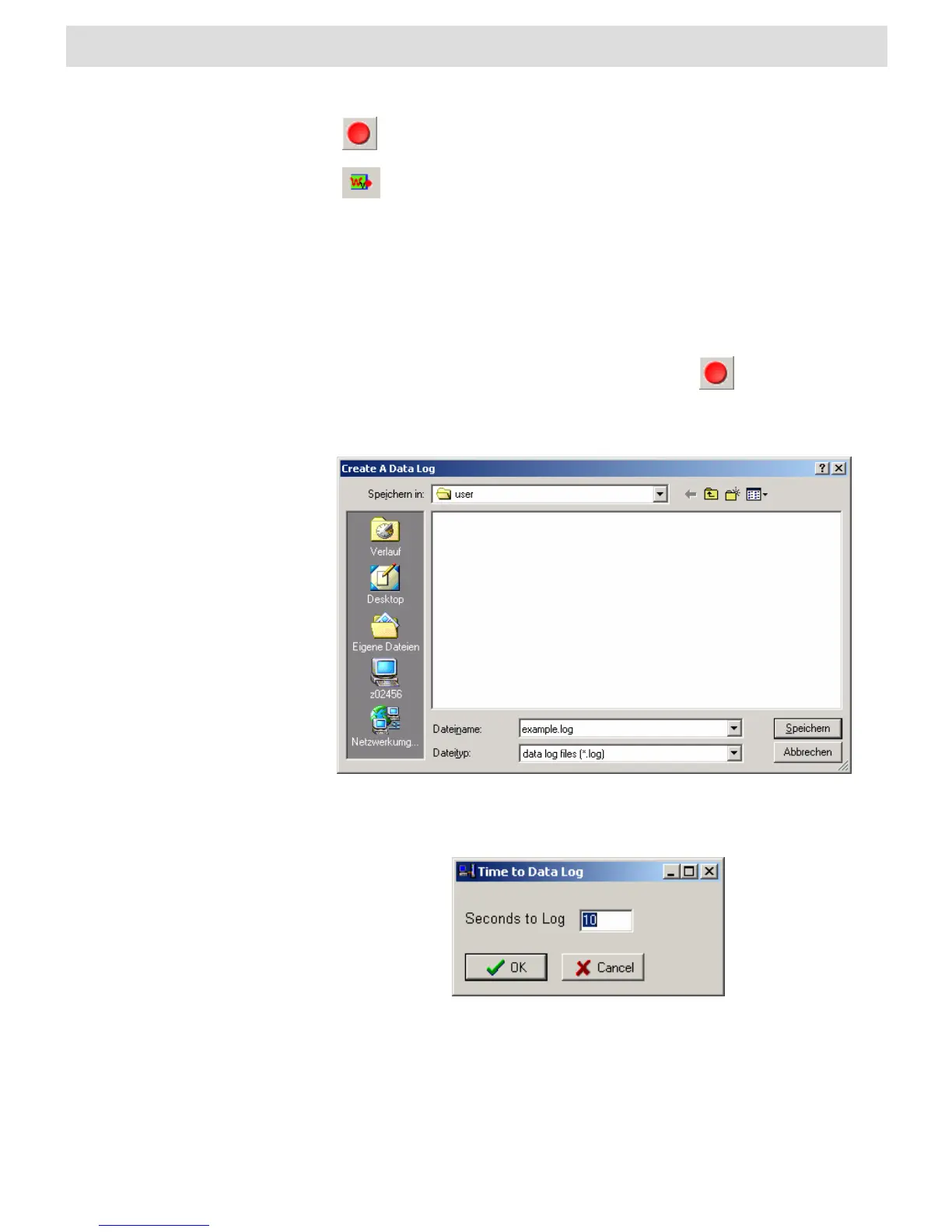
Ø Click on the Data Log icon.
Ø This will open an explorer window in which the user has to specify the file-path
and the filename of the log-file. Confirm the selection by clicking on „Save“.
Ø A window will appear that will ask fort he duration of the logging. Please enter the
log-time in seconds.
Ø After confirmation by clicking the OK button the window will close. On the right
side in the status bar of the “Motion Data” window the progress of the logging
activity can be monitored.


 To Next Page