RE 30126-01-B/08.07 | Manual Hydraulics | Bosch Rexroth AG 49/76
BODAC – Menu Description 5
5.4 Configuration menu
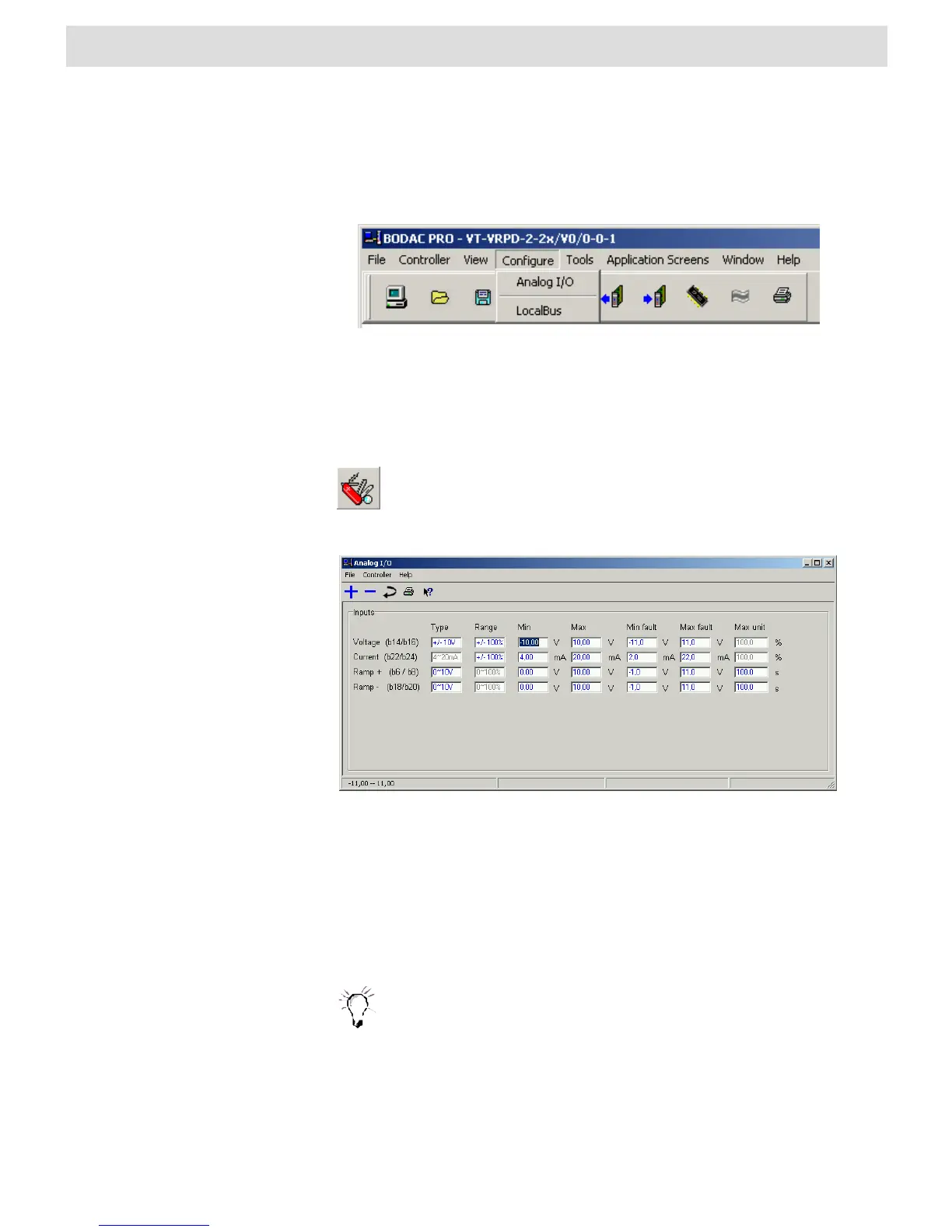
The “Configuration” menu contains the “Analog I/O” command which you use to open
the window for configuring the analog inputs of the controller card.
Fig. 27 “Configuration” menu
Analog I/O
The “Analog I/O” window is where you make the settings for all analog inputs on the
card.
Clicking on the preceding icon, which is a component of the toolbar,
also opens the “Analog I/O” window. A list of existing shortcuts for the
toolbar can be found in Section 4.2 “BODAC Toolbar”.
Fig. 27 “Analog I/O" window
“Inputs” field
The first column in the Inputs field lists the names of the analog inputs.
In the following columns the parameter values for the analog input signals are
specified.
The Voltage input (b14/b16) can not be configured as Current.
The Current input (b24/b26) can not be configured as Voltage.


 To Next Page