also generates the “Connect” command. The symbol is only visible if
there is no currently active connection to the card. A list of existing
shortcuts for the toolbar can be found in Section 4.2 “BODAC Toolbar”.
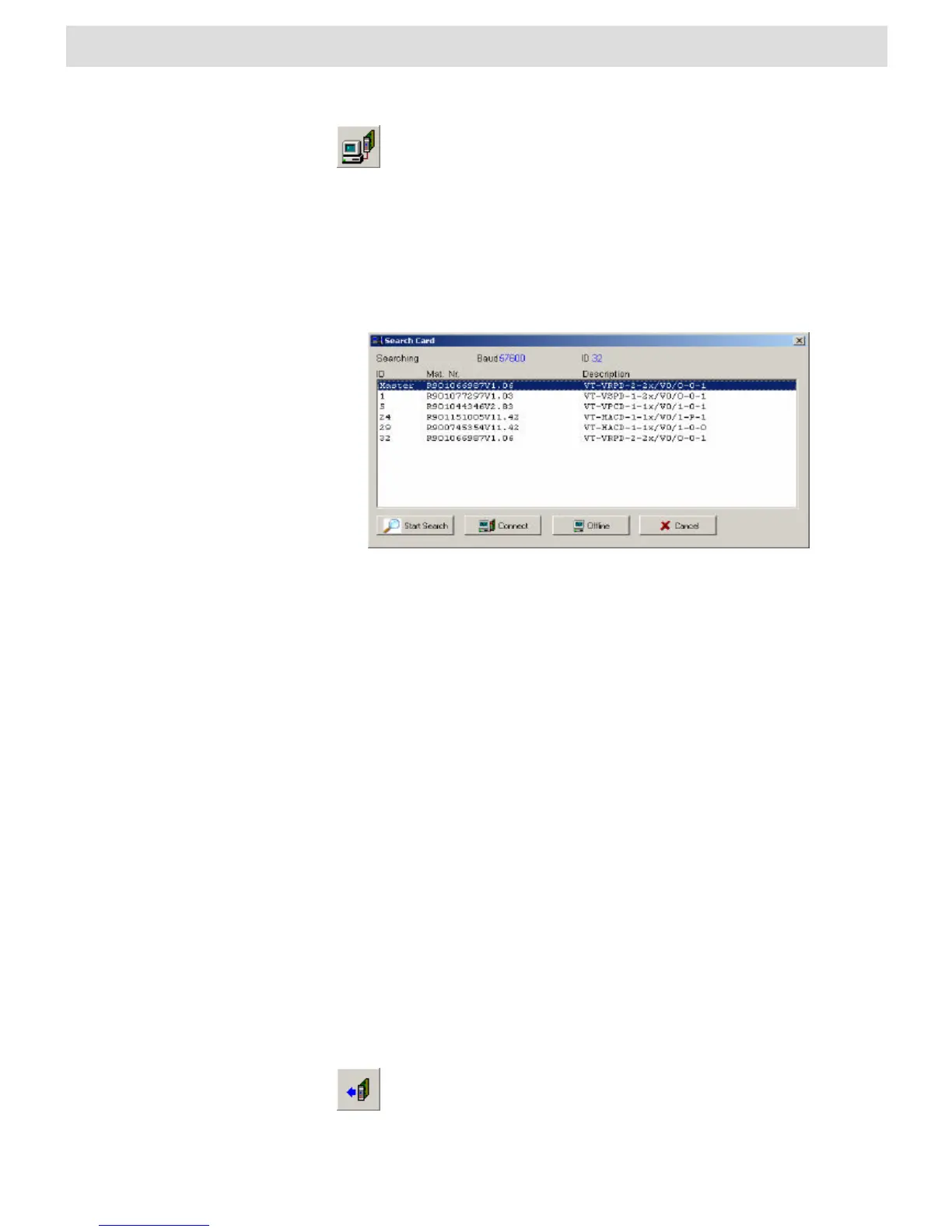
Search Card
The command “Search Card” opens the window “Search Card”, searches for active
cards on the local bus and lists them in a tabular form.
Fig. 22 Window “Search Cards“
Cards are searched for on the local bus.
Bodac connects to the selected card.
Bodac changes over to the offline mode and closes the connection with the active
card.
The search for cards is interrupted, and Bodac maintains the connection with the
active card.
In the first column “ID“ the bus address of the card is shown. The master bus address
is not listed, but must differ from the bus addresses of other cards.
The second column “Mat. Nr.“ includes the material number of the card and the
version number of the configuration. (see “Card Information“).
The third column “Description“ shows the text presented on the display. This text can
be changed in the window “Card Information“.
Read parameters
The “Read parameters” command reads the data (parameter set) stored in the
working memory of the controller card and passes the set to the BODAC program.
also reads out the data stored in the card and sends them to the
BODAC program. A list of existing shortcuts for the toolbar can be
found in Section 4.2 “BODAC Toolbar”.


 To Next Page