Operation
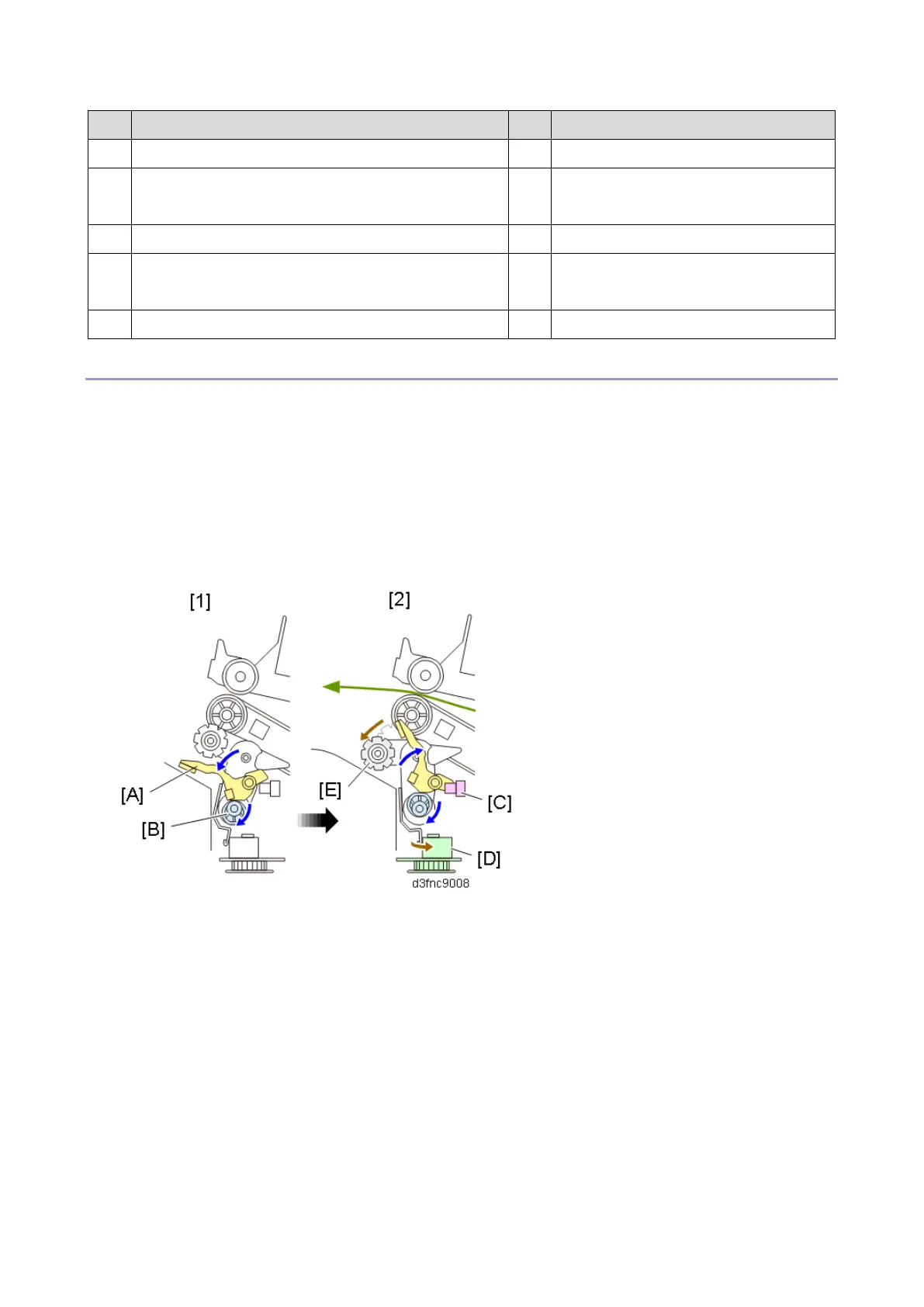
There are five steps in the operation:
1. When a job starts, the Paper Stacking Holder Motor (DCM8) rotates the paper stacking holder cam
[B] to move the paper stacking holder [A] down.
2. The paper stacking holder lift motor [D] rotates the stacking sponge roller cam to move the stacking
sponge roller [E] down. The Paper Stacking Holder Motor (DCM8) rotates the paper stacking
holder cam [B] to lift the paper stacking holder [A] up to its HP (until the paper stacking holder
interrupts the Paper Stacking Holder HP Sensor (S24) [C]).
3. The Paper Stacking Holder Motor (DCM8) drives in reverse to let the stacking sponge roller [A] pull
the output paper in.
4. The Paper Stacking Holder Motor (DCM8) rotates the paper stacking holder cam [C] to drop the



 To Next Page