− 41 −
ME12058B
Maintenance Section
Items Contents Notes
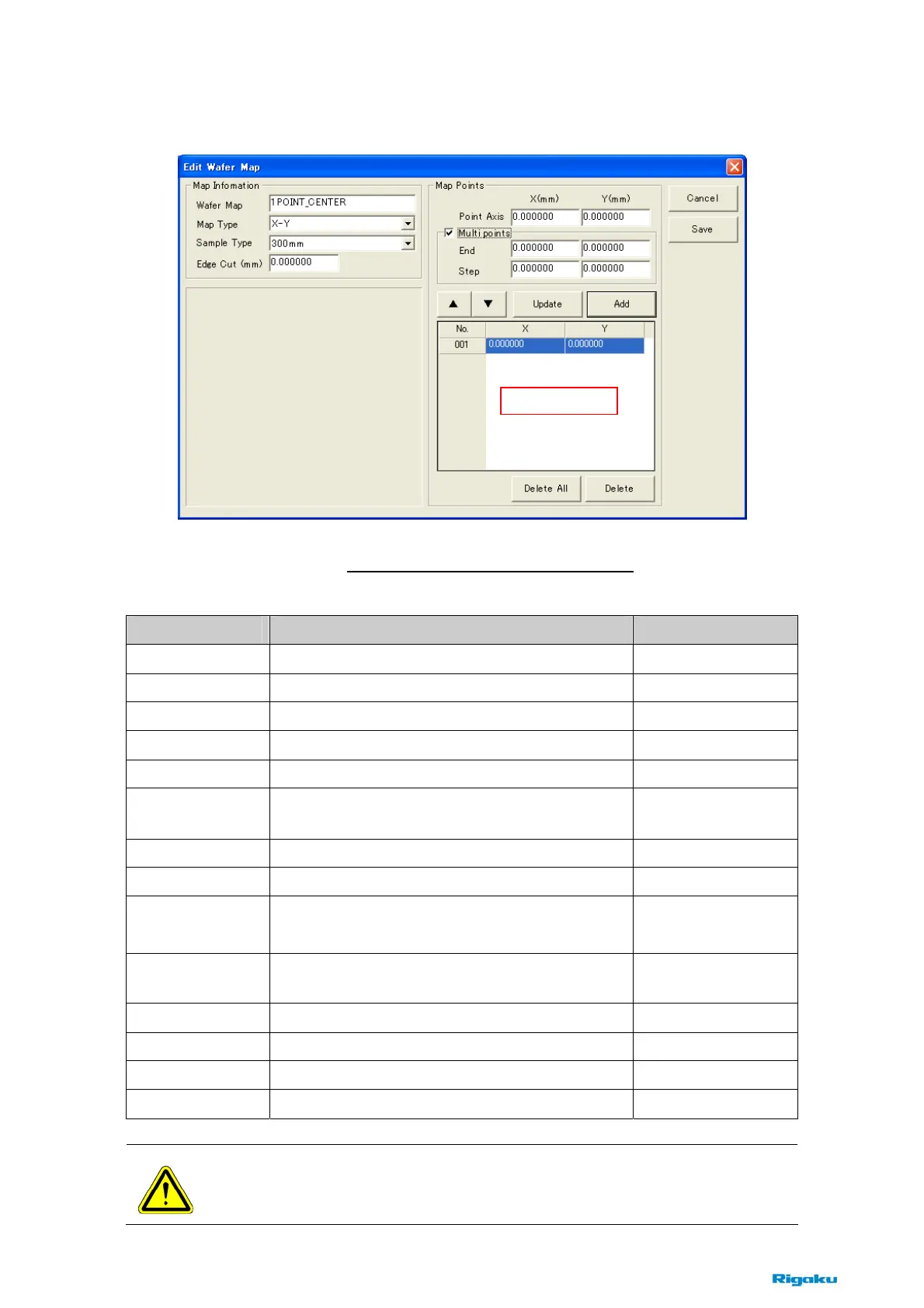
Wafer Map
Enter the name of wafer map recipe.
Map Type
Choose an axis type, X-Y or R-θ
.
Sample Type
Choose wafer size, 300mm or 200mm.
Edge Cut
Enter the edge cut of the wafer.
Point Axis
Enter the axis of measurement point.
Multi Points
Check this box, when specifying regular plural
points.
End
Enter the axis of end point.
Step
Enter the step between [Point Axis] to [End].
▲▼
Move the specified line in the mapping list to upper
or lower side.
▲ : To upper side
▼ : To lower side
Update
Replace the specified line in the mapping list to the
[Point Axis].
Add
Add the specified map points to the mapping list.
Delete All
Delete all contents in the mapping list.
Delete
Delete the specified line in the mapping list.
Save
Save the wafer map recipe.
NOTE : Click the [Save] button, when editing is completed.
If the dialog box is closed without clicking on this button, the recipe is not changed.
Fig. 8-2-8 Edit Wafer Map dialog box
Mapping List



 To Next Page