3.3. SAFETY DEVICE DESCRIPTION
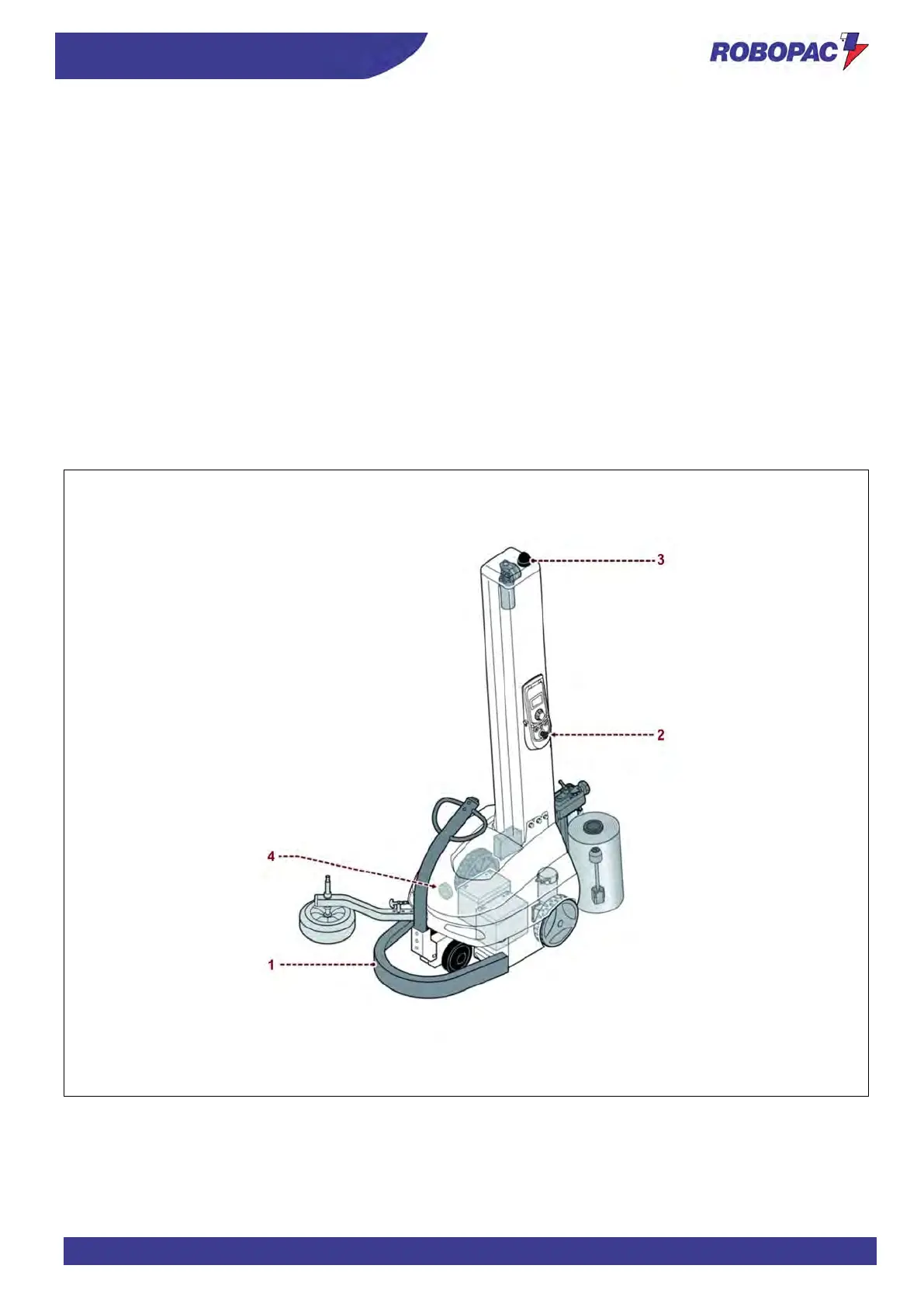
The figure shows the position of the devices on the machine.
1. Safety bumper
in case of collision against an obstacle, it stops the machine run and the wrapping cycle.
To reset the machine, remove the obstacle, cut the film and press the control.
When the spool carriage has reached its starting position, restart the machine to repeat the wrapping.
For further details, see paragraph "Wrapping Start and Stop".
2. Emergency stop button
it is used in case of imminent risk to stop, with a voluntary action, the machine parts which may pose a risk.
The control must stay "locked" until all the normal operating conditions have been restored.
Restore the normal operating conditions, cut the film, unlock the button and press the control to reset the
machine.
When the spool carriage has reached its starting position, restart the machine to repeat the wrapping.
For further details, see paragraph "Wrapping Start and Stop".
3. Light indicator (orange light)
it signals that the machine is running.
4. Acoustic warning
it warns that the wrapping cycle has started.



 To Next Page