7.3.2. MONTHLY CHECK
Perform the check with the machine on but not moving.
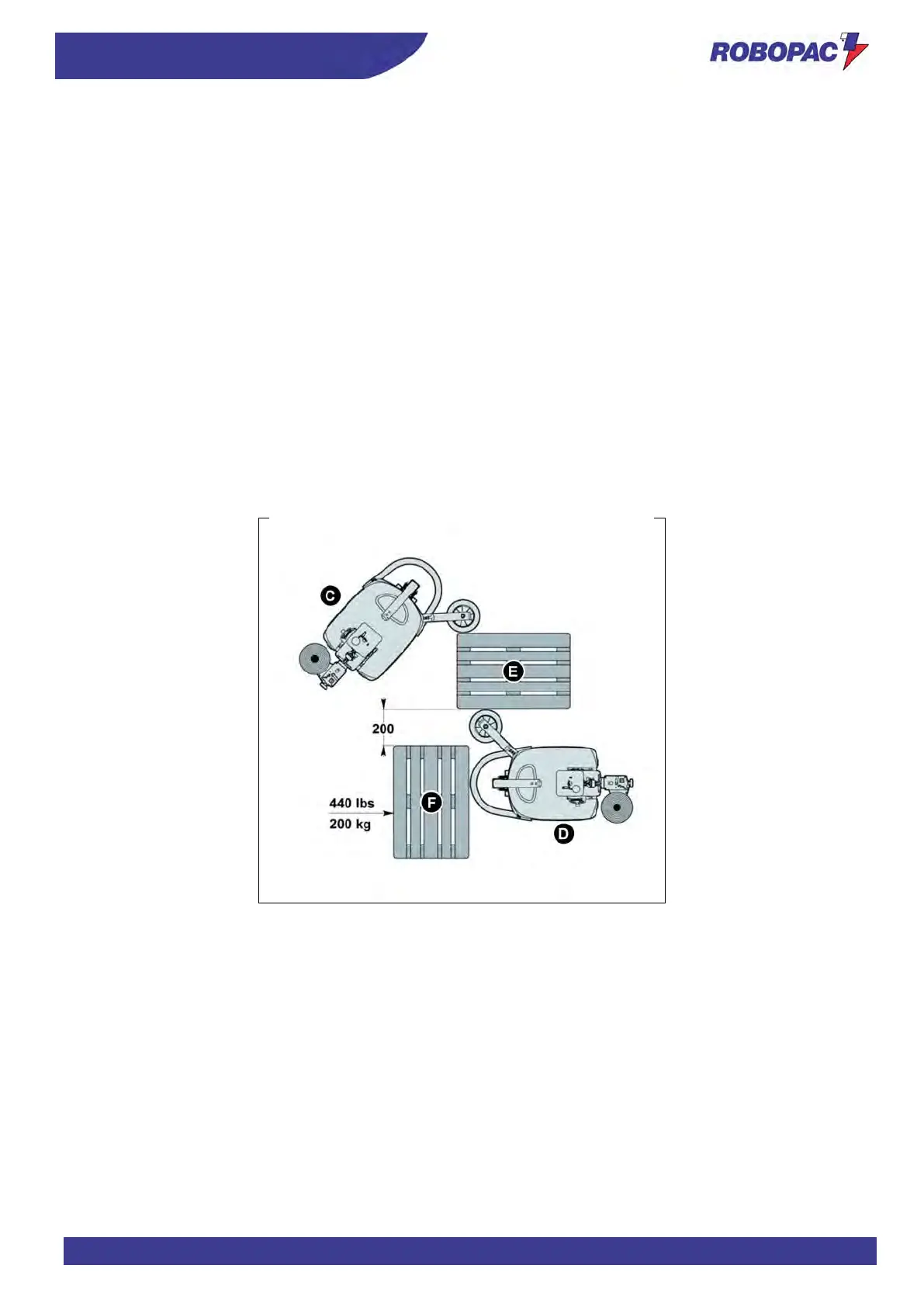
1. Move the machine, in manual mode, and place it near a load to be wrapped (E) in the position (C).
2. Place another load or a test pallet (F) in the position and at the distance indicated in the figure.
The test load must have a minimum weight of 440 lbs (200 kg).
3. Set the minimum rotation speed to 120 ft/ m = 38 m/ min. on the operator panel.
4. Make sure that the whole area around the test area is safe and free from persons and objects.
5. Press the START button on the control panel.
6. Wait for the machine to start and check, at a proper safety distance, its trajectory until the impact point between
the “emergency bumper” and the test load (
F) is reached in the position (D).
7. Check that the machine performs an emergency stop and make sure that the rotation motor has actually stopped
(visually check that the drive wheel is actually braked and not in traction).
8. The display must show the “E10” alarm message and the “RES” message (Machine in emergency mode).
9. Press the “Reset” button to reset the machine.
10. Once the check is complete, set the rotation speed on the control panel to the value prior to the check.
If the display does not show any message, this means that a failure or a fault occurred in the protection device safety
system.
Immediately contact the manufacturer or authorised service centres.



 To Next Page