INFORMATION ABOUT THE USE
6.2. DESCRIPTION OF THE CONTROLS
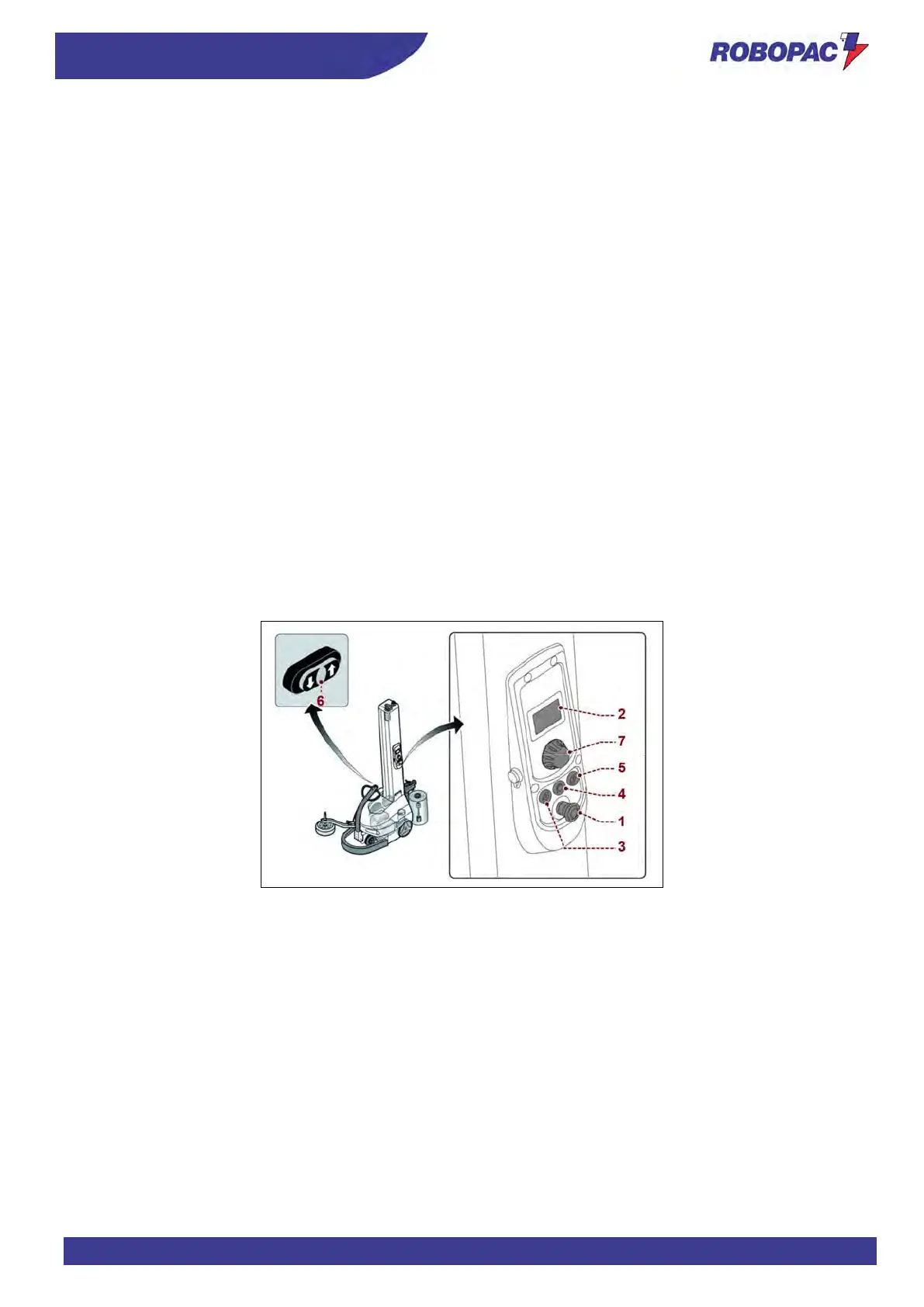
The figure shows the machine main controls and the list includes their description and function.
1. Emergency stop button:
it is used in case of imminent risk to stop, with a voluntary action, the machine parts which may pose a risk.
For more details, see the paragraph “Description of safety devices”.
2. User interface:
it is used to set or modify the machine operating parameters.
The user interface is equipped with a display and a multi-function selector (7).
For more details, see the paragraph “Description of user interface”.
3. “Cycle start” button:
it is used to start the wrapping automatic cycle.
4. Light button (orange light):
it enables and disables the power supply voltage of controls.
When the indicator light turns on it means that the function has been enabled.
5. “Reset” button:
it is used to reset the machine before restarting it after an emergency stop or after a shut-down due to the
disconnection of the power supply.
6. Buttons (hold to run):
they are used to manually move the machine.
The control is used also for the spool carriage vertical movement in "manual mode".
For more details, see the paragraph “Spool carriage vertical movement (manual mode)”.
7. Multi-function selector:
it allows activating and setting machine functions.
Turn the selector (clockwise or counter-clockwise) and release it when the concerned page or function is
selected.
Press to activate the selected function.



 To Next Page